Author Archives: krcmic.com

What are the best open source CRM systems in 2022

What are the best (free) open source CRM systems in 2022?

In case you want to know how to pick up the best free or paid open source CRMs or cloud, what are the factors you should consider, check out the article How can CRM system help you and how to choose the best customer relationship management software?. I honestly recommend starting with this article and then getting back to the open source CRMs topic, as it will help you understand better our differences and possible benefits of both free/paid open source or ready-to-go solutions.

When an app is “open source,” this means its ‘source code (i.e. the code that makes the program run) is publicly available. This source code may be dispersed, customized, and rearranged by users according to their needs. The idea is that, if any designers can peek under the hood and modify the method the program works, the app will end up being more beneficial and error-free with time.

Developers get together on Github or other platforms to fix bugs, add functions, or change existing ones. Businesses can hire designers to customize the open source CRM tool of their option, and get a platform that satisfies their hyper-specific requirements.

Open source CRM services generally work on Linux (instead of the typical Mac/Windows support) and often combine easily available software like Apache web server and PHP. Any software application that operates under an Open Source Initiative and holds an OSI-compliant license can be incorporated into a CRM platform and utilized for business functions.

Open source customer relationship management uses all the useful features of an exclusive CRM like customer support, pipeline management, market automation, and contact management, however, there are significant distinctions between the two types to think about. We describe everything here.

Difference between open source code vs. exclusive software application

Think about it by doing this: Proprietary software application is a closed system, a boxed-up, completed item. You download it free, purchase a subscription, and set it up for your requirements. No assembly is required (aka. you can skip employing internal developers).

This is a ‘complete stack’ category of CRM – generally created for the big picture, which indicates they can cover standard requirements.

Meanwhile, an open source platform’s source code is readily available to the general public for use and further advancement and adjustments. The expectation is that you’ll wish to take the existing product and fine-tune things according to your particular workflow requirements. Open source code is currently well established, and modification solutions have been structured for speed and ease.

Many little and medium-sized organizations go open source. Others pick a closed source, proprietary software.

Both types do sales, service, marketing, and task management in every possible way you can imagine. Qualitatively speaking, there’s not a massive difference between the two in terms of functionality you can get. The difference is that many non-open source CRMs systems which can be customized are quite expensive and for small companies, it is simply not reachable.

The option is really to write down all functionalities you need from the CRM application, check if there is no ready-made solution already and if not ask some implementation partners or developer team what could be the possible cost of that custom implementation to get your system up and running.

The advantages of open source CRM

There are a lot of benefits why to choosing open source CRMs. The main advantages are:

  • Open source CRM – can be way cheaper than proprietary CRMs – you can get a great piece of software for a much better price than big corporate solutions (Salesforce or Microsoft Dynamics). You simply pay just for the development and maintenance of the CRM (which can be a bigger investment, especially at the beginning).
  • Open source is a cheaper option when need to scalable your business – as you don’t have to pay any license or are not limited by the cost-per-user costs. You don’t have to sign any long-term deals with software licenses. With a proprietary CRM, you will have to do that. With open source – if you don’t have money for any other updates, you simply don’t develop any new features and have practically zero costs.
  • You get CRM exactly according to your needs – you can develop the exact CRM system you desire with no supplier limitations (if you have a good team of developers or a reliable implementation vendor partner). If you’re worried about flexibility and scalability in time, open source has the benefit. As your business will grow, you will find out that some functionalities are critical for you and if you do everything in-house in terms of development, you can get it much faster (as an open community allows you to simply hire more developers, you are not dependent on just one vendor and also there is much less possibility to vendor lock).
  • Lower risk of vendor lock and knowledge base – open source CRMs are having a huge community – as all guidelines, source code, and plugins are open for everyone. The strong, active community of developers is a key factor. Updates, bug repairs, and so on can be much more easily solved when you have thousands of people who probably had solved similar problems in the past.
  • No middle man – you pay “just” for the labor costs – your developers (or project manager/testers). You do not pay any margin to any other middleman (which is mostly covered in license costs). On the other hand, you are fully responsible for the whole project development, which means – when you reach a dead end with the development of some functionality/features – you are the person who will and has to pay for it all from your pocket. therefore open source CRM software might certainly be the method forward if you’re running a little company and looking for really specific functions. But if your organization is doing something more ‘regular’ in a well-defined market, needs more complicated tools, and/or demands highly responsive product support, it may be much better to opt for a feature-rich proprietary tool that was developed to address your requirements.

Socially open open-source CRMs

While all CRMs- both open source and proprietary – started as tools for sales groups and later extended that reach to give marketing and support some helping hands, nowadays its social media teams that are the newest to delight in the added advantages of these platforms.

Therefore it must be, as so much advertising goes on because coveted social area.

Some CRM features for social media supervisors and teams consist of tools to unify all social channels into a single summary, the ability to pre-compose and schedule posts, provide analytics on reach and engagement, aggregate all incoming communication through all social channels into one dashboard, and even use constantly-updated recommendations on what to post, when, and how frequently.

Some examples of open source CRMs working closely in social networks spaces are Vtiger, which integrates with Twitter, where you can tweet or submit a 3MB picture to Twitter straight from your CRM. SuiteCRM integrates with other apps to do things like, learning which social networks your leads are most active on.

The name of the game is interoperability
Fortunately, softwares don’t enter this world in isolation structure garrisons around their code.

A huge advantage to many platforms is versatility, specifically in the kind of their API (application programming user interface). This is sort of like the instructions from one set of code to another that permits 2 programs to work along with, or on top of one another.

There are various standards of API, with RESTful API (or sometimes simply REST) being somewhat of a gold standard, especially with open source CRM. Since the concept of open source is to never close the gates on brand-new developments– no matter where they originate from– numerous API builders depend on the liberty and versatility of RESTful API.

All of the above-discussed open source CRMs make the most of RESTful API.

Are you an open source CRM type?
Depending on your skillset and what you wish to attain with a CRM, open source might interest you more than a complimentary or paid closed source one.

If you’re running a small company and looking for really specific functions, going with open source CRM software could indeed be the way forward. If your service is doing something more ‘normal’ in a well-defined market, needs more intricate tools, and/or needs extremely responsive product assistance, it may be better to go with a feature-rich exclusive tool that was constructed to address your requirements.

Fortunately, if you’re on the fence, it’s simple enough to download a complimentary open source program and check out.

Possible disadvantages of free open source CRMs

  • It takes more time to start with and can not end well  – others might find open source software development to be a lengthy project and sometimes it can be a black hole for your finances in case you don’t manage the project well.  It will also take some time for you or your team (somebody has to supervise developers, prepare briefs for them, etc.).
  • Slower start – while both open source CRM and proprietary cloud CRM applications are practical having all necessary features even in the basic version, open source has a longer implementation process. You have to set up your server, and configure everything (look, communication with hosting, mailing servers, etc.). Open source company tools generally require a lot of time from developers for initial setup. Simply it takes time as you are building a new solution from the scratch. All cloud/proprietary CRMs are compared to open source ready to go after the initial set-up, which can take a couple of minutes. But you will still have to do many other settings after sign-up to adjust it to your needs. So it will still take you some time, but it will probably not be months, also many of these online CRMs are having their key account managers which can help you with the initial setup.

From my point of view, the most popular open source is SuiteCRM and Vtiger. So in case you are looking for your solution, recommend these tools to start with. Quite popular was also SugarCRM – SugarCRM was historically the most well-known open source CRM. Their Community Edition project has been on the market for 14 years and resulted in a ton of spin-off projects. Yes indeed, those two sentences are past tense for a reason – the platform quietly stopped being open source in early 2018.

But its legacy lives on! Vtiger and SuiteCRM, for example, are proud children of SugarCRM’s original open source code, birthed and set off into the wilds in 2004 and 2013 respectively.

But you can also take a look at those other open source or free CRM options, which you will find below:

  • VTiger
  • SuiteCRM
  • Odo
  • OroCRM
  • X2CRM
  • EspoCRM
  • CiviCRM

Other free open source alternatives are just free versions of normal proprietary CRM systems – they can sometimes fulfill your needs at the early beginning of your business journey. But I honestly recommend starting building your solution with VTiger or similar open source. As you will soon or later end up with that solution anyway (in case you don’t have huge funding and need already a solution that works right here right now).

Because as you will grow, your team will have probably more than 10-20 team members and you will realize that these proprietary CRMs becoming quite expensive and (what is more important) they lack some necessary functionality you will desperately need to lower your human resource costs or to make your business way more effective).

  • Really Simple Systems (RSS) (the free version of the proprietary CRM system)
  • Trello (the free version of the proprietary CRM system)
  • Freshsales (the free version of the proprietary CRM system)
  • HubSpot CRM (the free version of the proprietary CRM system)
  • Airtable (the free version of the proprietary CRM system)
  • Streak (the free version of the proprietary CRM system)
  • Bitrix24 (the free version of the proprietary CRM system)
  • Insightly (the free version of the proprietary CRM system)
  • Apptivo (the free version of the proprietary CRM system)
  • Flowlu (the free version of the proprietary CRM system)

Brief description of all these open sources or free version CRMs solutions

Vtiger CRM (free open source CRM solution)

Benefits (why to choose VTiger as your new company CRM system):

Vtiger CRM Open Source covers the best of the best open source customer relationship management features you need.

You can use it to run marketing campaigns and keep track of leads, customers, and opportunities, handling the sales cycle and daily workflows. Have all necessary

Reporting and analytics features are consisted of, and it has a Gmail extension, which is super helpful for referencing CRM information and information while emailing.

As you scale up your usage, you can inspect the marketplace for add-ons for greater features. It’s the # 1 most downloaded Open Source CRM on SourceForge (with 4.5 million+ downloads), so it has a huge community of users and designers behind it, which is very important for further development and customization.

It works well with every operating system like Windows, OS/X, Ubuntu, Android, iOS.

Possible downsides of VTiger:

When compared to its paid variation, Vtiger’s reporting features are rather lightweight in the open-source version of VTiger. Navigation in between functions sometimes is not so good, and the Google Sheets integration also isn’t the best of the best. Vtiger also has a moderate discovering curve, so it will take some time to train your team to implement the platform efficiently. But due to the high community of developers and implementation partners, you do not have to hire developers with zero experience with this CRM tool.

My personal opinion is that this is the best choice for smaller companies and mid-size businesses which simply conclude that they need a lot of modification, but don’t have enough money for any expensive enterprise CRM solution.

Pricing of VTiger CRM:

  • Free, with paid add-ons available in the marketplace.

SuiteCRM (free open source CRM solution)

Benefits (why to choose SuiteCRM as your CRM system):

Similar to VTiger – Suite CRM is a free, powerful, customizable, easy-to-use CRM with hundreds of extensions and integrations, SuiteCRM is used by millions of people every day.

SuiteCRM manages sales, service, and marketing, with custom module, layout, and relationship development tools that will please your IT department too (if you have one). This CRM has also got real-time dashboards, meaning as data streams in, new figures offer broader insights into things like pipeline metrics, open project statuses, and cash flow.

As well as VTiger SuiteCRM offer limitless customizability and thus is great solution for any small or bigger company as you can easily have there . It also works with every operating system like Windows, OS/X, Ubuntu, Android, iOS.

And as well as VTiger SuiteCRM is certainly one of the most friendly open-source systems on the scene. It’s also one of the most popular.

Possible downsides of SuiteCRM:

Helpdesk assistance can be sluggish, as it is community-based.

There’s likewise a moderate discovering curve, and the complimentary open source version’s functions and integrations aren’t as developed as in paid versions. SuiteCRM does not integrate with ERP software, so if you’re looking for a holistic service process combination, it might not be the right option.

So which one of these CRMs is better? I would honestly pick VTiger because of bigger community of developers, thats the only reason why SuiteCRM is not number one on my list.

Pricing of SuiteCRM:

  • SuiteCRM has free version, but as mentioned above – there are some limits in free version obsiously (you have no support, which same as with free version of VTiger, but missing ERP could be also the thing).
  • Starter plan (recommended for 1-10 users) is $123 (billed as ₤ 95) per month and it is billed annually.
  • Company strategy (advised for 5-50 users) is $430 (billed as ₤ 332.50) each month it is billed every year.
  • Premium strategy (recommended for 10-150 users) is $614 (billed as ₤ 475) and it is annually.

But there is 30-day free trial is offered for all SuiteCRM paid versions.

Odoo (free open source CRM solution)

Benefits (why to choose Odoo as CRM system):

Odoo is another well know and very often used CRM system worldwide and it is a great piece of software.

Odoo is all about ‘extensible architecture,’ with a modular style that lets you blend and match various functions. The open source Community Edition of Odoo CRM plugs into the 10,000+ apps in the supplier’s space, which are configured to integrate with one another easily (at least in a theoretical way, but yes, this part help a lot, but you will also find out that not every integration with other systems works well).

If you’re in retail, restaurants, or other brick-and-mortar business, you may be interested to know Odoo has a very beneficial point of sale app. Dealing with other Odoo apps, point of sale data can easily flow into your stock management, e-mail marketing, and sales operations.

Possible downsides of CRM Odoo:

The open source variation of Odoo CRM has a considerable learning curve, and you’ll need to pay unique attention to setting it up and executing it to prevent headaches later. The invoicing tool is a bit more complicated than needed (you have to develop a quote, followed by an order in order to generate an invoice), and reporting alternatives are restricted.

Customer support is dependent on app community members.

Pricing of Odoo CRM:

  • Open source CRM is totally free. Paid add-ons available.

OroCRM (free open source CRM solution)

Benefits (why to choose OroCRM as CRM system):

OroCRM has a reputation as the most flexible open source CRM. It’s based upon the Symfony2 PHP framework for web development, which is widely used and well-liked. That indicates that lots of open source developers discover it easy to understand Oro’s code and develop brand-new customizations, making it relatively easy and affordable to modify the platform to your requirements.

Easy combinations with Zendesk, MailChimp, and numerous other clutch apps are a good touch too.

Possible downsides of CRM system OroCRM:

If you’re handling ecommerce, you may need a developer to customize the app in order to meet helpdesk/ consumer assistance functions. There is likewise no localization (Oro is just available in English).

Pricing of OroCRM system:

  • Open source edition is complimentary.
  • Contact vendor for Enterprise Edition access.

X2CRM (free open source CRM solution)

Benefits (why to choose X2CRM as your new CRM system):

X2CRM has an open source edition, which generously shares code through GitHub, SourceForge and Bitnami, hence motivating anyone and everybody to tailor it for their own purposes. The software application can be downloaded best onto a webserver, however you can likewise get assist when downloading it as part of a full stack version.

This open source edition employs a lot of the core modules from the basic (non-open source) X2CRM platform, which is more tailored toward larger enterprises instead of lean startups.

Lighter operations can make the most of X2CRM Open Source’s tools for marketing campaigns and pipeline and funnel management. There are e-mail modules that consist of open e-mail tracking and a function to design workflow visualizations. X2CRM also has Android and iOS apps.

Possible downsides of CRM system X2CRM:

X2CRM is an up-and-coming platform and not the most extensively utilized, so you might find it challenging to get the assistance you need through its small-ish community.

Pricing of X2CRM CRM system:

  • Open source variation is totally free.
  • Paid customized configuration and advancement solutions likewise available.

EspoCRM (free open source CRM solution)

Benefits (why to choose EspoCRM as your new CRM system):

EspoCRM offers full-featured sales automation for leads and tracking for contacts, accounts, and opportunities. It also keeps tabs on contacts by defining relationships and relating them to numerous accounts. EspoCRM’s social stream permits you to track activities and “follow” particular records that pertain to your work.

Possible downsides of CRM system EspoCRM:

Time invested executing the open source service on-premise and paying for designers, data hosting, etc might negate some of the financial advantages of getting the software application complimentary. Likewise, there aren’t numerous integrations with other apps.

Pricing of EspoCRM system:

  • Self-hosted (on-premise) service is free.
  • Cloud-hosted option prices in assessment with vendor.
  • A one-month complimentary trial is offered for the cloud-hosted service. Charge card not required.

CiviCRM (free open source CRM solution)

Benefits (why to choose CiviCRM as your new CRM system):

CiviCRM is a completely complimentary open source CRM targeted at non-profits, associations, and civic sector companies. User-friendly and developed to be adjusted towards a wide variety of uses, CiviCRM supplies full-fledged CRM functions like contact management, accounting combination, case management, and email marketing.

Possible downsides of CRM system CiviCRM:

You will likely require aid customizing the solution and installing for your company’s needs. It’s not developed for sales, so you might find it doesn’t satisfy your business requirements or requires too much financial investment in time and money to tailor. It ought to be noted, the UI is also somewhat out-of-date.

Pricing of CiviCRM system:

  • Free.

Searching for a free complimentary CRM system?

If you’re thinking about open source purely for the sake of reducing expenses, you may wish to take a look at the complimentary version of the following all-in-one (proprietary) CRMs.

Freshsales (free complimentary CRM system)

Benefits (why to choose Freshsales as your new CRM system):

Freshsales is a full-fledged sales force automation option for sales groups. It offers everything a salesperson needs to– bring in quality leads, participate in contextual discussions, drive handle AI-powered insights, and support consumer relationships.

With integrated email, telephone systems, phone, and chat, Freshsales empowers sales groups with more time for selling by automating the sales procedure and increases effectiveness and efficiency in their daily activities. With Freddy AI, salesmen can get insights into the finest deals to go after and what actions to take and predict income with sales forecasting. Services can take the next advance towards effective pipeline management with Freshsales. Also, the alternative to utilize native CPQ makes producing and sharing quotes and other crucial sales possessions hassle-free.

Possible downsides of CRM system Freshsales:

Like lots of vendors, a few of the better functions are booked for premium packages. Amongst these for Freshworks CRM are time-based workflows, some chatbot tools and advanced metric reporting. In general, the complimentary and standard plans are a good place to begin, and you can always update.

Pricing of Freshsales CRM system:

  • There is a Free Forever Startup plan
  • Growth strategy is $15 per user/month billed yearly
  • Pro plan is $39 per user/month billed every year
  • Business strategy is $69 per user/month billed every year

HubSpot CRM (free complimentary CRM system)

Benefits (why to choose HubSpot CRM as your new CRM system):

HubSpot is a massive company, and played a big part in introducing the increase of inbound marketing. Their complimentary version automates routine jobs, manages lead management, and permits a database of one million contacts. It likewise permits endless users and unrestricted storage.

Some benefits to HubSpot are first of all their big wealth of training videos to help accelerate adoption. Since of their sheer enormity, they have a pretty fantastic credibility for individualized customer service, which is a big point in its favor vs. lots of open source solutions.

Possible downsides of HubSpot CRM:

Some negatives include limited syncing between contact and deal data, a weak search function, and the inability to log e-mail accessories into the contact record. As you might have surmised, you might well need to dish out money on add-on modules to get the most out of the complimentary version.

Pricing of HubSpot CRM system:

  • HubSpot CRM is totally free.
  • Marketing Hub, Sales Hub, and Service Hub add-on plans are $50 each per user/per month, billed regular monthly.
  • HubSpot CMS begins at $300 per month, billed month-to-month.
  • All-inclusive Starter Growth Suite starts at $113 per user/per month, billed month-to-month.

Really Simple Systems (RSS) – free complimentary CRM system

Benefits (why to choose Really Simple Systems (RSS as your new CRM system):

Really Simple Systems (RSS) is a user friendly, yet reliable marketing automation, sales and service platform created specifically for B2B. They use a free version of their software for approximately two users, that includes a lot of the core features of the paid item, including sales automation and customer support. It offers you endless contacts and 100 MB of file storage.

RSS contact management updates details and related jobs in real-time for suppliers, providers, and customers. This is very helpful for coordinating remote groups.

Possible downsides of Really Simple Systems (RSS) CRM:

RSS doesn’t use a lot of third-party combinations. Personalization features are somewhat minimal, and might not accommodate niche companies, nonprofits, or non-traditional CRM applications (however, it is created for B2B). While functional, the mobile app is not the most easy to use one out there.

Pricing of Really Simple Systems (RSS) CRM system:

  • Free version for up to 2 users.
  • Starter plan is $14 per user/per month, billed every year.
  • Expert strategy is $30 per user/per month, billed annually.
  • Enterprise plan is $46 per user/per month, billed each year.

Trello (free complimentary CRM system)

Benefits (why to choose Trello CRM as your new CRM system):

A non-traditional CRM alternative with a reliable and easy Kanban-view job management app that can work as a light-weight CRM. Extremely low knowing curve and simple to utilize throughout mobile and web apps. The complimentary version, although restricted, might be enough for small company team collaboration and simple organization procedures.

Possible downsides of Trello CRM:

Kanban view can become confusing as the intricacy of your task increases. Limited file accessory size in the complimentary variation can be an issue with video files, Powerpoints, heftier PDFs, and so on.

Pricing of Trello CRM system:

  • Free version offered, with restricted functions.
  • Organization Class plan is $9.99 per user/per month billed yearly, and $12.50 per user/per month billed regular monthly.
  • Enterprise plan is $20.83 per user/per month billed annually (price variable, figure provided for 100 users).

Airtable (free complimentary CRM system)

Benefits (why to choose Airtable as your new CRM system):

Airtable is a non-traditional, light-weight CRM with pleasing aesthetics as one of its main selling points.

The workflow management database intends to re-invent spreadsheets, letting users rapidly link and analyze data from different sets. Users can have fun with style to customize data sorting to their needs through personalization. It’s simple and simple to import and export information as a CSV.

Possible downsides of Airtable CRM:

Airtable is certainly a “light-weight” CRM, so for more complex job management (i.e. with sub-tasks), you might discover the platform is not perfect.

Pricing of Airtable CRM system:

  • Free version provides necessary functions.
  • Plus version is $10 per user/per month, billed yearly.
  • Pro variation is $20 per user/per month, billed annually.
  • Enterprise version rates remains in consultation with supplier.

Streak (free complimentary CRM system)

Benefits (why to choose Streak as your new CRM system):

Streak is a completely incorporated Gmail CRM that lives in your inbox. Based in a familiar environment, the app streamlines CRM adoption for brand-new users.

The free version of the app is mainly for personal usage and includes basic CRM tools and full email features. The e-mail templates function is an excellent way of sending out a high volume of personalized emails. You can also manage leads and sales with endless pipelines. Make notes in-app for central record keeping, track data on your correspondence with contacts, and check whether leads have opened your e-mails or not.

Possible downsides of Streak CRM:

Because Streak runs as an internet browser extension, whenever you change gadgets, you’ll need to download it again. If you deal with reasonably complicated company processes, it’s a relatively light-weight CRM solution and may not be up to the job.

Pricing of Streak CRM system:

  • Personal version is complimentary for specific users.
  • Professional plan is $49 per user/per month, billed annually.
  • Business plan is $129 per user/per month, billed yearly.

Bitrix24 (free complimentary CRM system)

Benefits (why to choose Bitrix24 as your new CRM system):

The cloud variation of Bitrix24 is free for up to 12 users and offers 5GB of information storage area. It has mainly the same functions as the paid variation, albeit provided in a scaled-down type. All told, it’s a pretty generous gratis product offering.

The Bitrix24 CRM provides all the needed features through a tidy UI (with a particularly nice Kanban view), like pipeline management, reporting, and sales tracking. The app’s interaction package includes voice, video, chat, and email– so you can constantly reach a contact on the best channel.

Possible downsides of Bitrix24 CRM:

Bitrix24’s UI doesn’t always offer the most user-friendly navigation, and the app can slow down from time to time. There’s a moderate learning curve and the customizability functions might not suffice for specific niche business applications.

Pricing of Bitrix24 CRM system:

  • Free starter organization tool suite for up to 12 users.
  • CRM+ strategy for approximately 6 users is $55 per user/per month billed annually, and $69 per user/per month billed regular monthly.
  • Task+ prepare for approximately 24 users is $55 per user/per month billed each year, and $69 per user/per month billed monthly.
  • Requirement strategy for up to 50 users is $79 per user/per month billed yearly, and $99 per user/per month
  • Professional plan is $159 per user/per month billed yearly, and $199 per user/per month for an unrestricted variety of users.

The rates above are for the cloud-based version. On-premise options are also offered.

Insightly (free complimentary CRM system)

Benefits (why to choose Insightly as your new CRM system):

Insightly’s complimentary variation is not effectively promoted (concealed at the bottom of their prices page), so consider this a semi-insider idea. The unpaid version includes a clean user interface, with consumer, contact, and job management and pipeline functions to keep your sales procedure humming.

The software application supplies native combination with G Suite and Microsoft 365, along with Mailchimp and lots of others. Training videos are readily available to describe functions in a straightforward way, reducing the learning curve.

Possible downsides of Insightly CRM:

Insightly’s complimentary variation is restricted to approximately 2 users. The complimentary version likewise does not have an information backup system, sets everyday caps for mass emailing, and restricts the number of customized fields can be added for each record. Better lead assignment modules are just available in the paid plans.

Pricing of Insightly CRM system:

  • No-frills strategy for approximately 2 users is free.
  • Plus is $29 per user/per month, billed each year.
  • Expert is $49 per user/per month, billed yearly.
  • Business is $99 per user/per month, billed every year.
  • A 14-day totally free trial is available for the Plus and Professional strategies.

Apptivo (free complimentary CRM system)

Benefits (why to choose Apptivo as your new CRM system):

Apptivo offers a flexible suite of apps concentrated on customizability. Their starter variation is complimentary, and offers a lot of the core tools from their complete set and 500 MBs of storage. The variety of users is topped at 3.

The contact app permits you to import information from e-mails and websites, so you can populate your contact and lead information with very little manual entry. Task management apps in the Apptivo universe offer person and team company, while the Cases app automates consumer questions by turning e-mails into tickets with a service-level contract.

Possible downsides of Apptivo CRM:

The free version of Apptivo does not support third-party combinations. Often it runs a bit slow, and the interface, while fit for its functions, is not necessarily the most user-friendly.

Pricing of Apptivo CRM system:

  • Starter plan is totally free for up to three users.
  • Premium plan is $8 per user/per month, billed every year.
  • Ultimate strategy is $20 per user/per month, billed each year.

Flowlu (free complimentary CRM system)

Benefits (why to choose Flowlu as your new CRM system):

Deal with task management and build an understanding base in one place. Create personalized billings with CRM information auto-inserted into each invoice. Build web kinds to produce leads and welcome customers to upcoming occasions and studies in-app. Free version for 2 users uses 1 TB of storage information.

Possible downsides of Flowlu CRM:

Financial reporting functions may not be deep enough, depending on your company. Job filter function is a bit cumbersome. Collaboration tools are not advanced.

Pricing of Flowlu CRM system:

  • Free for approximately two users.
  • Team strategy is $29 for all users/per month billed annually, and $39 for all users/per month billed regular monthly.
  • Company plan is $59 for all users/per month billed every year, and $74 for all users/per month billed regular monthly.
  • Expert strategy is $119 for all users/per month billed each year, and $149 for all users/per month billed month-to-month.
  • Enterprise plan is $239 for all users/per month billed each year, and $299 for all users/per month billed regular monthly.
Copywriting - a superpower you should master

Copywriting – a superpower you should master

What is copywriting?

It’s a form of writing, which purpose has marketing and advertising characteristics. The outcome of this action called “copy” takes the form of a written text which is used to increase brand awareness and persuade the reader to take action. This form of writing is considered important among huge brands such as Amazon which teaches their employees how to copywrite properly.
Here are 9 tips on how to write like an Amazon employee:

Use shorter sentences

Keep sentences short. According to Amazon, the ideal length is 30, but they keep them under 15. This will keep them clear and concise and informs your potential reader in a short period of time. As we know the longer a human brain tries to concentrate on a certain activity, its ability to focus decreases gradually as time passes. By keeping your sentences short, you will keep the reader’s attention. Another benefit of using shorter sentences is easier comprehension. The shorter the sentence is, the easier it is to understand the narrative.

Stop using common phrases

Limit the overused common phrases that are seen everywhere. Instead, prioritize clarity. Don’t waste the reader’s time. Because concise copy leads to concise decision making. Another disadvantage of constant usage of common phrases is that you may look limited in your own vocabulary which leads to readers questioning your professionalism.

In order to stop this habit, you have to identify overused phrases and words used in your writing. After you identify them, simply cut them out of your vocabulary and try to substitute them with something more precise.

Replace adjectives with dates

Numbers are pleasing to the human eye and organize information into a logical order.

Eliminate “weasel” words

What are weasel words?

These words are frequently used as a way to make your answer seem clear, but in reality, your answer was inconclusive and vague.

Weasel words make sentences look boring and weak, so they tend to evoke weak emotions and weak emotions don’t lead to action.

Examples of weasel words:

  • “Well”
  • “Often”
  • “Research shows” or, “Experts say..”
  • “I would say that”

Use the “So what” test

Reread your writing and ask yourself: “So what ?”. This can help you realize whether a potential reader will understand your sentence, paragraph, or the whole page.

Here are some questions you should be asking yourself:

  • Is the knowledge relevant to understanding the whole writing?
  • Does this sentence bring any value? Check the information in your sentences, paragraphs, etc. Look for information that might educate, inform and bring overall value to your readers. Some sentences may bring value, but they might be used in the wrong paragraph from time to time. You should definitely avoid writing about off-topic points, which can mislead your reader, and definitely cut out information that is not necessary for understanding your whole point.
  • Stay away from adverbs that sound obvious. For example: “scream loudly”, the adjective loudly is clearly an extra word there and doesn’t stop you from understanding the text, since screaming is an action that is done loudly no matter what.
  • Is this adverb the best choice? When you manage to find an adverb in your writing, ask yourself a question? Is this the best choice here?

Give preference to objectivity

Objectivity is a very important aspect of writing. Being subjective lacks facts and figures and is rather supported by your own thoughts, opinions, and subjective view. Try to make your writing look as objective as possible because it exudes confidence and is backed by facts.

Limit abbreviations and jargon

Avoid using abbreviations as much as possible. It’s quite misleading to think that abbreviations save time, while in fact, they increase the time for a person to understand a sentence. Another reason why using abbreviations is a bad thing is that many acronyms can have different meanings depending on the context. This might lead to confusion.

Use a subject-verb-object sentence structure

Use this sentence pattern to make your sentence clearer. It is essential to know who/what you are writing about, what they did, and what happened.

Example of subject-verb-object: The boy (subject)  threw (verb) an apple (object).

Have someone read your work aloud to you

Having a friend reading your copy for you might be a useful idea to help you understand whether your written work as a whole makes sense. Sometimes the idea you tried to put into your text doesn’t have to match what is actually written in the text.

Finalize the format

Make sure you know what the guidelines and format of your work should be. That means you respect your publisher’s requirements and make a decent first impression. Present your work as a finished one so the content is the one to get a spotlight, not incorrect formatting errors.

Run it through a professional editor

Last but not least, have a professional editor run through your work to catch some mistakes you might have missed as the final nail in the coffin. Keep in mind that if there is no editor you might ask to check your work, but there is always software to help you out.

Recommendations for editing tools that might come in handy

  • Copy AI – Copy AI allows you to generate human-like written text within a few seconds.
  • Hemingway App – Helps you with recognizing complex sentences and common errors, it also tells you whether your sentence should be shortened. The software warns you about these errors by highlighting your sentence in yellow colour. On the other hand, if your sentence is red, it means that your sentence is so complicated that your reader might get lost trying to comprehend its meaning. The highlights vanish once you edit your text correctly.
  • Text Blaze – This is useful when it comes to saving smaller text snippets and inserting them anywhere on the web using keyboard shortcuts.
  • Write Sonic – Can be compared to Canva in the world of writing. It helps you to write and publish the text by simplifying the process of creating, editing, correcting, and publishing articles.
  • Coschedule Headline Analyzer – Its purpose is pretty evident from the name. This software elevates your headline skills and helps you to create better and more captivating headlines, which result in better social shares, increased traffic, and overall SEO value.
Content Management Systems (CMS)

How to choose the right CMS?

No website can manage without a CMS these days, but how should you choose the right one? What questions should be asked? What should you watch out for and what shouldn’t be forgotten about?

Static websites, where each word had to be put in manually by a coder, are gone long ago. These days, it’s hard to go by without a content management system when it comes to small but mainly large-scale projects. With larger projects, it’s a vital necessity. As the capabilities of content management systems were getting better, the term „CMS“ was getting more known. CMS means it is a editorial (publication) system with added features.

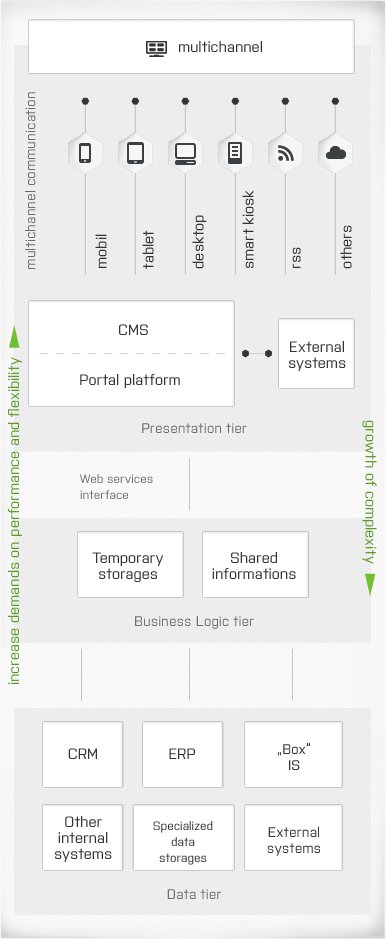
CMS and its various groups are an integral part of any portal platform and it is absolutely crucial to include them when working with the contents. Therefore it is necessary to pay attention choosing the right one.

Which questions need to be asked

There are various systems for managing content, but their features and prices can differ as a Trabant or Audi do. When choosing a CMS, you should ask yourself the same questions as choosing a car.

Purpose

  • How often will we use it?
  • For what purpose?
  • For how many people?
  • Which projects will be included?
  • You will know if you’re looking for either a truck or a two-seat sports car.
  • You will know whether you need a robust system for managing a large portal with various language versions which will be managed by 10 other people, or you just need a smaller CMS which will be sufficent for a 30 page website and it can be managed by just one person.

Properties

  • How fast is it?
  • Does it have simple controls?
  • Does it have premium features?
  • It is safe?
  • You will know if you want a vehicle with air-conditioning, airbags, leather seats and with powered steering or the basic one is sufficent, even if it only goes a maximum speed of eighty.
  • You will know what your CMS needs to be capable of and how easy and quick it is to work with.

Price and services

  • What is the starting price?
  • How much does the operation cost?
  • What are the additional services provided with it?
  • You will know if you have the enough finances for a vehicle you want or you need to pay extra or compromise on your requirements.
  • You will know how much it costs, and what are the subsequent license and service fees. Simultaneously you will find out what other services are provided to it.

Some advice

Figure out what you need

Make a list of requirements you really need and without which the system is inadequate. Don’t settle.

Think ahead

Do you have any future plans, the market is changing, your business is evolving, the demand in a year will be greater than it is today, but the CMS should suffice even then.

Do a research

Find out what do the systems offer, what features they have and how much they cost. Don’t give on one good recommendation, even from a best friend. His project may have different needs than yours.

Make a quick test

If it is a paid system then ask the person, who is offering it, for a quick demonstration. Thanks to that you will familiarize with a CMS and also you will try out the system and the company. The test will be described in a separate article.

Try to work with it

Even though the system is capable of what you need, there is still a big difference in HOW it feels when working with it. User-friendliness, simplicity and intuitiveness is important and will affect your speed and willingness. If more people will be working with it, then an easy to use interface is essential. A demonstration from someone else doesn’t beat your own personal experience – „touching“ it yourself. More tips will be published in the „User Interface CMS“ article.crm what does it mean

What does CMS enable you to do?

What should be a standard capability of every “ordinary” editing system and what features are “luxury” extras? The following overview of basic and advanced functions can help you choose a system.

A universal editing or publication system ideal for all situations does not exist, and so you should choose a system according to the needs of your project. A corporate web portal in several languages will not require the same system as a “who we are, what we do and where you can find us“ website of a small company or an extensive web community. Nevertheless, in this article I will name the functions that a Content Management System (CMS) cannot do without, and other functions that allow you to do more:

A “basic” CMS system should allow you to

  • manage your website from anywhere;
  • create a page;
  • add content to it (formatted text, links and tables);
  • insert images and connect other files;
  • edit (make adjustments) to content, with the help of WYSIWYG editor;
  • publish a page;
  • rename/move/rearrange a page;
  • delete or (or cache) a page;
  • edit URL pages;
  • make adjustments to SEO features (such as description, title and keywords).

With CMS with luxury extras you can

  • retain the structure of the pages;
  • create a photo gallery;
  • edit images (e.g. change their size or rotate them);
  • insert videos;
  • create boxes/components that can be used in more than one place;
  • ensure reference integrity;
  • edit style (the layout and appearance of features);
  • create and edit layouts and templates;
  • carry out content versioning;
  • manage workflows;
  • set times for content publication and deletion easily create lists of pages (menu, navigation menu),
  • initiate and moderate discussions;
  • manage users, rights, groups and roles;
  • create and manage several language versions;
  • create and manage several websites;
  • create and edit forms.

Of course, there are many other functions used in enterprise solutions (back-ups, synchronisation, analytical tools for marketing and similar features), but these are beyond the scope of this article.

Important “hidden qualities” include:

  • Security
  • Efficiency
  • Reliability
  • Flexibility

When choosing your CMS, bear in mind what it can actually do for your project. You should also check whether CMS can handle a function you naturally regard as basic. The above list can only help to make sure that you do not overlook anything.

Controls on a CMS dashboard

Using a Content Management System can either be easy or frustrating. This also depends on the look and layout of the controls. Staying true to stereotype in this case is useful and allows you to focus on WHAT you want to do rather than being distracted by debating HOW to do it (or in our case – how to click it).

When using websites it’s quite important that the graphic elements are chosen to hint and not confuse users. There has been written a lot about site navigation, but it usually deals with site navigation visible to the visitor. Orientation on the administration side of the site is also important, even if far fewer people access it and it is assumed they already have some training.

If you click on a button that is gray, flat and has gray lettering, you might hesitate if it’s inactive or not. When you see something red, you expect it having a warning function of some sort (e.g. “Warning, are you sure you want to delete this?”) and green usually means positive information (e.g. “Yes, you successfully uploaded the file”).

If there is a continuous area coinciding with the background, no one would expect being able to input text into it. Just for kicks – how many people do you know that are able to edit or rewrite the subject of a received email message in Outlook?

Anyway, let’s look at the most common elements…

The button and the icon

From buttons and icons we expect them to perform actions, such as saving, deleting, highlighting or copying…

It probably has a plastic or similar effect to give an impression it’s clickable. It should also match the color of its function. If the “Save” button is red, you might have an uneasy feeling every time you click on it, thinking it might do something different – something dangerous or even forbidden.

You might find a button which function is currently inactive. This is maybe because it doesn’t have a significant meaning on that page – e.g. “Show subpages” when the page has no subpages. It may also be inactive because you don’t have rights to perform the specific action. Or the page itself is not in the correct state – for example, you can’t publish the page until its content is approved. In this case it is appropriate that the button for this action was still in its place where it’s supposed to be, but its appearance suggests it is not active at the moment. If the button completely disappears, the person using the system will become confused and probably stop and look for it. This causes more uncertainty than clearly saying, “normally it does this, but right now it’s not possible to do it…”

Tabs

When using tabs, we’re able to switch between visible content and other content currently invisible – but basically you stay on the same page in the same document or dialog box. From the tab’s design it should be apparent which one is currently selected, e.g. by framing the active content which will help you in finding the “child” section (page or window). Other tabs should be visibly inactive and “cut off” by the frame that belongs only to the active part of the content.

Links

As expected when you see an underlined text you’ll definitely associate it with a link. After clicking it, it will relocate you to another page or website. Rarely, it may move you to another location within the same page (anchor).

It really depends on the design of the CMS but sometimes links aren’t underlined but they can be emphasized differently (e.g. highlighted or the text would be in a different color than the rest). Though, the design should be unified across the whole system. Still, if the design differs from common usage, this may be a problem and the users might get confused if “this is a link” or not.

Text fields

Empty text fields (or textareas) give you the option to enter text into them.

If there is something already entered in a text field but it’s faded out, this means the text will disappear when we click into it. We can start typing our own text afterwards.

If the input text is in a darker contrasting color (usually black), this means this is a valid value that you can edit.

Sometimes you might be pleasantly surprised that when you start typing, the system will show you a hint of possible words or phrases you can use for your search, page URL or any other relevant items. This means the system has a “whisper” feature.

Select box

From a dropdown menu – a textbox that has an arrow pointing down (select box), you expect an expanded selection of options you can choose from. Of course, as expected, you won’t be able to input your own text into a dropdown menu.

Consolidating the interface

It’s confusing when the system has a same kind of image (icon) for multiple different actions. Even the opposite case is wrong, when the same action on various pages has a different interface element (e.g. blue button in one place and a text link on the other).

Also, you might be annoyed when an interface element is located differently across various pages in a different part of the screen. You’ll be either spending time looking for it or you’ll get the impression that you’re not permitted to use that function at all (since you think it’s missing). So, when it’s not at the same place, you don’t need to assume it could be elsewhere.

Border

Having a border around whole elements (either by a line or a colored background) tells us how they are related together. It can help identify the context between content and it’s much more important than you’d think. But, a wrongly led “line” along the content can cause confusion if it’s placed incorrectly. For example, when you press the Save button you’d expect to save everything that’s somehow framed together by a border. But when you save more or less, you see it as a mistake because you only wanted the specific part to be saved.

Conclusion

A properly selected color, size, type and location of interface elements helps you intuitively assume their function and behavior and thus will make your work much, much easier. Therefore any atypical use of inappropriate behavior is flat-out wrong… and downright criminal! In practice this causes confusion – just as if an unnamed European country would decide that a red traffic light would mean “go”. Imagine the mess!

The super-fast CMS crash test

So you’ve come to this point – now that you have a few content management systems (CMS) that meet your needs and fit into the price limit, you are looking for your favorite. I suggest taking a simple “crash” test that will tell you more than you expect. This test should not take more than 20 minutes of your time. This will hugely save you from the pain and agony of using a poorly chosen CMS.

Demonstrate it

You’ve been offered a CMS to use. Ask whoever relevant to demonstrate on any live website that is running on that CMS, in person here and now and as quickly possible, these following steps:

  1. Create a webpage named “Our Company”,
  2. Write one paragraph of any kind of dummy text (copy & paste will do),
  3. Insert a random image to the right of the text (preferably a smaller image)
  4. Attached a PDF file for download and placed a text link to it
  5. Set up three subpages (About us, Products and Contacts) for the “Our Company” webpage
  6. Add some text to each subpage (preferably different texts so you can differentiate the pages)
  7. Ensure that the links to the subpages work from the main page and placed them in that order.
  8. Publish all four pages and show them to you.

Bored? Not likely!

While the sales representative will work with the CMS that he knows, you should do these three things:

  • Track the time he’ll need to complete the tasks.
  • In the meantime watch how easily the tasks are done, how many times he bumps into problems that will need to be fixed in the process and occasionally look at his hands as well.
  • Listen carefully to what he says (albeit even if he will mostly speak to himself).

The results

  • Whether and how quickly these basic common tasks are done by the system.
  • Ease of use of the system (assuming that the project is already operational beforehand and the user is experienced).
  • How much time is needed for an experienced user to fulfill these tasks.

Some practical advice

  • Print out the assignment so the presenter can think about the tasks and choose the order of the steps he’ll make.
  • Prepare the image and PDF file he can use, so the tracked time isn’t distorted. Or just deduct the time he spent searching for them.
  • Don’t count in the time he’ll be looking for a suitable website to show the features on or the time to log into the system.
  • Obviously don’t include his reading of the task list into your tracked time.
  • If he fails (or misses) any of the tasks, make him repeat them but add in the time.
  • Don’t take into account how the sites look graphic-wise. Just look out for everything mentioned in the tasks.

So, how did it go?

1 Everything achieved in less than 6 minutes. Excellent! Congratulations! You might have a winner there.
2 Completed under 11 minutes. Well done, that’s a very good result.
3 Done under 16 minutes. Not bad.
4 More than 16 minutes or some of the tasks aren’t realized. This isn’t a CMS that will help you. Either that or the presenter doesn’t know how to use it properly which isn’t a very good sign either.
5 The test can’t be realized since the company doesn’t have any sample projects to show the features on. Or the sales representative doesn’t have access or knowledge to show it to you. This isn’t the supplier right for you, a one that is ready meet your requirements. If the supplier is also the author of the CMS, then that’s even worse. If other companies offer the CMS as well, try contacting them and ask to demonstrate the system to you.

Usability and friendliness of CMS

You all know these questions – how quickly and easily will I be able to publish press releases? Does inserting a picture take me a minute or four? Will updating terms and conditions on the website bring me nightmares or is it just a click of a button? Can I make it all by lunch today?

All this affects the usage of CMS (Content Management System). Therefore, let’s look closely at its usability and friendliness at a time when we are still choosing which one to use.

What is the scope of usability of CMS when it comes to using the website? Let’s assume an ideal situation when the system is capable of everything you need. For the user (administrator or content editor), there is one very important aspect – how quickly and easily he’ll be able to perform the task. Although experience and know-how of the user play a certain role here, there are some general principles that affect the overall usability of the CMS:

Easy navigation through the structure of the site

How easily can you find what you’re looking for? For example, you need to edit a specific page, how long does it take to find it in the admin system? Some systems will “render” transparent trees, others have all the pages at the same level and you have to scroll down and read the names of them or use a filter / search so that you won’t need to go through tens or hundreds of pages or content, but only just among a relevant few. Although, when the system has a tree structure can you clearly see which page you are currently editing?

Location of frequently-used controls „at hand“

Think about it, while you’re working, do you have buttons and other controls where you expect them to be and where you need them? The most frequent actions – such as insterting text and images or  creating links should have the controls (buttons or links) in an obvious and accessible place when editing. However, if there are too many buttons and links “at hand”, the interface becomes too cluttered and harder to find what you need. The line between “too little” and “too much” is thin and some systems allow you to change the current view (you either see more or less, depending on what you currently need).

Buttons for actions that follow logically should be placed in a row and close to each other. For example, if you‘ll want to insert a link and you’ll have to “travel with the mouse” three times across the screen (and scroll while at it!) because each subsequent step is controlled from another location, you are wasting time by working with such a system. Hardly anyone wants to compete in the 100-kilometer mouse run around the screen!

Number of clicks needed for common operations

Let’s start with an example of inserting an image into text. You are editing the text right in the spot where you would like to see the picture. Click on „insert image“ and:

Case #1 – you can choose the image from anywhere (either from your computer or from any directory of your site – on the server). The picture’s size can be reduced, you can also add an alternative label and title and the image itself pasted directly into the text and see the result immediately. Estimated time: 45 seconds.

Case #2 – the image can only be loaded from a specific web directory, so you have to first upload it there. Though, this action is doable without the need of closing the original edited page. Estimated time 1.5 minutes.

Case #3 – images can be uploaded to a directory on the site. They can be only uploaded there from another subpage of the system admin. Therefore, you must leave the edit page, upload the image to the correct directory, go back to the edit page and insert the image. Reducing the image size can be done only by going to another dialog box (or not through the CMS at all), so you need to switch and resize it. And then describe the image title, if needed. Estimated time: 3 minutes or more.

So, as you can see, while doing the same operation you can spend four-times the time! That means if the system works like that globally and you would be using case #1 CMS, you can manage the same by 2 hours in comparision with case #3 for the entire eight-hour work period. And that’s a very expensive difference!

Switch between the admin view vs. visible side of the website

Usually when making adjustments, of course you use the admin panel (usually it’s called back-end), but when you want to see the complete result, it’s best to see it by the eyes of visitors – the “outside” of the website (front-end). Therefore it‘s important that you’re able to switch easily between these two views – the work and the preview. It‘s a step that you‘ll use very often (in both directions), but only some CMS have a simple “one-click” switch.

System response time

For most events there’s a delay when the system is processing your request. If it is done ​​within 2-3 seconds, we perceive it smoothly. If the waiting time exceeds five seconds, our system starts to delay and above 10 seconds or longer, the delay becomes unbearable. You should, however, take into account whether it’s a problem of the CMS or your current insternet’s speed.

Readability and text comprehension

Even the back-end needs to use suitable, legible and sufficiently large (preferably sans-serif) fonts. The font’s size helps us intuitively determine what is more important or less. From underlined texts we expect that they will work as a hyperlink. From texts that aren’t otherwise specially emphasized or highlighted we don‘t expect anything more than their informational function. You can‘t assume that users hover over them with their mouse and trying „what if“…

Controls and help

Another criteria of user-friendliness is the appearance of the interface and placement of controls, which I’ll talk about in a separate article.

Sometimes when there’s an emergency, you’ll be looking for help. Does your CMS has a help section? Read about this topic in a separate article.

Bottom line is, you expect functionality that suits your needs, but don’t forget how ergonomic the system can be. This not only affects your feelings, but also your work.

Help functions for CMS

They say that you should read the instructions when the worst comes to the worst. We often say that there is no better advice than this, so when choosing a content management system (CMS) never underestimate the help function or manual.

Access to the help function

The first assumption is that the system actually has a help function or manual. However, there is a major difference between how accessible the help function is and how easy it is to find the information you need from it. The most basic level is a printed copy of the manual, which at best is in your drawer. In the worst case, you have no such manual. An electronic version, which can be in PDF format or an entire website, is more common. Users find it easier to have a version accessible from every page of the administration and specifically relating to what they can see on the screen in front of them.

The next level involves the help function that appears at a specific field (or control), since there is no need for a search for the question that you are dealing with. The help function is visible in a pop-up, which appears after a mouse click on the control. Alternatively, it can be accessed by clicking on a question mark or another symbol beside the control, or after clicking on the relevant field.

The easier it is to obtain access to a help function from a specific location, the lesser the need to search within it, and the easier it will be to find the answer to your question. The more comprehensive the help function – and if it is accessible only as a whole unit (at the beginning, only the whole help function can be opened) – the more important a full-text search becomes, in terms of its content and the method of presenting the results.

Arrangement of the help function

A help function with pictures (screenshots) is always more understandable than text only. They say that a picture is worth a thousand words, and this is true in this case. And a help function with an embedded video is even better. Congratulations if you can reach a specialist, who can give you advice, because this is the best solution.

A critical moment for a help function is often be the launch of the newest version of CMS, especially when the design or layout changes. Screenshots from a previous version are merely confusing.

Structure of the help function

A help function that only shows users around the system (the “Insert” function does this and that, and in this way) tends to be less useful than a help function created as a means of resolving standard situations (e.g. “when you want to insert an image, you must do….“ etc…). Ideally, a help function contains both aspects (what the system can do and how to assign tasks).

Language of the help function

Short sentences are better understood better than long ones.

The choice of words is essential for understanding the help function. The basic rule is that synonyms are not suitable. It is best to forget about the beauty and range of the language the text is written in. Instead, always use the same word for something. If one activity is referred as “Search“, it is not appropriate to call it “Look up” or “Full text”. Synonyms should be used only as “an explanation“, directly below the “standard” term used in the help function. Synonyms can also help in finding terms when users are entering other words in searches with the help function.

Continuing on with the first point, two different things should never be given the same name. This creates confusion for customers by adding ambiguity into the process. For example, if the word “file” is used for a document type like PDF or DOC, then you shouldn’t use file in the instance of storing something.  The word file should not be used for any other meaning besides explaining a document type.

Obviously the concepts in the help function and inside the system should correspond. For example, if the button in the system is called “Upload“, the help function button cannot be referred to as “Insert“.

Contents of the help function

There is always a trade-off between brevity and precision. Either the text is briefer – and therefore more easily understandable – but it will omit several exceptions and is therefore not completely detailed. Longer and more detailed text includes more examples (and exceptions) and contains answers to specific questions. However, getting the results will involve more time and difficulty.

In a good help function you will also find out that the system cannot do certain things or deliberately does not do them. Often this involves information that saves operators lots of time – when users are trying, unsuccessfully, to find out how to carry out a particular activity. Unfortunately in most cases, the creators of CMS hide the fact that their systems do not know how to do something or a feature is not essential, so it does not occur to them to mention this in the help text.

In addition, the comprehensibility of the help function depends only on the experience, time, empathy and abilities of the person who designed it, any edits made to it, and feedback from CMS users.

Conclusion

When choosing CMS, you should definitely ask about the help functions. Find out whether they are included, what they are like and try them out and see if they are understandable and useful. I wish I did not need to say this, but there are times, when you will have no other way to find answers for your questions other than to us the help function.

A Complex guide to Google Analytics 4

A guide to Google Analytics 4 (for marketing agencies and small business)

On July 1, 2023, Google will move all users of Google Analytics to its latest version, Google Analytics 4 (GA4), and retire Google Analytics 3 (likewise known as Universal Analytics or UA if you want). While these modifications will benefit the average user without any obvious distinction in how they search and search online, for organizations and online marketers, the switch will need substantial modifications.

Here is everything you need to understand about this transition to GA4.

Including what it will mean for the way you determine marketing activity and conversions, how to get going using GA4, and how to prep your clients (or yourself) for this “modification”.

What is Google Analytics 4?

Google Analytics is a stable tool for online marketers to track the online activity on their websites. If you used Google Analytics in the past, GA4 will look familiar.

What is the big difference in GA4?

GA4 has changed the way how the data is collected and changed the metrics from sessions to events. This combines usersʼ web and mobile app data to more seamlessly measure their journey across different platforms. GA4ʼs data collection also takes into account the increasing concerns consumers have around privacy (yes, we are talking about cookie tracking, GDPR, and so on).

GA4 is currently available to use (and the default if you set up a new property), but many marketers still rely on Universal Analytics.

In addition, since GA4 is still being updated, everybody is in the exact same boat right now –  we all trying to find out how to utilize the brand-new metrics. Companies that integrate with Google Analytics should update their integrations prior to July 2023.

Does GA4 still use cookies?

Well, it does and it also does not use cookies. Strange answer, right?

The brief version is that Google Analytics 4 relies on first-party cookies while restricting third-party cookies. GA4 also adds signals to the mix, which is session information from websites and apps that Google associates with users who have signed into their Google accounts, and turned on Ads Personalization.

Why is that? Let’s summarize what a cookie is.

Cookies are a method for your computer to keep in mind where you have been and what you have done on a site, how you interacted with the site and it can track many more other things. This produces a more individualized experience and enables online marketers to track engagement.

Third-party cookies are special due to the fact that they permit the sites to track users beyond the property. Whole industries grew out of advertising utilizing third-party cookies, but the practice has actually come under regulation from regulators and privacy-conscious customers.

When the European Unionʼs General Data Protection Regulation (GDPR) took impact in 2018, it began a shift in the way third-party cookies are treated. By removing support for third-party cookies, GA4 actually beats Google web browser, Chrome, to the punch.

Chrome, the world’s most popular internet browser, will end third-party cookie support at the end of 2023. Privacy isnʼt the only reason that GA4 is moving away from third-party cookies (and to be honest it is a very logical step, which also other big advertisement platforms like Facebook did, so we can probably expect other regulation rules for example server-side tracking).

As more people utilize mobile phones to access the internet, more users are foregoing the web in lieu of apps. In truth, 90% of mobile time in 2021 was done by using mobile apps, not the web. That’s a substantial shift, and when matched with the death of third-party cookies, it ended up being clear to Google that Universal Analytics wasnʼt built for that reality.

Google Analytics 4 vs Universal Analytics and should I use Universal Analytics or GA4?

For now, you have an option – you can freely select between GA4 and UA. If you are establishing a brand-new Google Analytics property, it will be always as default GA4 property, but you can select to just use Universal Analytics (UA) through some advanced options during setup. I suggest utilizing both in the meantime, for several reasons (will explain later why).

Despite being out of its beta, GA4 is still continuously being enhanced and functions are being added. Moving over now may provide a false sense of what life with just GA4 will really be like.

UA metrics wonʼt align 1:1 with GA4 metrics. By having both, you can see how your key measurements will be affected by the modification and change your reporting appropriately.

For example, if you rely on bounce rate to track whether a page is performing well, you lose that in GA4.

Instead, you have an engagement rate, which can not be considered the inverse of bounce rate because it has a time threshold connected with it.

Universal Analytics (UA)  Google Analytics 4 (GA4)
 Metric: Engagement Rate (%)

Percentage of single-page sessions in which there was no interaction with the page. A bounced session has a period of 0 seconds. For instance, if a user pertains to your website and reviews the content on the homepage for numerous minutes, however leaves without clicking on any links or triggering any events being taped as interaction occasions, then the session will be counted as a bounce.

Metric: Engagement Rate (%)

Percentage of Engaged Sessions. Engaged Sessions is the number of sessions that lasted longer than 10 seconds, had a conversion occasion, or had at least 2 page pageviews or views.

By waiting to move far from UA, you keep your essential integrations with Google Analytics.

By leveraging components of both Universal Analytics and Google Analytics 4 into your customer reporting now, customers will get utilized to the new system and have time to change before transitioning totally to GA4 in 2023.

Eventually, obviously, youʼll be using GA4. Up until then, utilize this time as an opportunity to find out about GA4 without compromising your present reports or third-party GA integrations.

What do I get, and lose, with the upgrade?

With a big change like Google Analytics 4, there are going to be some things that seem like improvements and some things that seem like downgrades. Time will show what kind of effect this upgrade will have on the organization and your customers, but few things we already know already.

Here is what you get with Google Analytics 4 (GA4)

  • Event-based tracking: This one might easily go in the “lose” column depending on how you feel about UAʼs measurement design of sessions and pageviews. Event-based tracking brings together web and app engagement for a more holistic view of the user, with the potential for richer journey insights.
  • Better reporting and analysis: GA4 took great features and visualizations from Google Data Studio and offer simple-to-use design templates for customized reporting.
  • Automated insights: Artificial intelligence and artificial intelligence are going to highlight new insights for you.

Here is what you lose when you switch to GA4

  • Historical data: Your historical data in UA (in addition to your tags) wonʼt move over to GA4. Since GA4 needs a new property, you will essentially be starting from scratch (which is sad, but you can still can work with older UA profiles, where you will have old data, but will not be comparable with GA4).
  • Your conversions: Since the underlying measurements are altered, your conversions will be different now too.
  • Views: As of now, GA4 doesnʼt offer views, which UA users might release to configure tests or filter internal traffic from the data.
  • Limits on filters and client measurements: IP and hostname filtering have been limited or deprecated, and custom-made dimensions are restricted to 50.
  • Third-party integrations: Third-party integrations into GA for whatever from your CRMs, to your eCommerce, to your CMS’ that were developed on UAʼs measurements, will no longer work up until they are upgraded to GA4.

Audit your third-party tools to ensure they are also ready for the GA4 transition

It may have been a while since you examined which of your customers’ information sources is feeding into, or taking data from, your Google Analytics.

While you have access to both UA and GA4, take the time to examine your clientsʼ third-party tools. See whether they will work with GA4 and how those integrations may alter. When UA is shut down in July 2023, keeping on top of your third-party tools alongside your switch to GA4 will make sure there are no surprise data losses.

How to update your account from Universal Analytics (UA) to Google Analytics 4 (GA4)

Luckily, it’s simple to add a GA4 property to a site that already has Universal Analytics. You can see the detailed walkthrough in this Google Analytics support article.

  1. Log in to your (or your clientʼs) Google Analytics account with an Editor role/rights access.

    GA4 migration from Universal Analytics - how to do it

    Step 1-3: GA4 migration from Universal Analytics – go to Admin and select UA property

  2. Browse to the Admin page and select the desired Account.
  3. Select the Universal Analytics property in the next column to which you want to include GA4.
  4. Click the “GA4 Setup Assistant.”.
  5. Select “I wish to produce a brand-new Google Analytics 4 residential or commercial property” and either add a tag or make it possible for the use of your existing tags.

    Step 5 - create new property in GA4

    Step 5 – Create a new property in GA4

  6. Click “Create Property”.

    Step 6 - create new property in GA4

    Step 6 – Create a new property in GA4

  7. The setup wizard will configure your GA4 property according to your UA residential or commercial property.
  8. Guarantee your brand-new gtag.js tag is on your page, or check your information in 30 minutes to see that your existing tags are passing data through.
  9. Find your brand-new GA4 on-page tag from Admin → Property, then click Data Streams → Web, and under “Tagging Instructions” click Add brand-new on-page tag > Global Site Tag (gtag.js).

    Step 8-9 - Check it works after upgrade to GA4 from Universal Analytics (UA)

    Step 8-9 – Check it works after upgrading to GA4 from Universal Analytics (UA)

  10. You can also set up connected site tags. If your Universal Analytics property uses gtag.js, the GA4 Setup Assistant wizard can reuse your existing tagging (i.e. the tag being used by your Universal Analytics property). This tag reuse saves you from having to add the tag manually to your web pages and is made possible via a feature called connected site tags. However, if your Universal Analytics property uses analytics.js, the GA4 Setup Assistant wizard won’t be able to reuse your existing tag. You’ll need to paste the Google tag (i.e. gtag.js) directly into your website pages.

    If you dont see in real-time reports in GA4 property any data in the last 30 minutes, try to disconnect and connect GA4 site tag again.
    Step 10 - GA4 upgrade from Universal Analytics - web analytics implementation for websites

How to set up a brand-new GA4 property

You can set up a new account if you are starting from scratch with a new Google Analytics account or simply want to focus on GA4.

How to create a complete new GA4 account

The very first action to setup GA4 is to create a Google Analytics account. Establishing an Analytics account requires you to set up a GA4 property, choose what data you want to share with Google, set up your very first property in here, and share info about your business (if you want).

When you set up these basics steps, you will choose from 3 data streams to start determining:

  • iOS app,
  • Android app,
  • Web (this is the most used one).

Donʼt forget to also add your Analytics tag to your site so GA4 can see your user activity there.

How to setup Google Analytics 4 (GA4) in Google Tag Manager (GTM)

If you are familiar with Google Tag Manager, you will have to setup GA4 tags there: GA4 Configuration (which initializes GA4 in GTM on a particular page) and the GA4 event tag (which lets you send out custom-made events to Analytics).

You can see the whole process here, but in basic adding these tags is easy.

Only you have to do is:

  1. Log into GTM.
  2. Click Tags > New.
  3. Click Tag Configuration.GTM setup for GA4
    Select GA4 configuration in Google Tag Manager
  4. Select GA4 Configuration or GA4 event, if you have already done the Configuration tag.
  5. For the Configuration tag, enter your measurement ID, choose what optional specifications or modifications to enable, click Triggering and choose the events that would trigger the tag to fire.Insert measurement ID in GTMMeasurement ID for GA4 you will find in Google Analytics account (GA4 version) in Data Streams
  6. For the Event tags, select the event name, configure choice event specifications and customizations, click Triggering and pick the events that would trigger the tag to fire.
  7. Save the tag setups and publish.

How to add GA4 to your (or your clientʼs) site

Adding GA4 to your clientʼs site is an important step. For Google Sites, Wix, WooCommerce, and WordPress.com users, itʼs as simple as adding your “G-” ID thatʼs provided by your CMS into the Web Data Stream for your GA4 property.

All other CMS’ or website WYSISYG builders need you to paste the entire international tag into your site utilizing the HTML function.

Learn more about it in this support article under “Set up information collection
(for websites)”.

To begin tracking an existing event as a conversion:

  • In the left navigation, click Configure > Events.
  • Find the event in the Existing events table.
  • In the eventʼs Mark as conversion column, click to turn the
    switch on.
Setting of GA4 events in Google Analytics - a guide to Google Analytics 4 (for marketing agencies and small business)

Setting of GA4 events in Google Analytics

To produce a conversion from the event name:

  • In the left navigation, choose Configure > Conversions.
  • Click New Conversion Event.
  • Enter the name of the brand-new event Make certain to utilize the precise event name with proper capitalization.
  • Click Save.
Setting of GA4 conversion events in Google Analytics

Setting of GA4 conversion events in Google Analytics

Customized events can be produced with a distinct names and parameters.

Customized events can be used to track events particular to your business.

Keep in mind, there is a limit to the variety of custom-made event you can set
up in GA4.

How to establish objectives (conversions) in GA4

With the move to GA4, goals are now conversions. GA4 is a lot more smart and automated about conversion tracking, so setting up goals based on limited conversion requirements is no longer needed.

Conversions in GA4 are based on events

Hence, your conversions will be event_name, with the specification modifying the event. You can now mark an event as a conversion. GA4 instantly marks the following as conversions:
purchase (web and app).

  • first_open (app only)
  • in_app_purchase (app only)
  • app_store_subscription_convert (app only)
  • app_store_subscription_renew (app only)

To by hand mark an event as a conversion, you can configure it in two ways.

  1. Track an existing event as a conversion.
  2. Develop a new conversion event from the event name.

How to track & develop custom-made events in GA4 and what are GA4 events specifications?

Event parameters provide color to events that would otherwise all seem the very same, considering that GA4ʼs events donʼt offer the very same URL-level uniqueness that UAʼs pageviews and sessions tracking did.

Event criteria can be utilized to track user residential or commercial properties such as age, country, gender, language, device category, and so on. Or they can be used to specify custom-made parameters based upon text or numbers, such as product prices, descriptions, and so on.

How to establish event specifications?

Particular event criteria are automatically tracked in GA4 with every event, consisting of language, page_location, page_referrer, page_title, and screen_resolution. If you desire to include more parameters, to explain a specific event, and assist you to track your conversions more accurately, you can utilize the GA4 interface.

When you have the event you wish to customize the parameters for, you can select the Parameter field and get in a brand-new worth to distinguish the event.

For instance, customizing the page_view specification with the worth of “Homepage” will assist you to track the views on the homepage.

Similarly, you can create custom events based upon matching specifications and events. For instance, to track an event for large purchases, you can combine two criteria, event_name and value, with criteria that indicate a purchase over a particular numeric value.

When you modify an event with a custom-made specification in Google Tag Manager rather than GA4, it is necessary to sign up that parameter’s meaning, otherwise, it may not occupy your numerous reports.

Navigate from Configure to Custom Definitions. When you click the Create Custom Dimensions button, you need to get in:

  • The name of the parameter.
  • The scope of the events it applies to.
  • The event parameter needs to match precisely what is in GTM.

How to use event criteria as part of tracked conversions.

Event specifications permit you to bring a level of modification to your customized occasions or the events that GA4 immediately captures. You can catch as much as 25 custom-made parameters in a single event.

Use your event parameters to customize events and ensure youʼre tracking exactly what actions you deem a conversion.

Conversion tracking in GA4

Conversion tracking in Google Analytics 4 is going to be different from UA due to differences in the underlying event data tracking methods. To track your conversions correctly in GA4, initially comprehend the distinctions between GA4 and UA in meanings for frequently measured actions or habits utilized to develop conversions. Check out a contrast from Google here.

Other crucial differences between GA4 and UA conversion tracks consist of

  • UA supported five goal types: location, duration, pages/session, clever goals, and event objectives. GA4 only has conversion events. Thus, there may not always be a 1:1 equivalent.
  • UA counted one conversion per session, whereas GA4 can count multiple conversions of the very same event per session.
Web Crawlers

Web crawler – what is it?

A web crawler (sometimes referred to as a spider) is an Internet bot that automatically scans data throughout the Web to create an index of data. Search engines like Google or Bing use crawlers. With the help of web crawlers, relevant results can be presented after user searches.

How do crawlers work?

Basically, a crawler is like an online librarian that indexes web pages, updates web information, and evaluates the quality of the content on the site. These crawlers crawl the web like spiders and act as automatic indexers or web robots. This process is also known as web crawling. The most famous web crawler is Googlebot.

The crawler usually starts its work by visiting a list of websites it has visited before. During these visits, it also searches for other related websites worth checking. This allows the crawler to discover new pages or URLs, update changes to existing pages, etc. When a web crawler visits a particular page, it crawls the entire content of the page and then transfers it to its database. Once the data is collected, the words on the page are added to the search engine’s index. You can think of an index as a huge database of words. However, once a website is indexed, the crawlers don’t stop completely. From time to time, they check to see if changes have been made to the website. If something new appears, the index that was created is also updated.

Nowadays, there are so many websites and so many newly created, updated pages every minute of every day that you can imagine the huge amount of work that these crawlers perform. For this reason, search engines have set certain guidelines for the content to be crawled, the order of crawling and the frequency of crawling, etc. For example, a web page that is updated regularly may be crawled more frequently than a page that changes infrequently. All these rules are designed to help streamline the process. Each search engine has its own crawlers that can be used to update website data. It must be said that crawlers play an important role in the internet age. Without web crawlers, it is extremely difficult to find the desired information in such a huge ocean of information.

The Importance of a Continuous Advertising Strategy

What are the benefits of continuous advertising/campaign? Why you should not run campaigns for just short period of time but continuously advertise and remind yourself?

What are the benefits of the always-on approach? The short explanation is – because you are ready to engage with our audience when they’re ready. But first, let’s start with what it means always-on for us as marketers.

What always-on means for marketers

Always-on means that you are ready to engage with your audience when they’re ready. It means having your campaigns and plans already in place, not launching campaigns in the traditional sense when your business is ready to reveal something new. Our big takeaway from this is: that it’s not about when we’re ready to promote a campaign, it’s about when our audience is looking for that product or service. 

We think always-on activities are great practice for businesses because you build what your customers need or want that they can access when it’s the right time for them. Think of it sort of like always-on lead generation efforts. This also means that the activities can be online, in-store, or a mix of both. 

The key to always-on activities is to be relevant right when your audience is looking for the product or service your business offers. But be sure to let the data be your guide.

Always-on means = continuous advertising which (ideally) never stops

But to be always-on in marketing has two different aspects, which I tried to differentiate into two parts:

  • Soft reasons for continuous advertising strategy – how does it influence your brand, your brand awareness, business, customers’ decision-making and “desire to shop” right here and right now, and many other aspects not connected with technical solutions?
  • Technical reasons – which are more connected with data, AI of ad serving systems, audience collections/data collection, SEO, and data consistency (for AI and marketers, who manage campaigns).

I believe that many of us had to sometimes explain to the board or to non-marketing personnel (sales, IT, or any other company department) why it is important not to run campaigns with brake and gas style. So if you are now in the same position and you are looking for some “fancy reasons” for your presentation, feel free to use these down there. Below these shortlists, you will find more sophisticated explanations in case you need them.

Also if you find any other reasons, please write them in the comments and I will add them to this list. The more reasons we will have there, the bigger chance “other people” will find this article, understand why it is not a clever decision, and maybe will not try to stop our campaigns in the future. 🙂

Soft aspects for continuous advertising (short version)

  • Constant „top of mind“ awareness
  • Continual lead and data collection
  • We are there when customers need us
  • Understanding our customers + room for improvement
  • Reliable sales cycle/revenue streams
  • Educate your consumers, prospects, or potential customers
  • You can test, adjust, and repeat constantly = better performance
  • Complete overview of the market situation
  • Proper marketing messaging/products/pricing
  • Fine-tuned processes thanks to feedback from customers

Tech aspects for continuous advertising (short version)

  • SEO – we don’t lose visibility on Google, traffic as rankings decrease, leads + competitors will overtake us
  • AI of ads systems has enough data
  • Well performing ads
  • Bigger target list (audience, emails, other contacts) for main campaigns
  • Historical data for better marketing decisions
  • Complete overview of the market situation based on hard data

+ we have well set properly all processes = no new big surprises before main season campaigns (something doesn’t work, we didn’t look at something, we forgot something, etc.)

Soft reasons – why to run campaigns continuously (more detailed explanation)

  • Constant „top of mind“ awareness – more than half (60%) of consumers around prefer to buy products from a familiar brand than to switch to a new brand. If he has ever heard of us = chances are that he will choose our product.
  • Establishing brand authority in the market – effective brand awareness can be achieved through effective advertisements produced for ad campaigns that intend to develop a positive understanding of your brand name or improve negative existing perceptions to position your brand as the No.1 choice for related products or services.These kinds of advertisements should concentrate on your company values, your product quality, your reasonable rates method, how professional your company customer support options are, and your long-term first concern is your consumers’ complete satisfaction.Visual ads like video ads are a suitable choice for branding ads as they increase the ad recall for a longer duration and attain instant acknowledgment when the targeted audience is exposed to anything related to your brand name.
  • Continual lead and data collection – the more leads you collect throughout the year, the bigger targeted list you have to market it during seasonal peaks. Plus old outdated ad audiences will not work well (simply people who interacted with ads 6 months ago are probably having different needs now = lower conversion/engagement rate + we need to build audiences again practically from zero again and again constantly).
  • We are there when customers need us – it’s not about when we’re ready to promote a campaign, it’s about when our audience is looking for our products or services = increase in sales.
  • Understanding our customers + room for improvement – complete insight into the ongoings in the market (who our customers are, how they behave, what they believe, how they interact, and what are their needs).
  • We can test, adjust, and repeat constantly = so we know when we need to switch the products, message, channels, or budget and what worked well before the main campaign has to start. We’re continually seeing what makes our audience click to call-to-action button, enter a promotion, go to our website, sign-up for a newsletter or simply engage with our brand and help us to better understand what our audience responds to the best.
  • More stable sales cycles – advertising leads to sporadic sales cycles. One quarter is a boom, while the next is a bust. Unless you’re running a part-time business on your own, this makes it very difficult to budget for fixed costs, like employee salaries and overhead. By using a continuous advertising strategy, you can build on your successes, escalate sales, invest more in marketing, and escalate sales even more. Even seasonal products, with the possible exception of snow shovels, can have sales in off months, as a large percentage of customers will want to plan ahead.
  • Educate your consumers, prospects, or potential customers – being 100% persuaded about which service or product is suitable to satisfy your needs is what inspires clients to complete a purchase. Ads can be utilized to educate your consumers about the usages of available items or services and how they can depend upon what you’re using to fix associated individual or business problems for prospective consumers. Promoted informative content related to targeted customers’ needs and problems will demonstrate thought leadership or industry leadership for your business and increase trust in choosing your business over competitors. Video advertisements like YouTube ads or television ads can be used likewise to educate your consumers about how to utilize your items to satisfy their requirements(like item tutorials or how-to videos).
  • Complete overview of the market situation – you know what are the needs of your audience. How do they react, and if the pricing is well set or not. If there are any other (and better) competitors and how they communicate and what they offer. So no big surprises before the main campaign launch.
  • To have a vessel for customer feedback – if there is a gap somewhere in our processes or in another area – we know about these weak points early on, as soon as the problem appears and we can fix it in advance again before the main campaign launch. We don‘t have to fix it during the main seasonal campaign which can critically influence the whole campaign and the company performance. We can also react more quickly to changes in the market because we get instant feedback from our customers during the whole year
  • Product differentiation – momentum is one of the hardest things to get going and it can feel tough in the early days as you try to get that heavy marketing flywheel moving.Once your marketing messages, personal development, stories, differentiation, and campaign approach are all locked down, approved and ready for prime time, building campaigns are quick and highly efficient.You know what to say, whom to say it to, and how to say it. The challenge to this approach is creating those strategy assets, building out personas and developing disruptive, compelling and emotional messaging demands hard work, takes time, and often requires agreement across a variety of constituents.This is especially true when it comes to product differentiation.Being different than of all your competition is hard work and often requires commitments to operational upgrades. It also takes time to gain agreement and consensus on what you’re going to commit to publicly.Finally, it’s important to understand that a great strategy takes time and investment. The time in question comes along with a commitment to being patient and doing the hard work necessary for creating compelling messages that move markets.
  • Supporting other company operations – as we discussed previously, advertising is (or should be) a part of your organization’s marketing strategy and ads work when they achieve the wanted objectives and support the operation of other departments consisting of:
    • Educate your customers about your service to assist in consumer service activities (we already covered it above).
    • Establish a background understanding of your services or products to assist salesmen in their mission.
    • The hiring of top talents – for great campaigns you need great staff. If your brand sucks, you will have a problem getting top talents in.
    • We could also mention that in case you minimize extreme peaks because you will be able to spread sales over the whole year, you will also minimize the possibility of a major failure (products out of stock), but your employees and suppliers will be under less pressure and will also have time to rest or at least prepare for the upcoming peak of the season.

Technical reasons – why to run campaigns continuously (more detailed explanation)

  • SEO – we lose:
    • Visibility on Google
    • Traffic as rankings decrease
    • Leads and competitors will not overtake us – main webpages are unlikely to keep their top-ranking places if there is no new content or links, targeting keywords, fixing tech issues, and remaining authoritative. Pages won’t immediately fall off of their current page rank, but we can expect to see a precipitous decrease in rankings as time goes on and it can take months to get back to the original positions and if our competitors are doing SEO constantly, we will never overtake them (because we lost momentum – sites/domains/pages are not updated often enough and the search engine’s algorithm need weeks or months to see that something has changed = before the search engine can react to any change = the campaign came to the end).
  • AI of ads system – the whole PPC ecosystem is based on AI. Simply it needs user data to be able to serve our ads to the right customers at the right time. When we stop the campaign and run it again, the system will target the wrong users who will probably not interact well with current campaigns and has to learn it again from the beginning – because the PPC AI has old data and these audiences had different needs than now (imagine campaign targeting audience from summer vs winter audience = completely different needs). The more data AI of the PPC system has, the better results will be. By running short campaigns, you’re effectively starving the system of data until you all of a sudden need the system to work perfectly on very short notice. This often leads to inferior, more expensive results as the system didn’t have enough time and data to make good predictions about your potential customers. If you regularly feed the system data through running campaigns, the algorithm will be much more prepared to predict who your best customers are, how to find the cheapest prices for you, and where your highest potential for sales is. Chances are if you feel a campaign has not achieved the results you wanted, simply feeding the system more data may have been enough to improve data.
  • Outdated ads/ads not performing well – even though pausing and resuming a campaign, ad group, keyword, or ad won’t affect the quality score or historical data, it will certainly affect performance in case you did not change your ads and did some kind of testing. For continuous campaigns, this part is done during the whole year as ads are adjusted/tested constantly. Plus when a campaign does not perform well, we as „marketers“ can check/compare/do analysis and understand well what happened. Why the performance is good or wrong => compared to other campaigns in the past. When we have no whole history data, our view is very limited.
GDPR compliance brings security, clearness, and trust to ecommerce operations. In this short article, you will find out more about GDPR for ecommerce operations.

Introduction to the GDPR for Ecommerce – a guide for (not only) online business

GDPR compliance brings security, clearness, and trust to ecommerce operations. In this short article, you will find out more about GDPR for ecommerce operations.

Companies that would process the individual info of EU locals need to comply with the GDPR. To sell things to customers, particularly online, needs gathering and processing individual info. As do web analytics, marketing and other business functions.

The business that win in this market will be those that comprehend that GDPR compliance and putting privacy first is not a difficult business obstruction, but a competitive benefit.

The European ecommerce market creates billions of dollars in yearly earnings, and growth continues to accelerate. The European Union (EU) currently has the world’s second-largest economy and a population of almost 450 million people, with internet gain access to at over 80 percent.

Ecommerce giants like Amazon and Alibaba have set their sights on the EU, as have lots of smaller players. The regulative challenge dealing with little and huge ecommerce companies alike is the General Data Protection Regulation (GDPR).

How the GDPR impacts EU customers

It doesn’t matter if a company is based in the EU or not. It just matters if the consumers/the company’s customers live there for the GDPR to apply.

Under the GDPR, consent for personal info processing need to be gotten from customers prior to their information can be collected, and per Art. 5 (1) lit. c GDPR, data can just be gathered and processed as much as is “reasonably essential”.

This is called an “opt-in” model. There is likewise an “opt-out” model, such as is utilized in the California Consumer Protection Act (CCPA), wherein consumer permission does not require to be acquired to collect individual information. It only needs to be acquired before the individual details is sold, or, in some cases, shared.

EU customers and consent

Permission for data processing is a vital part of the GDPR, and for consumers’ grant be thought about valid, it needs to be “freely offered, particular, educated and unambiguous”. More clarifying the “easily provided” part, it should likewise be voluntary. Art. 7 and Recital 32 of the GDPR cover valid legal consent in more detail.

Even if EU consumers have actually formerly offered their consent for collection and processing of their information, under the GDPR’s Art. 7(3), “The data subject will have the right to withdraw his or her consent at any time.”

Information security and management and the GDPR

Art. 25( 1) of the GDPR also requires data to be secured by style and kept safe and secure. It checks out, in part:

” … the controller shall, both at the time of the decision of the ways for processing and at the time of the processing itself, implement appropriate technical and organisational steps, such as pseudonymisation, which are designed to carry out data-protection concepts, such as data minimisation, in an efficient way and to integrate the required safeguards into the processing in order to meet the requirements of this Regulation and protect the rights of information subjects.”

In addition to keeping consumers’ personal data safe once gathered, companies should likewise erase it when asked for to by the customer (subject to certain other legal requirements). This is covered under Art. 17, the “right to be forgotten”. Companies should also be able to show that they did delete the information.

These requirements likewise use to third celebrations to whom a company has actually provided consumers’ personal data. A company that manages satisfaction of products bought on behalf of the business that sold them. It is therefore essential to have privacy contracts in location with all specialists and 3rd parties to guarantee it’s clear how customers’ personal data is to be secured, used, saved, and erased.

Steps Description
1. Develop an extensive Privacy Policy  Ensure it is easy to check out, discover and comprehend for the typical user.
– Inform about e.g. life expectancy of each cookie and whether 3rd parties may have access to those cookies.
– Implementation: Make the info offered in a Privacy Banner when the user gos to your site (a CMP ensures you have all essential info consisted of).
2. Let users know you are using cookies or other tracking technologies – Ensure you notify users about  your objectives or before you begin collecting information.
– Include this info in your Privacy Policy.
3. Explain what your cookies are doing and why – Inform the users about the purpose of each cookie individually to ensure you obtain specific authorization for each cookie goal (= granularity).
– It ought to be mentioned in the Privacy Policy. Consult national information protection guidelines for further information e.g. Denmark requires a granular selection to be consisted of in the first layer of the Privacy Banner.
4. Obtain your users valid permission
to store a cookie on their device
– Explicit: Active acceptance e.g. ticking a box or clicking a link.
– Informed: Who, what, why, how long?
– Documented: You have the burden of proof in the case of an audit.
– In advance: No data is to be collected before opt-in, i.e. cookies can not be set on your site prior to the user has actually granted them.
– Granular: Individual consent for private function, i.e. authorization can not be bundled with other activities or purposes.
– Freely given: “Accept” and “Reject” button.
– Easy to withdraw: opt-out on the same layer as opt-in.
5. Give users access to your service even if they do not consent to cookies – In case a user refuses data  processing, no unessential cookies must be set. Essential cookies will be set regardless if the user accepts or refuses.
– Nevertheless, ensure users are still allowed to access your service even if they refuse to allow the use of certain cookies/technologies.
6. Collect and process information just after acquiring legitimate consent – Ensure that cookies are not filled up until the user has offered his approval.
– Once you have indeed obtained valid consent, you are free to collect and process personal data for the purposes you informed your user before.
7. Document and store permission received from users – Comply with your commitment to guarantee you have the ability to validate the users’ approval in case of an audit by Data Defense Authorities (DPA).
8. Offer easy basic opt-out and opt-in – Make it as easy for users to withdraw their approval as it was for them to give their consent in the first place. Easy in, easy out.
– External links to a third page for opt-out are not sufficient.
– Make sure that the choices for accepting and rejecting are developed in a comparable way e.g. on the exact same level and in the same format with the same degree of simplicity.
9. After opt-out make sure that no further information is gathered or forwarded – Ensure that for any user further objection – that no further data is collected or forwarded.

Does the GDPR use to my business?

Because the GDPR applies to any company collecting and processing consumers’ personal data, it is important for business to understand and have tape-recorded what data they gather, where, and how, along with how it’s utilized and kept. It is also common for data to be collected and processed by various departments of a company, along with by 3rd parties, which can make information subject gain access to demands (when customers request for this information about their data, or for a copy of it) difficult to fulfill.

Under Art. 15 of the GDPR consumers have the right to request from companies what data they have collected from them, who has access to it, and info on how it’s used. If site visitor data, payment processing data, CRM data, and so on are held by various departments, that requires a lot of coordination to offer a consumer and gather with their information in the required timely style. That requirement is within a month of invoice unless there are specific situations requiring an extension or rejection of the request. This can also present more chances for omissions or mistakes.

If the consumer remains in the EU and their individual information is being processed, the GDPR uses to the sale of both digital and physical services and products, and to many types and sizes of services. It uses even when there hasn’t yet been a transaction and you’re simply monitoring visitor habits on the site.

A partial exception can exist for small companies. Under Art. 30, business with under 250 staff members are not needed to preserve records of their data processing. They must comply with the rest of the law.

GDPR penalties

It is commonly kept in mind that the GDPR entered result in May 2018, which is not completely accurate. The GDPR was embraced on April 14, 2016 but became enforceable on May 25, 2018. The data protection authorities like the Information Commissioner’s Office (ICO) in the UK are accountable for enforcement, and the size of fines can be substantial for refusal to comply or unintentional infraction.

  • Less serious (e.g. noncompliance): as much as two percent of global annual revenue or as much as EUR 10 million, whichever is higher
  • More extreme (e.g. large information breach): as much as 4 percent of global yearly revenue or as much as EUR 20 million, whichever is higher.

Large tech and ecommerce companies like Google and Amazon have been hit with fines from multiple countries. Google was fined € 50 million in March 2020 by the Commission Nationale Informatique & Libertés (CNIL), the French Data Protection Agency. It was also fined € 7 million by the Swedish Data Protection Authority (SDPA) in the same month. Google’s smallest fine to date was € 28, levied by Hungary against Google IrelandAmazon’s largest fine to date is € 746 million, levied by Luxembourg’s National Commission for Data Protection in July 2021.

Enforcement doesn’t just affect giant tech companies, either. Small ecommerce and offline businesses have been fined smaller amounts for not adequately protecting data they collected, or for collecting data without an adequate legal basis for it, among other reasons. For a small business, however, even comparatively small fines of a few thousand Euros could be ruinous.

Making ecommerce GDPR-compliant

Business offering via their own sites should account for the data personal privacy and security of every service they use if customers’ information is gathered by means of those services. It likewise most likely means the necessity of confirming personal privacy compliance with the 3rd celebration companies utilized to provide those services, as the majority of companies do not develop all systems they use themselves.

There are numerous things business need to focus on and complete total with regards to their ecommerce organization to assist make sure GDPR compliance when doing company in the EU.

  • Conduct an info audit to determine what information the company procedures and who has access to it.
  • Have a legal validation for information processing activities. (User permission is one legal basis.).
  • Offer clear info about information processing and legal validation in the business’s personal privacy policy.

On a more granular level, there are extra considerations for particular kinds of ecommerce services. As constantly, business should speak with legal counsel with privacy law and GDPR expertise to ensure each service is being compliantly handled.

Purchasing, payments and fulfillment services

Numerous companies utilize third-party services, tools and apps to deal with consumers’ ordering, payments and satisfaction. These services tend to fall under the guidelines for the efficiency of a contract, in Art. 6( 1b) of the GDPR. The agreement here is the contract that the customer is buying/bought something from the business, and the company will meet that purchase.

Carrying out activities for the performance of an agreement is a different legal basis, so does not also need users’ ongoing or specific permission, which is a different legal basis. Companies do not require to get clients’ explicit permission to gather and share pertinent info with third-party services in these circumstances.

The appropriate details is that which is needed to complete the purchase and satisfaction procedure, e.g. charge card billing and shipping. Companies do still require to make sure that they plainly notify clients what information is gathered, how it is shared, with whom and under what circumstances. These functions likewise must be brought out in a certified manner, and any 3rd parties services/companies also require to be GDPR-compliant in their operations. Ecommerce is quite an ecosystem and not an active single entity and should be considered as such.

Sales, marketing and customer support

Prospect and client information is collected and utilized by sales, marketing and client support groups to obtain consumers, to interact with them and to ensure their use of and complete satisfaction with the product and services purchased. This info can be saved and accessed from a number of systems, which tend to range in elegance depending upon the size and maturity of the company. They might include spreadsheets, social media or analytics tools, e-mail marketing services, a CRM, etc.

Customers’ individual details saved in such systems must be securely kept, with access to it controlled. The information must also be provided to clients (complimentary of charge and in an “accessible” format), or deleted, upon their demand. The more systems a company uses to store consumers’ individual details, the more care and effort will likely be required to offer a precise copy of all appropriate information, or erase everything.

Business likewise require to be gotten ready for an audit of their security and information management practices. So upkeep of these processes and systems, upgrading and removing gain access to by those who no longer need it and regular evaluation and removal of data held, are among the actions that companies require to handle a routine basis.

The GDPR requires that many companies have an appointed Data Protection Officer (more detail in Art. 37 and Art. 38). Part of that individual’s function would consist of ensuring evaluations and the security of processes and systems, along with satisfaction of information subject gain access to requests– when customers inquire about or a copy of the information the company has about them (Art. 15)

The GDPR ecommerce advantage

For a business going back to square one, accomplishing GDPR compliance can be a reasonable little bit of work, but thinking of it as an inconvenience is the wrong point of view. There is nothing required by the GDPR that is not simply solid personal privacy and security guidance, excellent functional company, and that centres terrific customer experience.

Compliance brings security, trust and clearness to ecommerce operations. Clients can quickly discover or see what a business’s practices and policies are, which the company has centred their personal privacy and the consumer’s control over their data and the use of it. This makes customers most likely to wish to do business with a company, particularly online where people do not have the experience of walking into a shop and speaking with the proprietor in person. Or, even much better, become a repeat client who advises doing organization with that business to others.

Once a company attains GDPR compliance, it also makes staying up to date with the evolution of the law more straightforward. Technology and organization are constantly changing and developing, so business need to expect laws and their responsibilities under them to progress also for everyone’s security and protection.

For companies that aspire to broaden totally worldwide, attaining GDPR compliance helps guarantee that a lot of the work to accomplish personal privacy compliance with other privacy laws worldwide (like Brazil’s LGPD, California’s CCPA, etc) is already done. From a development perspective, who would not desire access to the world’s second-largest economy?

Conclusion

Personal privacy is the new normal in service worldwide, and specifically online. Companies need to build trust with prospective (and, preferably, repeat) clients when they can’t construct relationships deal with to deal with. One of the very best methods of doing that is to demonstrate a commitment to the personal privacy and security of consumers’ info.

It makes data management clear, arranged, and more protected. This serves all companies well as they broaden globally.

A company that handles satisfaction of products bought on behalf of the company that sold them. Under Art. 15 of the GDPR customers have the right to request from companies what data they have gathered from them, who has access to it, and info on how it’s utilized. It also most likely means the need of validating personal privacy compliance with the 3rd celebration companies used to provide those services, as the majority of business do not construct all systems they utilize themselves. The agreement here is the contract that the consumer is buying/bought something from the company, and the business will satisfy that purchase.

Consumers can quickly see or learn what a business’s policies and practices are, and that the company has centred their personal privacy and the consumer’s control over their information and the use of it.

SOX cybersecurity requirements

What Is SOX 404 Compliance and How Can You Achieve It?

SOX 404 compliance is a requirement for all publicly-traded business in the United States, in addition to whole-owned subsidiaries and publicly-traded foreign business that do business in the US.

It was created after a variety of high-profile corporate scandals throughout the early 2000s and was put in place to much better safeguard shareholders and increase openness through consistent and accurate business disclosures.

There are a number of sections within SOX’s 11 titles, but some will be more essential to businesses because of their scope and expense– particularly SOX 404, which worries the evaluation of internal controls concerning monetary reporting.

SOX 404 compliance can be very pricey, but through modern-day technology and document management, many previously manual processes can be automated, reducing risk and expense.

In this post, we’re going to take a look at SOX 404, including what’s required and what organizations can do to be compliant.

What Is SOX Section 404?

Section 404 of the SOX Act is the most intricate and expensive element of SOX compliance and issues yearly monetary reporting.

Area 404 requires that annual reports consist of the business’s own evaluation of their internal controls on monetary reporting, as well as an auditor attesting and reporting on the company’s evaluation.

This auditor should be a third-party, and is required to demonstrate the reliability and precision of a business’s internal controls.

Under Section 404, SEC registrants will be needed to include with their annual filing:

  • A statement of management’s obligation for establishing and maintaining appropriate internal control over financial reporting
  • A declaration recognizing the structure utilized by management to examine the efficiency of internal control
  • Management’s assessment of the effectiveness of internal control since completion of the company’s latest end
  • A declaration that the company’s external auditor has issued an attestation report on management’s evaluation

What Does Internal Controls Mean?

In any business, no matter their size, leading management workers need to preserve a set of standards to guarantee the accuracy of their monetary statements.

The legislation itself does not define precisely what business should do to satisfy their standards for internal controls– this has actually caused numerous interpreting what “internal controls” really indicates.

Fortunately, there are existing frameworks, significantly the COSO Internal Control Framework, established as a joint initiative in between 5 companies: Institute of Internal Auditors (IIA), American Institute of Certified Public Accountants (AICPA), Financial Executives International (FEI), The Association of Accountants and Financial Professionals in Business (IMA), and American Accounting Association (AAA).

The controls detailed in the COSO Controls Framework are appropriate to adopt for business aiming to make sure SOX 404 compliance.

The COSO Framework

The COSO structure contains 17 concepts within five subsections that should be followed in order to demonstrate to a third-party auditor that the company remains in compliance with SOX cybersecurity requirements.

5 components of the COSO structure|What Is SOX 404 Compliance and How Can You Achieve It?

Control environment

The control environment sets out the set of requirements and procedures that are the foundation for performing internal control throughout a business.

An effective system of internal control is predicated on the control environment, and should be driven by the tactical objectives of:

  • Providing trustworthy monetary reporting to internal and external stakeholders.
  • Operating the business efficiently and efficiently.
  • Adhering to all appropriate laws and guidelines.
  • Securing properties and sensitive info.

Associated principles

  • Show commitment to stability and ethical worths.
  • Ensure that the board exercises oversight duty.
  • Develop structures, reporting authorities, responsibilities, and lines.
  • Demonstrate dedication to a proficient labor force.
  • Hold individuals accountable.

Risk assessment for SOX

A threat assessment for SOX is important for identifying what a business’s threat aspects are and how they will be handled.

In this case, “risk” is specified as the likelihood that an event will happen that will interrupt organization objectives.

Threat assessment requires leading management to consider the implications of modifications in the control environment and to act where appropriate to manage risk.

Associated principles

  • Define suitable objectives
  • Recognize and examine dangers
  • Examine scams risks
  • Recognize and examine modifications that might considerably affect internal controls

Control activities

Control activities describes actions that are taken that assistance reduce dangers identified in the threat evaluation.

These activities might be preventive or investigator and can be performed at all levels within a company.

Associated principles

  • Select and establish control activities that mitigate dangers
  • Select and develop innovation controls
  • Deploy control activities through procedures and policies

Information & communications

Information and interaction streaming up, down, and across organizations is shared successfully and effectively.

Info systems and repositories need to offer the proper stakeholders with info that pertains to their recognized objectives in a sufficiently easy to understand and timely way.

The exact same is also essential for stakeholders outside the organization.

Associated principles

  • Use relevant, quality info to support the internal control function
  • Communicate internal control information internally
  • Interact internal control details externally

Tracking and monitoring

Ongoing evaluations of internal controls need to be adopted by the organization in order to make sure internal control functions are operating properly.

When shortages are found, these should be assessed and communicated in a timely manner to senior management and the board of directors (if necessary) so that they can be fixed rapidly.

Associated principles

  • Perform ongoing or routine assessments of internal controls (or a mix of the two).
  • Communicate internal control deficiencies.

Why Should You Establish the COSO structure In Your Business?

They may extremely well be in infraction of SOX 404 requirements mandated under federal law for financial reporting if a company stops working to carry out the controls of the COSO structure.

Auditors will judge a business’s internal control abilities versus the COSO framework, so it’s best for companies to hold themselves to that requirement in order to abide by SOX.

How to Implement the COSO Framework?

COSO execution involves assessing where an organization presently is among its 5 subsections and understanding what’s required in order to get up to standard.

This will make up a SOX audit, which should integrate the COSO structure and an assessment of the 17 principles described earlier, generally in four unique phases.

Planning and scope

Implementation starts at the beginning: crucial stakeholders will be engaged and the cybersecurity auditors will designate the proper stakeholders for each of the concepts.

C-suite executives will be engaged for numerous of the Control Environment activities, while IT workers may be engaged for technology policy and treatment concepts, and a compliance might be engaged as the essential stakeholder for keeping an eye on concepts.

Auditors will require to have a total image of where all service information is stored, including in third-party applications running under the business network.

Execution

The auditors will perform penetration screening and vulnerability scanning in order to establish clearly where business stands with its present model within the COSO framework.

Analysis and reporting

These outcomes will then be reported to the crucial stakeholders and recommendations will be made to help get the business in compliance with the COSO structure, at which point the company can be confident they are SOX 404 certified.

SOX 404 compliance is an essential but honestly rather intricate form of compliance for publicly-traded companies.

The requirements of SOX 404 indicate adherence to the COSO structure. Its 17 concepts provide a strong structure and suggests for an organization to be SOX 404 certified, and it’s a good concept for companies to follow this requirement to get their internal controls up to standard.

To execute the COSO structure, businesses need to think about hiring a handled security provider to investigate their systems and provide recommendations on which services, policies, and procedures must be embraced to get in compliance.

Why Google hates low value content

Why Google hates low value content?

Google dislikes low worth content – a lot so that indexing has actually ended up being a huge problem for numerous millions of websites worldwide. Let me put it into perspective – why would Google or his scraping and indexing robots waste time/energy and processing power indexing and storing material that is never going to be of use and ultimately never served to end users.

Whilst it has indexed material in the past which had very low or zero value – things has changed rapidly.

As Google has actually driven much stronger AI integration into various algorithms such as RankBrain – there is far more decision making made before content is indexed (or ranked).

  • Signals to content value typically include
  • Page accessibility / internal link availability
  • Page positioning in a URL framework
  • Content offering / coverage
  • Content independence factors
  • Content intent alignment
  • Timestamping, age, stagnation times, update frequency
  • External links and citation
  • Social availability
  • Upper level brand / domain trust
  • Link scattering

So – let me turn this into a hypothetical – you run an eCommerce website that sells 10,000 SKUs, most of those SKUs are utilising manufactuer provided descriptions – this means your websites ability to rank for a product diminishes because that product is elsewhere on the web.

Then – compound duplicate content with product accessibility, categorisation and then surrounding factors such as brand trust authority, domain trust, drip down link equity, category coverage, filtering and GSC excluded data.

If for example – chunks of SKUs sit behind infinite scrolls on a domain with little authority and growing volumes of URLs in Crawled/Discovered currently not indexed – the chances are, Google is going to dump VALID products into a list of URLs that are of little to no value and therefore – indexability falls and products that exist on the website never get served, generate very few impressions and have massively fragmented average positions.

So what do you do?

  • Integrate user-generated content (UGC) options for users to submit content about a product – include product level reviews also
  • Increase top level, sub level and deep linking.
  • Progressively add independent content at a product level as part of a longer term strategy for product SKUs that are likely to have a longer lifespan.
  • Make relevant products dynamic so on recrawls the internal linking profile shifts.
  • Incorporate important SKU data into titles.
  • Build links into parent categories.
  • Avoid link depths beyond 3 clicks from any navigation based page.
  • Avoid any dynamic category loading – especially anything AJAX driven, ensure any server side rendering outputs raw HTML with accessible links.
  • Ensure URL integrity – single hop redirects, forced HTTPS, consistent trailing slashes, self referencing canonicals.
  • n, follow pagination.
  • Enhance and improve user journey – encourage more sub browsing, filter and product level interaction.