If you want to learn all about SEO then you must get upper-hand knowledge about canonicalization first. You need to start with the setup of canonical URLs. But you must keep in mind that if you implement it incorrectly, it can create lots of problems which can have a negative influence on the performance of your site.
In 2009, the canonical tags came up on the surface to assist those webmasters who are tired of getting their content duplicated or having to see highly similar content that is present with numerous URLs. However, if you want to use canonical tag properly, you need to know what it actually means, how it works, and how you can implement it to get the most benefits.
What is meant by canonical URLs and canonical tags?
First, I’m going to cover canonical tags and then move onto the canonical URLs. Another name used for canonical tags is rel=”canonical” which is utilized to tell all the search engines that a specific URL is a master copy of a specific page. For a given page, these tags help you to specify canonical URLs. A canonical link is given to all the webmasters which will prevent all the issues of having duplicate content. This can be done by specifying the preferred or the canonical version of a site.
Now, we are coming to the part to discuss canonical URLs. We are also going to learn how these URLs differentiate from the canonical tags.
Canonical Tags
The canonical tags can be found in the HTML source code, <head></head>, of the webpage. A canonical tag can be seen as:
<link rel="canonical" href="https://www.website.com/page/" />
These canonical tags have the ability to reference the URL of any other page to combine the signals or they can be self-referencing which means that the canonical tag can be pointed to any page’s URL.
There are often times when canonical URLs and canonical tags can take each other’s place but that’s not how this works.
To set the canonical URLs, the most commonly used method is using the rel=”canonical” tag. However, it’s not the only one out there.
Canonical URLs
But this makes us want to question that what is meant by a canonical link then? The URL chosen to be the master URL for several duplicate pages is defined to be the canonical link.
Google defines a canonical link as:
A canonical URL is the URL of the page that Google thinks is most representative from a set of duplicate pages on your site.
— Google search console help
Now, you can specify which canonical URL you want or like. But, when it comes to Google, it can choose or show different pages and there can be certain reasons behind it. But in most cases, if your URL is set correctly and appropriately, no one can stop it from being the chosen one.
To put everything in simpler words, canonical URLs demonstrate what kind of pages should come up when you search for something on Google. However, if a mobile-specific version is present, the user can find the duplicate content better.
How else can canonical URLs be specified?
It’s not a universal rule to use canonical tags to specify your canonical URL. There can be several other ways through which you can set up canonical and these are:
- 301 redirects usage
- Set up the header response naming rel=canonical HTTP
- In the sitemap (sitemaps contain a lot of pages that are all referred to as canonicals but it is Google who has the authority to decide which pages are the duplicates, if there are any).
Google recommended all the mentioned above ways but they can’t be applied in every situation. Proceed below to explore more ways along with the reasons for using it.
Just a quick update that it is not a requirement to setup a canonical URL. Even if you don’t specify a canonical URL, some other signals will be utilized by Google to identify the best version of a page.
But if you want to control how your site is appearing on the search engines, it is highly recommended to use the canonical URLs or tags effectively. It is also important if you want to prevent any issues arising from the presence of duplicate content.
What are the reasons for the existence of duplicate content?
Before moving on to other important questions, you need to know the reasons behind the existence of the duplicate content at all because there is no way that someone would want to create duplicate content within or outside a site.
This usually happens when the management system of your content produces various URs just after launching a page.
I’ve come up with the following URLs. Now, as a user, you search something and get all these URLs that contain the same content:
- https://www.website.com/category/product-a/
- https://www.website.com/product-a/
- https://website.com/product-a/
- http://www.website.com/product-a/
- http://website.com/product-a/
- https://m.website.com/product-a/
- https://www.website.com/product-a
- https://www.website.com/product-A/
For a search engine, they are eight pages having the same content instead of one page:
- URL 1 and URL 2 occur as a result of saving product URLs of CMS both of which can be with a category name or without.
- URL 3, URL 4, and URL 5 result from a site that has been accessible on both versions of HTTP and HTTPS.
- URL 6 sits on the subdomain and it is also the kind of version that is mobile-friendly.
- URL 7 will leave no trails behind as it is the non-trailing URL 2 slash version.
- URL 8 uses the product that has a capital letter A instead of a lowercase letter as mentioned on the other URLs.
Some other ways through which you can find the same content across all the URLs are:
- https://www.website.com/
- https://www.website.com/index.php
Now, you can imagine how much easier it can be for duplicate content to occur?
A lot of sites may have these difficulties but this is where canonical URLs jump in. All the variations of a page present on the internet can be perfectly identified by using canonical URLs.
What are the primary reasons for using canonical URLs for SEO?
The prime reason for the existence of canonical URLs is that they help in identifying the pages that have similar content and get rid of them to enhance the performance of your site.
However, to be more specific, there are a number of reasons to use canonical URLs for SEO which are stated as follows:
Specify the URL that should be shown in search results
You should choose the version of the page that must be on the SERPs display by setting up the canonical URL.
I’ll give you two options and you have to tell me which one you’ll go for?
- https://www.domain.com/page-1/
- https://www.domain.com/index.php?id=2
It will be the first one, most likely.
If you want the search engines to rank your URL, you will need the help of these canonicals.
Consolidate link signals across duplicate or near-identical webpages
It is possible that a particular URL can earn several links from some external sources when you see a few near-identical or totally identical pages on your website.
These canonical URLs can be used to combine all the near-identical links from all the pages and merge them into one URL that is specified by you.
In this way, you can rank your site because all the signals are merged into one robust signal.
Managing syndicated content
A lot of people syndicate their content across numerous websites to show to the world.
However, if you want to get rid of duplicate content taking up the place of the original content, you can use a canonical URL to unite all the URLs together and make it one.
Prevent Googlebot crawling duplicate pages
If you have a big website that consists of a number of pages, canonical URLs can be used to make sure that Googlebot crawls consider your new pages instead of taking note of the duplicate pages present everywhere.
What are the tips to perfectly implement the rel=canonical tag?
Using rel=”canonical” tag in the header of your page is, by far, the most common and optimal way for your canonical URL specification.
If you’re not a professional developer, adding HTML and tags can seem a little bit daunting. However, several platforms of CMS allow you to have an out-of-the-box specification.
Canonical URL set up on Magento and Magento 2
You have to follow the mentioned below steps if you want to run Magneto 1 store.
Magento 1 Product Page Canonicals
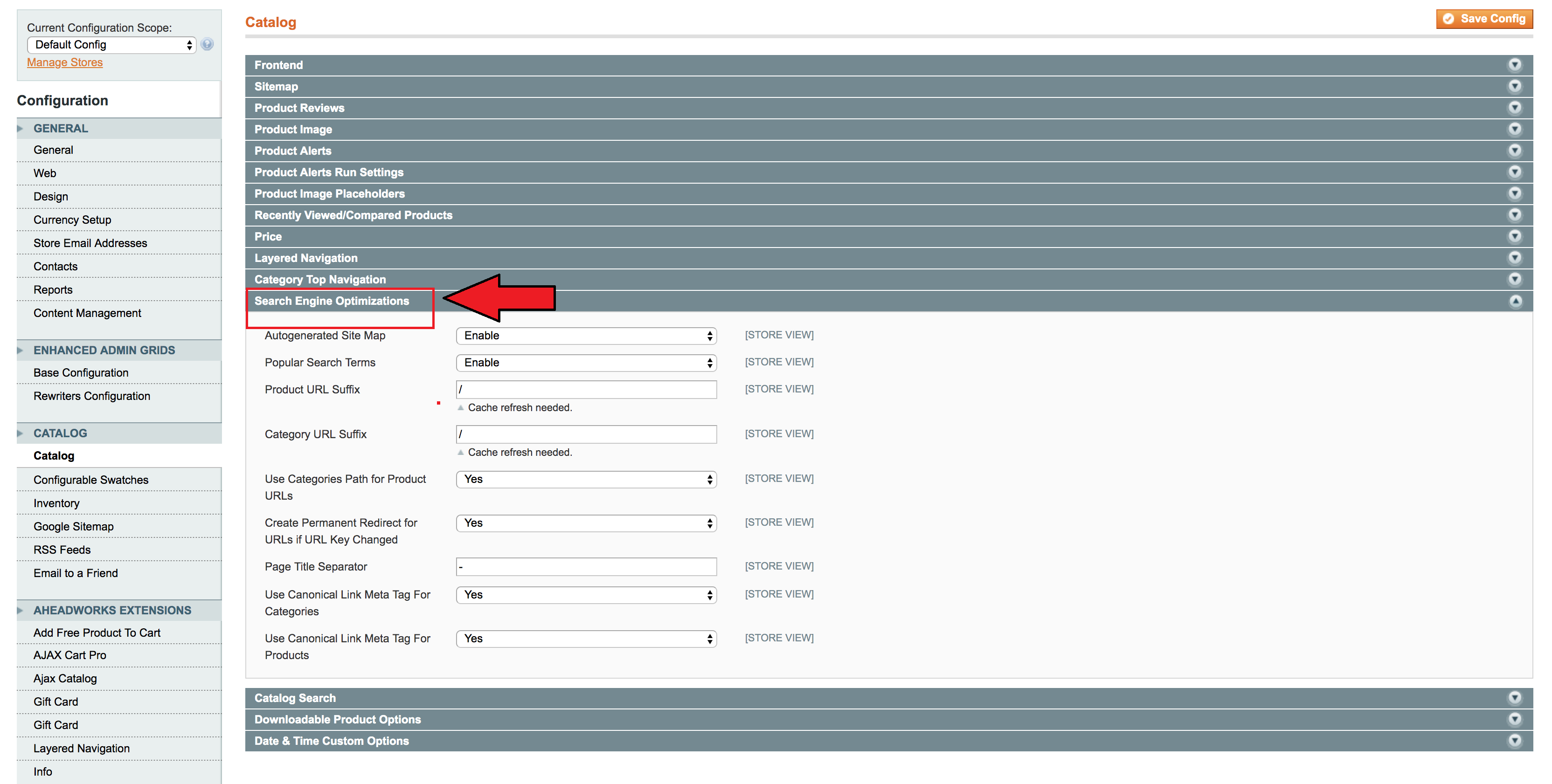
After logging into the admin panel, you will go straight to the system and then configuration. From there, you have to choose the catalog tab and click on the section of Search Engine Optimization as specified below:
Choose YES for the “use canonical link meta tag for products.”
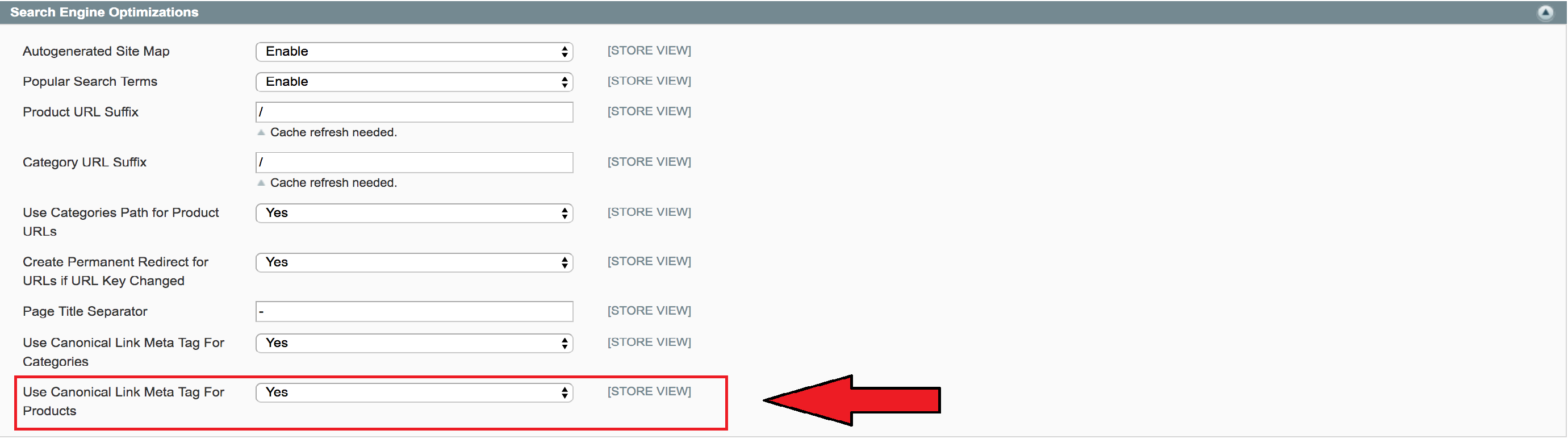
Sometimes, yes is selected by default which means that you won’t have to put in extra work or do anything else.
Magento 1 Category Canonicals
After that, you need to go back to the section of Search Engine Optimization and click on the option “use canonical link meta tag for categories.”

If you want to manually lay down the canonical URL categories, you will click on NO.
After setting the canonical URLs for manual specification, you can go to any categories. Now, each category has its own edit page which can be customized according to your requirements by clicking on the custom design tab. After clicking on it, you will see a box with the name custom layout update. In this box, you need to copy paste the following code to canonicalize your URLs.
<reference name="head">
<action method="addLinkRel">
<rel>canonical</rel>
<href>https://www.website.com/page-a/</href>
</action>
</reference>
Magento 2 Canonicals
You have to follow the mentioned below steps if you want to run a Magneto 2 canonical.
After logging into your admin head, go straight to the stores then to the settings, and select configuration. In configuration, you will see a drop-down named catalog, click on it, and select the tab of Search Engine Optimization.
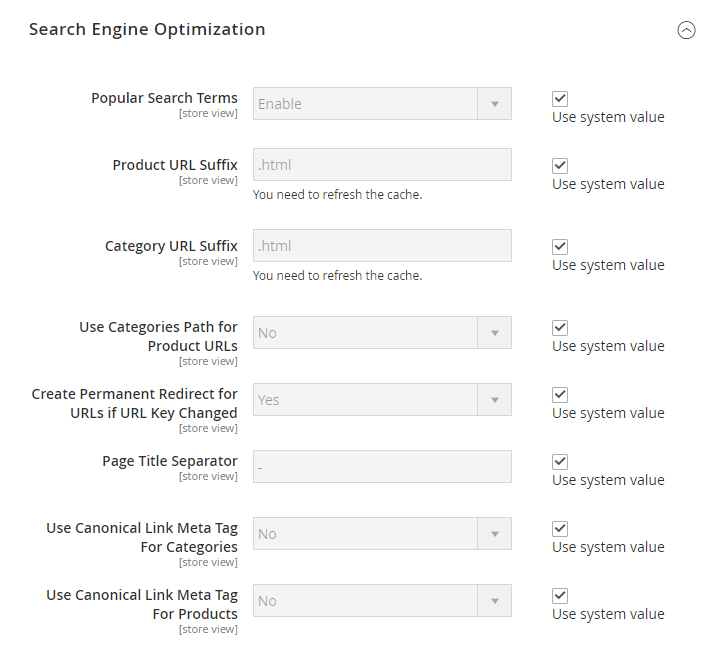
Image Credit: www.amasty.com
If you want to lay down your canonical URL to a complete category URL, you need to select YES on the “use canonical meta tags for categories.” The full-category URL will appear as:
- http://www.website.com/category/product.html.
However, if you want to same thing for your product pages to combine them into one, you need to select YES for the “use canonical meta tags for products.” Your canonical URL will appear as domain-name/product-url-key.
You may include the category part into the product’s URL but the URL will still appear as domain-name/product-url-key.
Canonical URL set up on WordPress
It is extremely easy to set the canonical URL on WordPress but before implementing it, you need to know which plugin of the WordPress SEO is being utilized during this process.
There are two most common WordPress plugins known as Yoast and RankMath. Proceed below to know the working of each of these plugins.
Canonical Tags with RankMath
RankMath is much easier to use as compared to Yoast. Go straight to the advanced tab on any post or page of the RankMath meta box. There you will see an option to specify or lay down your canonical URL.
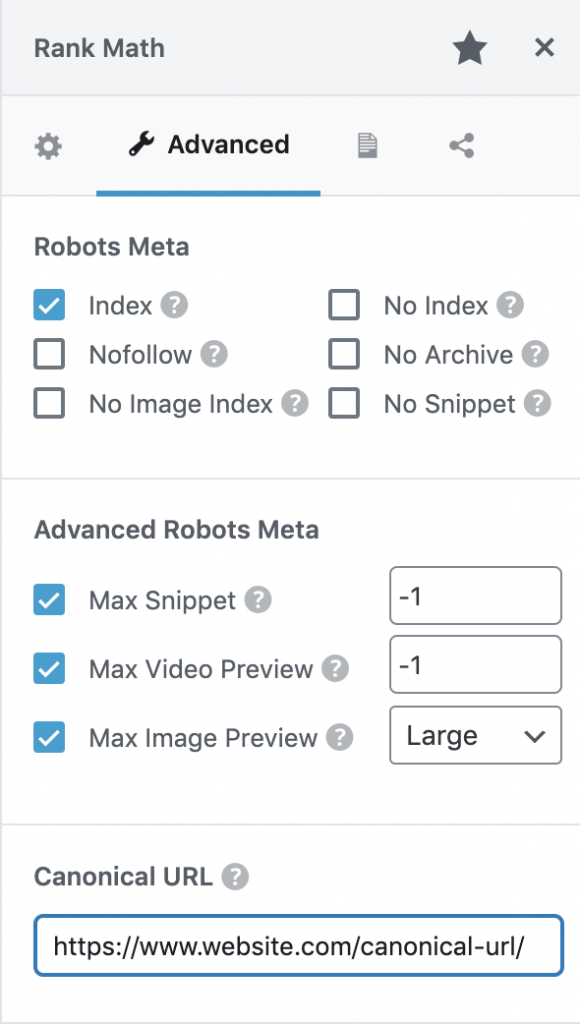
Image credit: www.rankmath.com
Canonical Tags with Yoast
With Yoast, all you have to do is to go on the SEO options of Yoast present on any post or a page. From there, you need to enlarge the advanced tab.
In this tab, you will see a field from where you can lay down the canonical URL of your page.
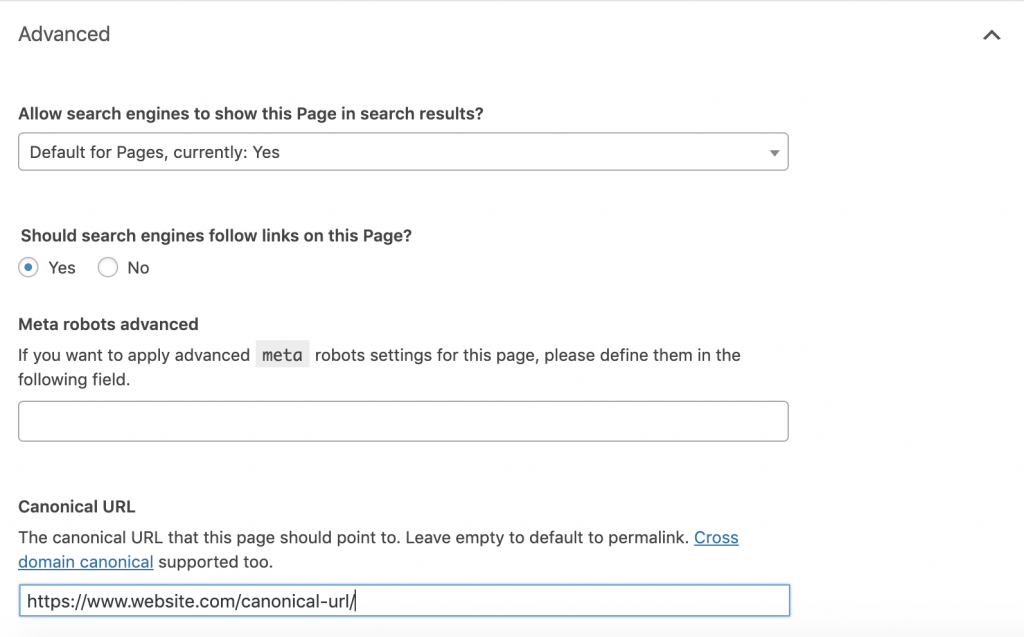
Image credit: www.yoast.com
Canonical URL set up on Wix
Now, comes the part where I’ll talk about self-referencing because all the pages of Wix use this referencing by default.
But this can be changed as well. You will have to go to the menus & pages and click on the show more icon. From there, you have to select SEO options and then click on advanced SEO. Once you click on this, you will see custom meta tags and under this heading, there is a tab named add new tag.
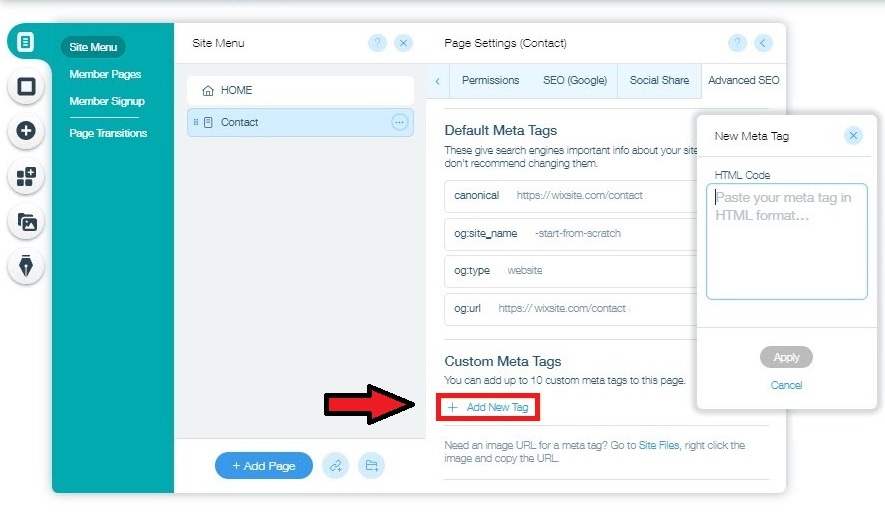
Image credit: www.wix.com
You need to add the entire canonical tag in here instead of a minute URL.
By using the mentioned below code, you can change your canonical URL:
<link rel="canonical" href="{your-page-url}"/>
Canonical URL set up on Shopify
Numerous SEO issues can arise within Shopify which makes it extremely important to understand. The most attention-grabbing problem is that Shopify can present multiple URLs for a single product page.
If you see the guidelines of Shopify, you will realize that you can utilize {{ canonical_url }} object when you want to develop a theme.
You can’t make changes to the canonical URL as you could make with Wix, Magneto, or WordPress.
It is the working of Shopify that can create problems because it can automatically update by default.
One product can be found on all the mentioned below URLs:
- https://www.website.com/products/product-a
- https://www.website.com/featured-collection/products/product-a
- https://www.website.com/sales-collection/products/product-a
All of these URLs will take you to the identical product page. However, it can totally resolve your canonical URLs. Moreover, Shopify will provide you with internal links that will take you to the duplicate version of the content which only increases your confusion.
But there are ways through which you can get rid of this confusion. All the steps are clearly mentioned in Path Interactive’s guide.
You will need a code to complete this process though. Go to the liquid files of your theme and then you will go to collection-template.liquid file from where you will get this code:
{{ product.url | within: collection }}
You need to edit this code to:
{{ product.url }}
Once you edit this code, all your internal links and canonical tags will be corrected.
What are the tips for the correct implementation of the rel=”canonical” HTTP header?
The use of rel=”canonical” HTTP header is considered to be the alternative to the canonical tags.
If you want to implement this approach, you need to lay down the canonical URL for the non-HTML documents or the PDFs.
The following code can be used to specify a canonical URL:
<Files "file-to-canonicalize.pdf">
Header add Link "< http://www.website.com/canonical-page/>; rel=\"canonical\""
</Files>
Canonical URLs specification using 301 redirects
According to Google, you can use 301 redirects to lay down your canonical URLs.
The important thing to remember here is that by using 301 redirects, all the other duplicate versions of your URL will be redirected to one canonical URL.
I think this is the best way to resolve all the issues of duplicate content across:
- HTTP and HTTPS
- WWW and non-WWW
- Non-trailing slash and trailing slash URLs
Unless you want to redirect a page after deleting it, this solution is the best.
Canonical URLs in sitemaps
If you want to keep everything easy and simple, don’t make the mistake of putting non-canonical URLs in the sitemaps. This is because Google can assume them to be identical canonical versions.
This can be one of the best practices to structure the sitemaps but this is not guaranteed that one will be able to specify his/her canonical URL.
Best practices of canonical tags
Implementation of the canonical tags can seem a bit frightening but once you get the hang of the best practices, all of it will be at your fingertips.
There are few tips that you must remember before implementing canonical URLs:
Only specify one canonical URL per page
All your canonical URLs will be ignored if you don’t specify a single canonical URL. Therefore, per page, you should only lay down one canonical URL.
Specify either non-WWW or WWW URLs
You must specify the correct URL for your product page because all the versions of WWW and non-WWW can be referred to as duplicate pages.
Specify the correct domain protocol
Never miss referencing all the HTTPS protocols as your canonical URL. People usually put wrong references. Therefore, thoroughly check the protocols to keep everything in check.
Specify either trailing slash or non-trailing slash URLs
At the end of the URLs, pay specific attention to your site’s slashing preferences that whether your site utilizes a non-trailing slash or trailing slash.
Use absolute URLs
Absolute URLs must be used for the referencing of the canonical tags rather than relative URLs. By choosing absolute URLs, they will be appropriately interpreted.
Thus, you should utilize:
<link rel="canonical" href="https://www.website.com/page-a/" />
Instead of:
<link rel="canonical" href="/page-a/" />
Use self-referencing canonical URLs if not canonicalizing to a different URL
The canonical tags of a page can reference itself if you properly implement the self-referencing URLs. Though it is not necessary but you can use this approach if your page is unable to canonicalize to another URL.
Common mistakes to avoid during the implementation of canonical tags
Mistakes are inevitable whenever you’re implementing a canonical tag. I’ve summed up a few of them which are stated as follows:
Setting multiple canonical URLs
You must utilize only one canonical tag for each page because they will be overlooked if you use multiple canonical tags.
Sometimes, in order to override various CMS defaults, you must remain careful because many people accidentally include two canonical tags with the <head> of the page.
Canonicalizing to a 301 redirect
You should set your canonical URL in such a way that it must become the redirect target rather than first canonicalizing and then be redirected.
Canonicalizing to an incorrect domain protocol
You must avoid setting up your canonical URLs with HTTP if your site is on HTTPS.
Confusing pagination & canonicalization
If pagination is implemented incorrectly, it can create many duplicate pages or content. However, canonicalizing all of them, from the first page till the last, isn’t the best solution.
You should always use view all pages to canonicalize all URLs.
Canonicalizing to irrelevant content
Apart from having near-identical or duplicate content, you should never canonicalize your URLs. I’ve often seen that various links are passed through canonical tags in order to boost up the ranking. This is not how it’s done and you must avoid doing it.
How can you audit canonical tags on your website and fix all the prevailing issues?
Whenever you run this audit on your site, you will get familiar with a bunch of checks that will all be related to the canonical tags.
Let’s take a look at some of the issues and the ways through which we can fix them.
AMP pages have no canonical tag
- The non-presence of the canonical tags on your AMP pages will be detected by this site audit tool.
- It is extremely crucial to canonicalize your pages between the non-AMP and AMP versions.
- This can be fixed by putting rel=”canonical” tag in AMP page’s <head> section.
No redirect or canonical to HTTPS homepage from HTTP version
The site audit will flag up the issues of duplicate content if your site is accessible on both HTTP and HTTPS versions.
To fix it up, you can use 301 redirects which redirect all your versions to the correct one. Another way through which 301 redirects can be used is by adding a canonical tag that references the HTTP page’s HTTPS version.
Pages with a broken canonical link
Canonical URLs will never understand the broken canonical links.
This could mean that all your canonical links point towards those webpages that don’t exist. This can create massive problems when it comes to indexing and crawling your content.
Find all the broken canonical links (if you have any) and update them to the correct and authentic canonical URLs.
Pages have multiple canonical URLs
- The error will be visible if there are a few canonical URLs present on a page.
- You can fix this issue by leaving just one canonical URL and removing the rest of them.
Conclusion
As an SEO, it is highly important to get first-hand knowledge regarding canonicalization because if it is used in the wrong way, it can have adverse effects on the performance of your website.
Now, if you want to use canonicalization effectively, you need to learn and understand its working and what it does to boost up your site’s performance. Furthermore, you will need to know how to pinpoint all the issues or problems and how readily you can fix all of them. Only then, you will be able to use it proficiently and remove all the duplicate content from your website.


