Author Archives: krcmic.com

Who can invite Chatter customers into a Chatter group?

Below is the answer and explanation for the question in the Salesforce Exams.

Who can invite Chatter customers into a Chatter group?

  • The system admin ✅
  • Group owner ✅
  • All Chatter users
  • None of the above

Correct Answers

The system admin ✅
Group owner ✅

The above question is related to the Salesforce Exams. You can find all the updated questions and answers related to the Salesforce Admin Practice Exam on the “Salesforce Exams” page. If you find the update in questions or answers, do comment on this page to let us know. I will update the answers as soon as possible.

To learn about Salesforce Exams: Salesforce Exams.

Chatter External license allow users outside the company to join public Chatter groups.

Below is the answer and explanation for the question in the Salesforce Exams.

Chatter External license allow users outside the company to join public Chatter groups.

  • True
  • False ✅

Correct Answers

False ✅

The above question is related to the Salesforce Exams. You can find all the updated questions and answers related to the Salesforce Admin Practice Exam on the “Salesforce Exams” page. If you find the update in questions or answers, do comment on this page to let us know. I will update the answers as soon as possible.

To learn about Salesforce Exams: Salesforce Exams.

When Chatter is enabled in an org, the following happens (Choose all that apply).

Below is the answer and explanation for the question in the Salesforce Exams.

When Chatter is enabled in an org, the following happens (Choose all that apply).

  • The Chatter app is added to the Force.com app menu ✅
  • The Chatter tab is added to all standard apps ✅
  • Accounts, Contacts, Cases, Leads and Opportunities are enabled for Chatter ✅
  • All users are added to the All Chatter group
  • All of the above

Correct Answers

The Chatter app is added to the Force.com app menu ✅
The Chatter tab is added to all standard apps ✅
Accounts, Contacts, Cases, Leads and Opportunities are enabled for Chatter ✅

The above question is related to the Salesforce Exams. You can find all the updated questions and answers related to the Salesforce Admin Practice Exam on the “Salesforce Exams” page. If you find the update in questions or answers, do comment on this page to let us know. I will update the answers as soon as possible.

To learn about Salesforce Exams: Salesforce Exams.

The Chatter Free license gives users the ability to access People, Profiles, Groups and Files as well as (Choose all that apply.)

Below is the answer and explanation for the question in the Salesforce Exams.

The Chatter Free license gives users the ability to access People, Profiles, Groups and Files as well as (Choose all that apply.)

  • Make posts ✅
  • View comments ✅
  • Upload files ✅
  • Join groups ✅
  • View records

Correct Answers

Make posts ✅
View comments ✅
Upload files ✅
Join groups ✅

The above question is related to the Salesforce Exams. You can find all the updated questions and answers related to the Salesforce Admin Practice Exam on the “Salesforce Exams” page. If you find the update in questions or answers, do comment on this page to let us know. I will update the answers as soon as possible.

To learn about Salesforce Exams: Salesforce Exams.

Auto response rules can be used to send an automated yet tailored response to customers based on the information they provide via the Web-to-lead form.

Below is the answer and explanation for the question in the Salesforce Exams.

Auto response rules can be used to send an automated yet tailored response to customers based on the information they provide via the Web-to-lead form.

  • True ✅
  • False

Correct Answers

True ✅

Explanation

Auto-response rules tell Salesforce what criteria a case must meet before sending out one of your saved email templates when a specific set of conditions are met. For example, you could set the trigger to send them when someone submits a new case or lead. You can select a series of criteria for the sending of the email, and it will send one based on the first rule entry criteria it matches.
You can think of this as the case above, where someone signs up for a discount program and wants confirmation that they’ve been registered correctly. This case would only require one email sent to the individual who submitted their information, so an auto-response rule is an appropriate choice. This is because auto-response rules send out one email per trigger, unlike workflow alerts.
Workflow alerts are the best choice if you plan to send:

  • Confirmation emails
  • “Thank you” messages
  • Or alerts for the person who submitted information in a web-to-lead form

The above question is related to the Salesforce Exams. You can find all the updated questions and answers related to the Salesforce Admin Practice Exam on the “Salesforce Exams” page. If you find the update in questions or answers, do comment on this page to let us know. I will update the answers as soon as possible.

To learn about Salesforce Exams: Salesforce Exams.

Facebook ads not delivering

12 reasons why your Facebook ads not delivering

You may take months or even years to come up with a strategy, did a lot of copywriting till late at night, and all that hard work to create a wonderful campaign that will kick start your business. You’ve worked out your target audience and checked up on all the delivery issues. Now, all that’s left to do is to publish your campaign and wait for the results. But even with all this struggle, nothing seems to happen.

At that point, you will question yourself, “Why are my Facebook ads not delivering? Why am I not seeing any impressions or results?”

The main reason behind all of this is that your Facebook ad isn’t visible to anyone. A lot of questions may start circulating in your mind, “have I done something wrong? Is the system out of order? Did I even send it?”

At this point, you may be banging your head against the wall to figure out what’s happening.

Now is the time when you should get familiar with the top reasons why are your Facebook ads not delivering and how to solve them.

So, if you want to know all about them, proceed below.

You may have gone through such a problem once or twice where your Facebook ads may not deliver as you expect them to do. In such a scenario, you may get very frustrated because it just doesn’t work!

However, the answer to this problem is quite simple, and once you get to know it, you may think that you’ve been fussing over nothing.

To help you with your Facebook ads and campaigns, we’ve collected the top reasons why are your Facebook ads not delivering and how you can solve them.

Reason no. 1: Facebook ads not delivering

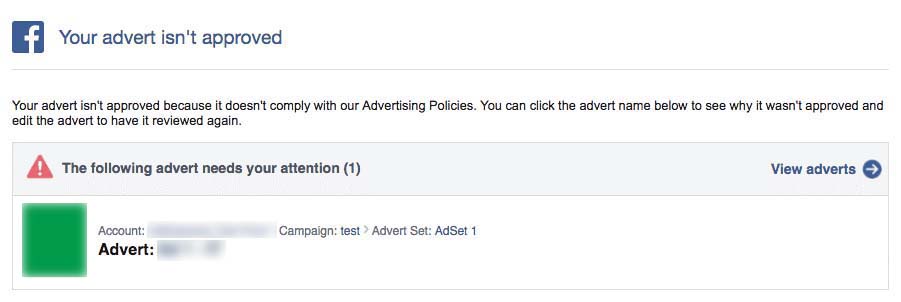
Disapproved ads and campaigns

The first reason why your Facebook ads not delivering is maybe your ad has been disapproved. You will be notified why your ad has been disapproved on your registered email.

If you can’t find your notification, make sure to check the Facebook ad manager.

10 reasons why your ad may get rejected

  1. There are a lot of reasons behind the rejection of your ads, but the most common ones are mentioned below.
  2. Your ad may be promoting tobacco-inducing products, drugs, and other related pharmaceuticals.
  3. Your ad may be promoting unhealthy diet supplements (this is solely up to Facebook as to which supplement is dangerous and which one is not).
  4. Your ad may be selling bombs, grenades, weapons, and other explosives.
  5. Your ad may contain highly violent content.
  6. Your ad may contain fake or fabricated documents such as passports, papers of your immigration (if applicable), or degrees.
  7. Your ad may contain surveillance equipment such as device tracker or spy cameras, and other malware.
  8. Your ad may contain questionable before-and-after images exhibiting a change in a person’s weight (all such ads must be targeted to people who are above 18-years-old)
  9. Your ad may contain “adult content.”
  10. Your ad may contain very unlikely get rick quickly or get rich with just one click schemes.

If you want to know more reasons why your Facebook ads are getting disapproved, you can check the advertising policies of Facebook.

How can you solve this issue?

Make the changes that Facebook is asking you to do

For instance, if your ad contains an image that portrays something inappropriate, simply change the image that fits the policies of Facebook. Once you’re done, you can save the ad, and it will be resubmitted automatically. Then you have to wait for Facebook to review it again and approve (possibly). Fingers crossed.

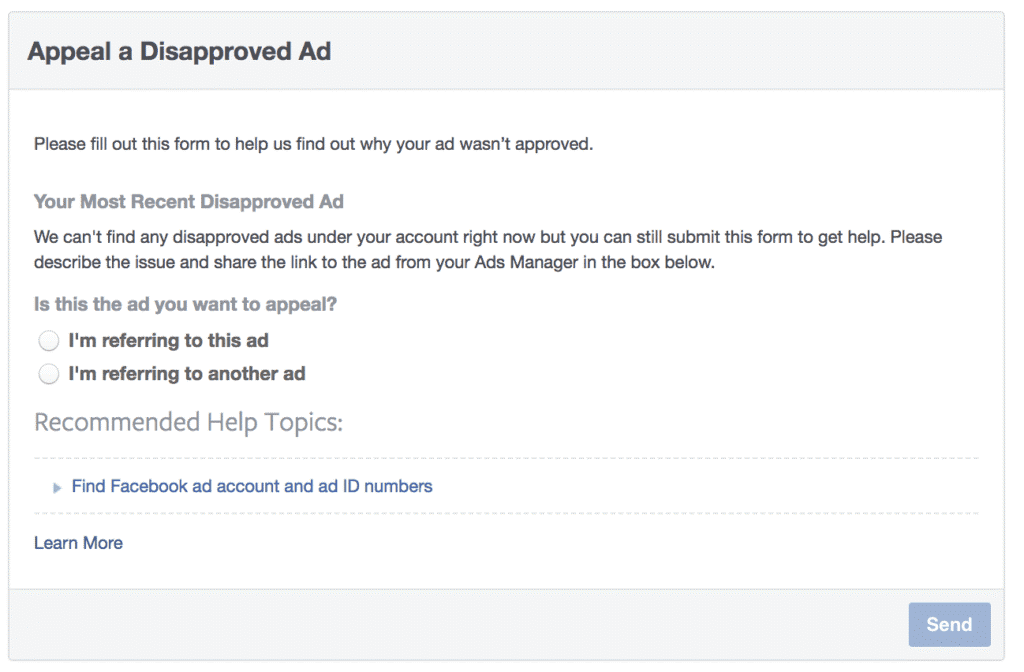
You can appeal for the wrong disapproval

Everyone can make mistakes, and so does Facebook. Therefore, if you think your ad is completely fine and adhere to the advertising policies of Facebook, you can appeal for the wrong disapproval. For this purpose, you have to fill out a form and submit it through Facebook. If you’re right and your content has nothing to get disapproved, Facebook will immediately start your ad. You will also get a notification of your ad starting up through the Facebook page or the ad account.

Reason no. 2: Facebook ads not delivering

Violation of the 20% rule

When it comes to advertising on Facebook, there are several rules that you need to keep in mind, but we often forget most of them. It’s quite easy to forget a rule when there are hundreds of them present, but if you don’t remember this one rule, it can create lots of problems for you, and that is the 20% text rule.

What does the 20% text rule do?

Facebook introduces a rule in which your ad images can’t go over to the specified image to text ratio, i.e., 20%. This text ratio includes catchphrases, logos, and watermarks of your business, along with all the other related texts.

To make you understand it in a much simpler way, you can’t put that text that eats up your entire image. If the image text appears to be OK, it means that you’ve used the appropriate ratio, and you can proceed with your ad.

I’ve found the below-mentioned example for you that contains the perfect image to text ratio for a Facebook ad.

But if you see a low, medium, or high rating instead of an OK, you will need to work on your text ratio.

In this regard, three examples can help you, and these are stated as follows:

I know what you all are thinking right now. You may have violated this rule in the past, but back then, Facebook simply rejected your ad or took it down once and for all. But now, it’s all a little different. Now, when you violate this rule, Facebook will decrease the reach of your ads, or it won’t run it at all. Facebook can do this without giving you any warning of some sort. So, you need to remember this rule if you want your Facebook ads to deliver.

However, there are some exceptions where this 20% text rule doesn’t apply, and these are:

Covers of Books and Albums

The covers of books and albums are all about texts. Almost 90% of the area is taken up by the text, and I think, for books and albums, it is quite necessary to have this much text. There’s no point to not run such images of the covers that contain this much text.

Games

Similarly, there is no point to not run these video game ads because nobody will click on such ads if they don’t contain the name of the game in big, bold letters.

Product Images

Another exception to the 20% text rule is product images. If you take a look at all the products sold in the USA, you will see that none of them contains a text that is lesser than 20%. Therefore, product images can forbid this rule as well.

Event Posters

To be practical, as with the product images and the other, event posters can also exceed the 20% text rule because only an awful and morbid poster will contain zero-to-none details. This is why event posters are also considered as one of the exceptions to the 20% text rule.

Other Exceptions

In addition to the mentioned above exceptions, the 20% text rule can be overlooked when it comes to graphs, magazines, movies, charts, posters of TV shows, etc.

How can you solve this issue?

To check the percentage of your image to text ratio, you can utilize the text overlay tool of Facebook. This tool will give one of the ratings to your ad image, and then you can proceed accordingly.

If you get a medium or high rating, try replacing the image altogether with the one that contains the lesser text. Once you post this lesser text image, you will see that your ads will begin to deliver.

If you get a low rating, you can correct it by fixing some of the points on the text of your image, and you’re ready to publish.

Reason no. 3: Facebook ads not delivering

Too small audience

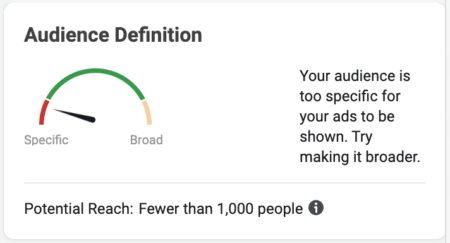
Another reason why your Facebook ads not delivering is that your target audience is too small. To avoid being “too creepy,” Facebook advises all of its advertisers to state a minimum size of the audience if you want your campaign to get published.

If your target audience doesn’t consist of 1,000 active users, Facebook will not run or publish your ad sets.

Now, there are many reasons why you don’t have this number of active users:

  • You want to appear efficient that’s why you’re not including your entire target audience
  • You’re not setting up your targeting layers in the correct way
  • You’ve chosen those parameters that don’t contain enough active users
  • Your customer upload list doesn’t contain as many users as you expected

So, if you’re narrowing down your audience to a very small size, your reach will die down, and your ad will not be visible to anyone.

How can you solve this issue?

I’m going to ask you this one question only, apart from your targeting audience, can the other users see your ad?

If the answer is yes, then you need to work more on your audience and try to increase its size by delving deeper into the demographics and behaviors of your new users. You need to push yourself till you can reach the 1,000 active users mark.

If the answer is no, your audience isn’t large enough, and you will need to gather more users so that your ads start getting visible to the people.

Reason no. 4: Facebook ads not delivering

Too low bid (Be careful about your bid)

The success of your ad can also be restricted when your bid is too low. Now, if the word “bid” makes you imagine an auction house, then you’re on the right track.

Your ad isn’t the only ad that Facebook needs to publish, but several other ads are also waiting to get published. This can be termed as a huge digital auction.

But Facebook doesn’t deal with the money; rather, there are three other factors that Facebook looks into to call a winner. These factors are:

  • The price of the bid – this is the price you’re willing to pay for any desired action
  • Quality and relevance – how your customers will react to your ad will determine the quality of your ad (positive or negative feedback) and how your ads can keep the audience engaged
  • Estimated rates of actions – how much of your audience is expected to take the mentioned action.

With the help of these three factors, Facebook decides which ads are viable to get published and which ones shouldn’t run at all.

If you want your ads to run successfully on Facebook, you need to maximize all the mentioned above factors. I will discuss the second and third factors in a while but let’s focus on the bid price for now. When Facebook purchases an ad, you will need to choose the desired action first, and then it will ask you how much you’re willing to pay for the actions you chose.

You will see two options when you’ll determine the amount you’re willing to pay and those are:

  1. Lowest cost
  2. Lowest cost with bid cap

If you go with the first option, i.e., the lowest cost, it means that you’ve given all the control to Facebook to select the best price for the action you’re going with and then bid accordingly. About 90% of the advertisers go with this option because it enables them to have the best bidding price ad it will never be too low or it never under-deliver.

But if you’re going with the second option and adding a bid cap to your lowest price, it means that you’re the one who’s going to tell Facebook how much you’re going to pay for your desired action. However, in this option, you have to select the maximum or average bid. If your bid is too low, Facebook won’t deliver your ads.

How can you solve this issue?

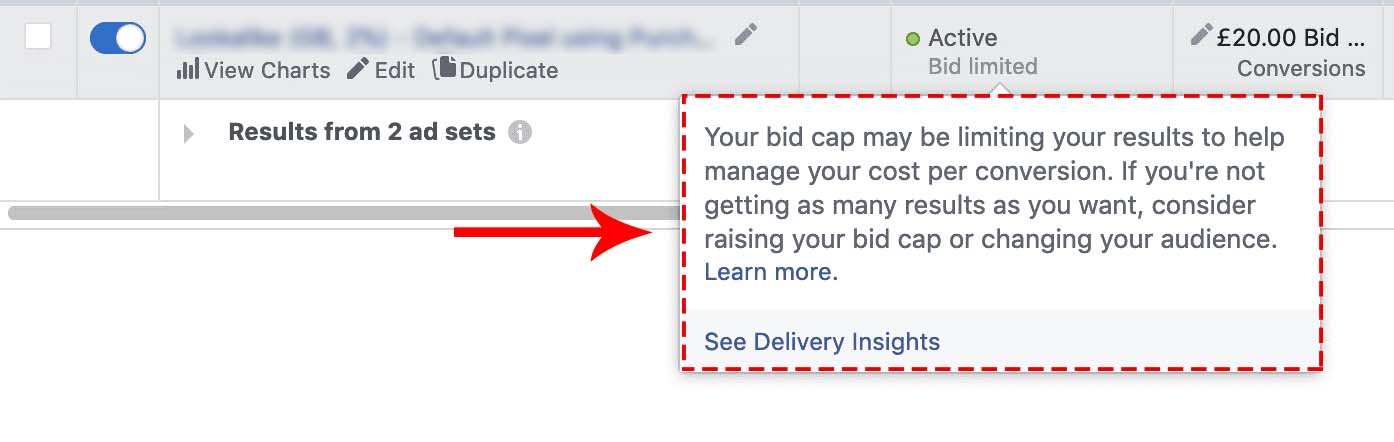
If you set a very low bid, there are very slight chances that your ads will show up, and in this way, you will also face some delivery problems.

To give you a heads up, a message will show up inside the ads manager as:

If you’ve selected the second option that consists of a bid cap and you’re still facing delivery issues, you may need to switch to a higher price or may change to the first option where you won’t need a bid cap so that Facebook can handle this one on its own.

Reason no. 5: Facebook ads not delivering

You’ve reached the spending limit of your account

This is the most common reason why your Facebook ads not delivering. Many people tend to forget their spending limit, and they exceed it.

If you’ve made several ads on Facebook, you may know that each one of the ads has its own spending limit. This is done to ensure that no ad exceeds the total budget of your campaign.

Once the campaign starts running successfully, many people forget the spending limit. Once your ad has reached this limit, it will be ceased to do any more spending. But don’t worry, it is very easy to solve this issue.

Pro Tip:

You must always double-check your sending limit before your petty issues become some major troubleshooting problems.

Now, let’s move onto fixing it.

How can you solve this issue?

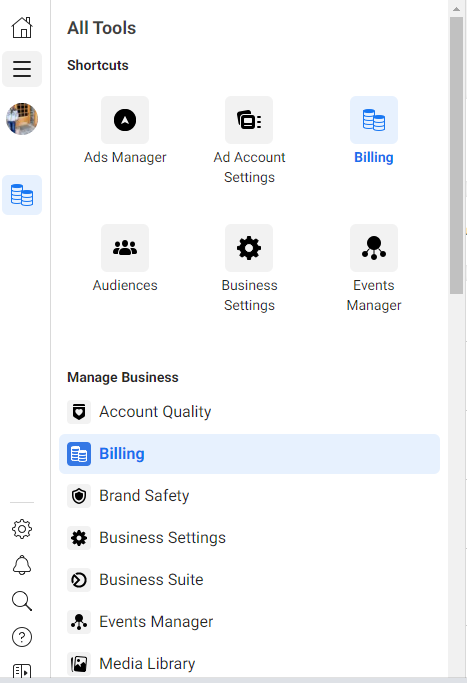
In order to look up the spending limit of your ad or campaign, you need to go to the menu of ads manager and select the billing & payment methods.

Once you select this one, you will come across the spending limit of your account that is located on the screen’s left-hand side. A specified by the image below, you will also analyze how much you’ve already spent out of the total limit.

As you can see in the above image, there are three links present – change, remove and reset. You can do whatever you want to do with your limit by clicking on any of these links, and voila! You’re good to go.

Reason no. 6: Facebook ads not delivering

Your campaign budget isn’t enough

You may have heard this oft-quoted proverb that you get what you give. Thousands of people are preaching that you can become a billionaire with just a $2 campaign if you follow this one secret trick. But we all know that’s not how this is done.

The basic price of a campaign stays between the ranges of $2 to $10 per day. However, several other factors may change this basic range. These factors include the target audience, billing event, etc.

This amount will be enough to make Facebook run and deliver your ads smoothly and successfully. You will be able to show your ad to a broader audience so that you can gather as much data as you can.

To understand this, you can imagine the gas money that you give out to your local delivery guy.

Now, a major error that most business people make is that they add a lot of ad sets into their ads. You must avoid this one. The more ad sets you’re adding, the more you’re increasing your budget because each ad set has a tiny budget given to it.

How can you solve this issue?

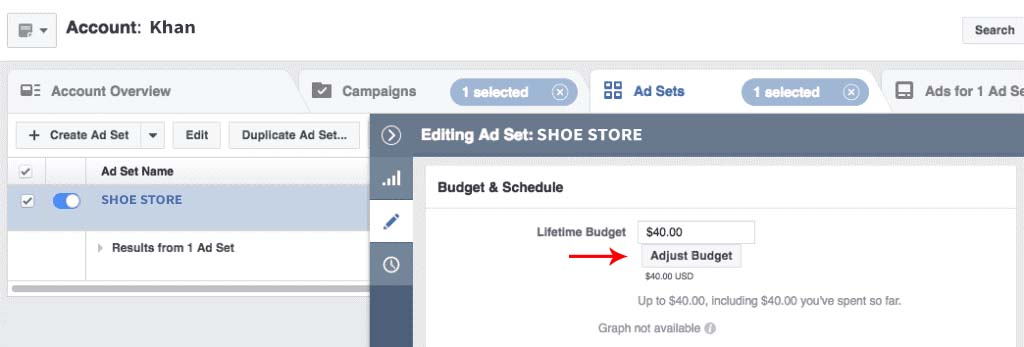
If you want to manage your budget, you need to go to the menu of ads manager and then click on the ad sets tab. From there on, you can select which one of your campaigns you want to edit. To edit, click on the pencil-shaped icon on the right-hand side.

Once you’re done with this, you can use the popup to go to the budget settings.

Reason no. 7: Facebook ads not delivering

Your audiences are overlapping

Remember that I talked about a digital auction; now, your audiences may have similar interests across some of your ad sets. During the “auction process,” Facebook doesn’t let your ads fight one another, and thus, it prevents some of your ad sets from running altogether. At the same time, some of your ads will continue to run. This selection is based on the history of the ad sets.

If your Facebook ads aren’t delivering as they once did and if everything else is working properly, you need to look up your targeting options to figure out the similarity between them.

But how can you do that? Facebook provides you with an audience overlap tool that can help you to do that.

How can you solve this issue?

To check the overlapping of your audiences, this is what you need to do:

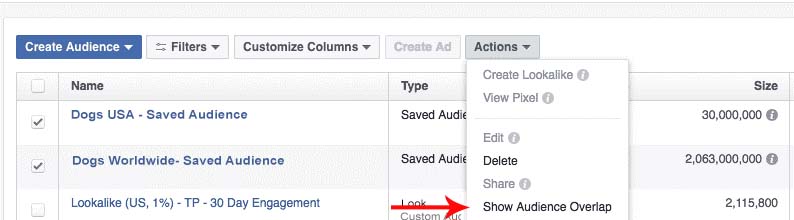
  • When you reach the audience page of Facebook, select at least five audiences.
  • After that, select the actions dropdown menu and then click on show audience overlap.

  • From there, the overlapping of your audiences will be visible to you.

Let’s take an example to understand it better.

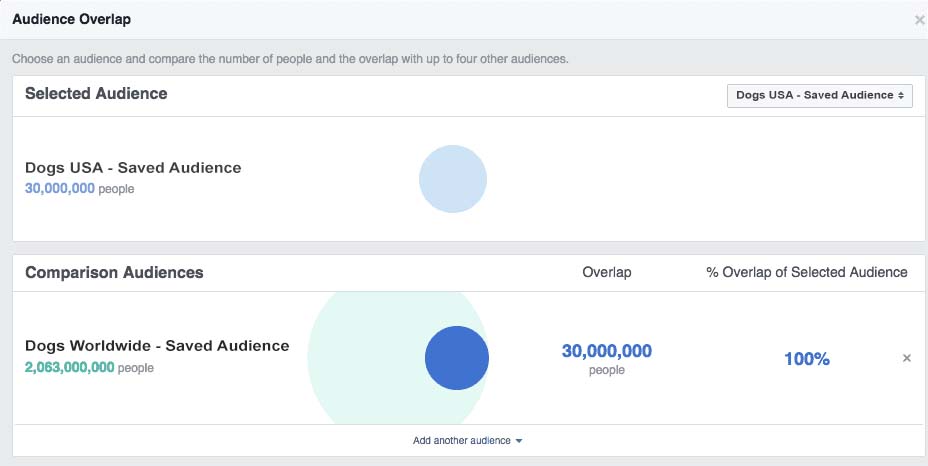
As you can see, I’ve chosen two audiences that are already saved. One audience comprises USA residents who are interested in dogs, and the other comprises people from all over the world who are interested in dogs.

From the chart mentioned above, we can clearly see how much the two audiences are overlapping, and that is 100%. It means that when this campaign will start to run, you’re going to see the same delivery issues that I talked about earlier.

But we can prevent this from happening.

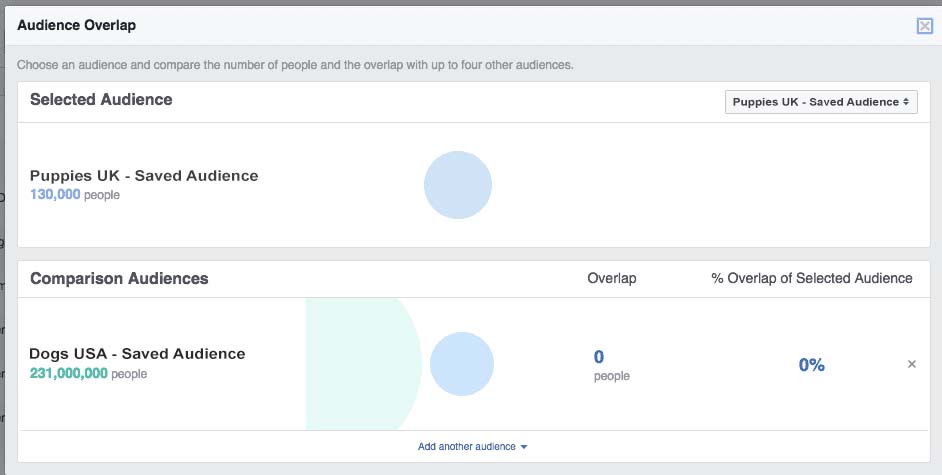
We can change our target audience, from the USA residents who are interested in dogs to the UK residents who are interested in puppies, you will see that the overlapping will reduce to 0%.

Reason no. 8: Facebook ads not delivering

It’s difficult to reach your optimization goal

Specifying your optimization goal is the ideal way to let Facebook know what kind of action you want your audience to take. In this way, Facebook can target that audience with much more accuracy than before. For instance, your optimization goal is to provide your audience with link clicks. Now, you’re letting Facebook know that you’re targeting that audience that is more likely to click on these links based on their engagement with those ads that are somewhat similar to yours. That is how estimated rates of actions jump into the equation which we discussed earlier.

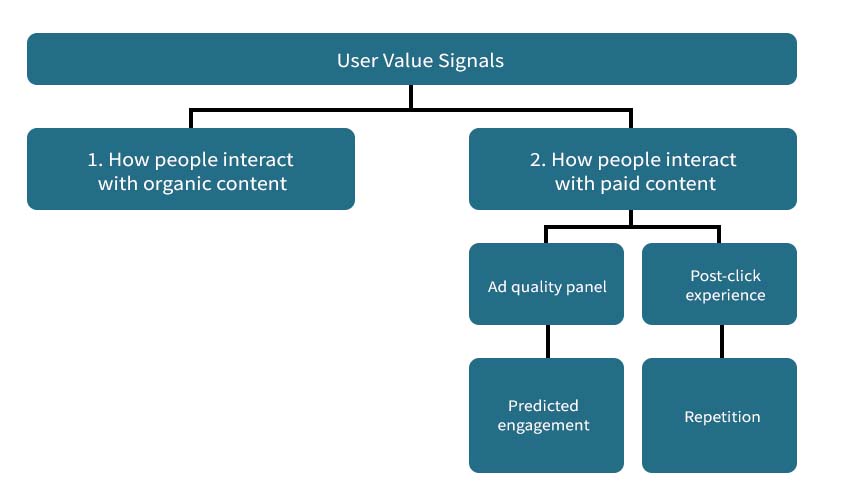
Mentioned below is an image that will let you know how you can determine the best audience for an optimization goal utilizing user value signals:

It is very important to use the proper optimization goal for your campaign because it helps to trim down your target audience. However, many problems occur when you start optimizing your conversion campaigns or ads.

Typically, when you optimize a goal for your campaign, a lot of delivery issues tend to rise, which may occur because there are not enough conversions taking place.

One of the reasons why your Facebook ads not delivering is you don’t have enough conversions. These conversions are used as a source by Facebook to find your target audience. But if there aren’t any conversions available, what will Facebook use as a source to look for your target audience? Your campaign may run, but Facebook will take it down after a while as it doesn’t know who can be interested in it because of lack of data. Therefore, you need to provide conversions.

How can you solve this issue?

If you want to avoid these kinds of issues, you need that conversion that can occur a large number of times each day. For example, instead of using “purchase,” you can use the “add to cart” event.

Another way you can avoid this issue is, instead of using conversions, you can use link clicks as your ultimate optimization goal. In this way, Facebook will know what kind of people are showing interest in your ad. This data can be collected by paying close attention to those people who are clicking on those links. In this way, Facebook will be able to pinpoint your target audience.

Once you’ve reached your daily conversions goal or even exceeding it, you can change your optimization goal back to “conversions.” Keep in mind that the minimum number of conversions specified by Facebook is about 50 per week.

If you want to change your optimization goal, you need to go to the ads manager and click on the ad set to edit. Here, you can change the optimization goal as per your choice.

Reason no. 9: Facebook ads not delivering

Your ad is stuck in review

As I’ve previously mentioned, once you’ve published your ad on Facebook, it will be thoroughly reviewed by the entire team of Facebook to check if it meets the terms of service of advertising on Facebook. Not only the team of Facebook but also several review systems of Facebook will also check your ad before giving it a thumbs up.

Now, how much time can this reviewing take? Generally, “most” ads take about 24 hours to get reviewed, as specified by the documentation of Facebook. But there are some cases where it can take more than this time limit. This is how your ad can get stuck in a review cycle, especially in Q4 when there is a lot of ad load on Facebook’s review systems.

How can you solve this issue?

If you want to avoid getting stuck in this review cycle, I suggest you wind up your campaign as soon as possible and send it for review. Thus, if Facebook takes time to review your ad, then it will not affect your business.

You can select the starting and ending date of your campaign by scheduling it in advance.

Note: Never edit your ads once you’ve sent them for review because when you edit your ad, the review process will start all over again.

Reason no. 10: Facebook ads not delivering

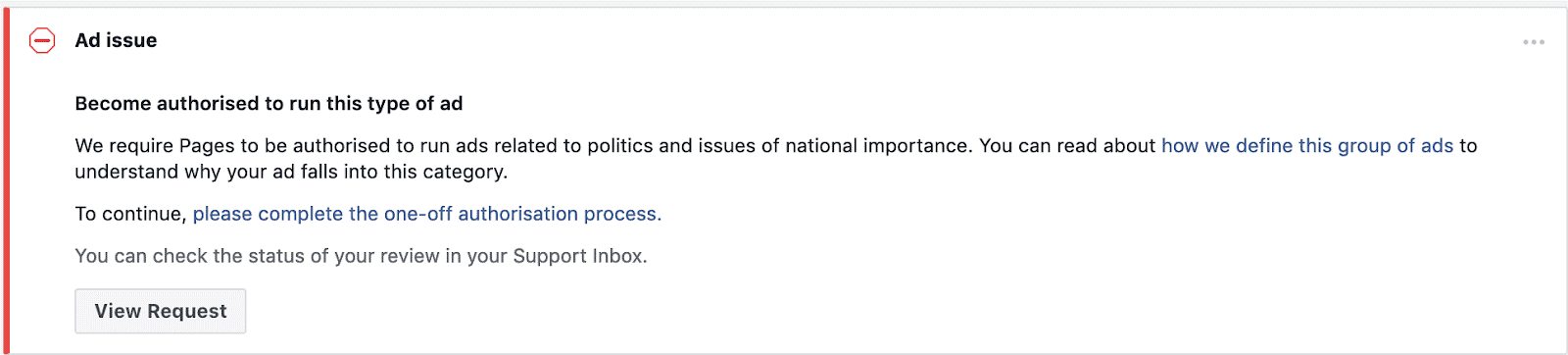
Your ad is of “national importance” (Political)

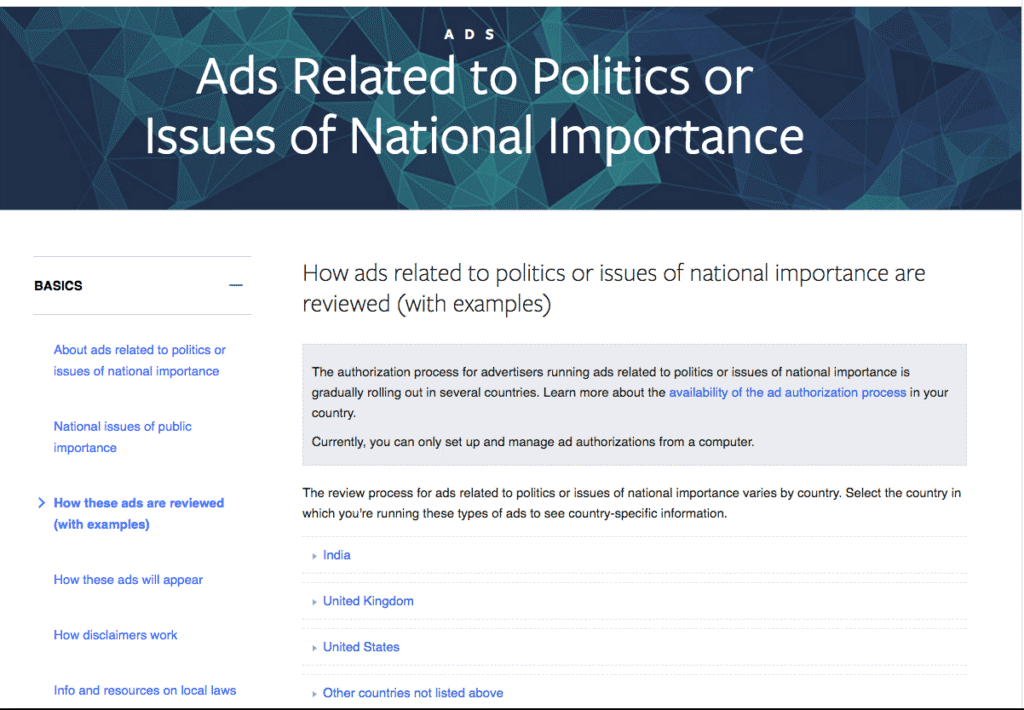
If your ads contain “political content” or if you’re posting “on behalf of the politicians,” you need to stop doing that because Facebook has made some over-the-top changes to such ads.

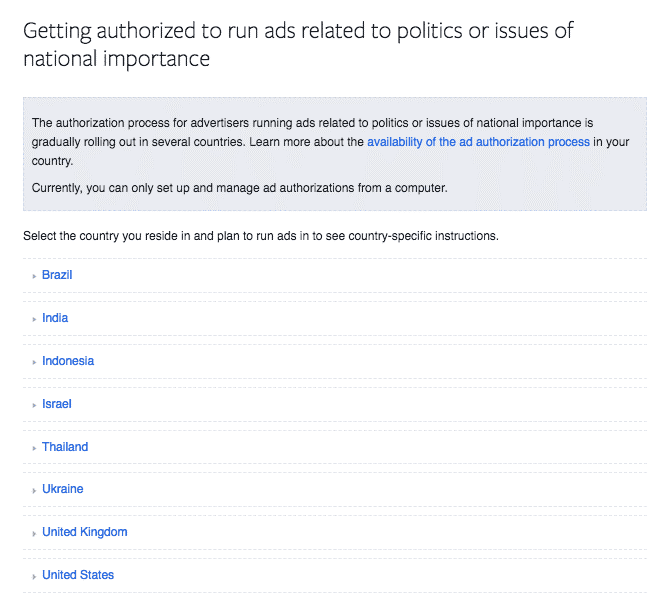
The definition of the “political content” may change from one country to another, but do you know what remains certain? The terms of service of Facebook for which you must remain very careful now.

Image Source: Facebook

However, Facebook states that some of the changes may change again with time. It means that the content which is considered to be non-political today may be considered as something else tomorrow.

But right now, if you’re abiding by every rule of Facebook’s advertising policy and still your ad isn’t delivering, you need to check if your ad contains some political content. If it does, you will get notified by the ads manager.

How can you solve this issue?

If your ads contain political content and you want them to deliver, you need to be authorized or legalized first to run such ads.

Depending upon your country, you can find out what you need to do to be authorized.

Reason no. 11: Facebook ads not delivering

You’re making low-quality ads

Facebook doesn’t go to the extremes of stopping the ads from spamming or clickbaiting; instead, it just reduces the reach of your ad by disapproving it and considering it a low-quality ad. The low-quality ads are divided into three main categories, namely;

  1. engagement bait,
  2. withholding information
  3. sensationalized language.

Engagement Bait

At some point in our lives, we all have come across such ads that ask people to like and tag a friend for any reason. But the thing that we don’t know is that it violates the policy of Facebook. Facebook terms these ads as spamming ones and defines them as “ads containing the content that asks people to engage with it in specific ways such as requesting likes, comments, and shares,” as shown in the mentioned below example.

Withholding Information

Another reason why your ad will be deemed low-quality is when it withholds information from the users. For instance, you see an ad like, “this one trick is the solution to all your problems – A big want!” Now, you won’t find out this solution unless you click on it. Facebook will out-right disapprove this ad claiming that it’s withholding information from the audience.

Sensationalized language

Sensationalized language is considered to be that language in which exaggerated language or headlines are used to force people to react, but when they go to the landing page, it doesn’t deliver anything.

For instance, if your headline states, IS CABBAGE THE MOST POWERFUL ANTI-OXIDANT ON EARTH? There are a lot of chances that your ad won’t deliver.

Other than the mentioned above reasons why your ad is deemed low-quality, Facebook also states that:

The ads which are deemed of low-quality will get disapproved altogether, or they will get decreased distribution when it comes to the auction process of the ads. This is applied to every advertiser out there. However, we focus more on those ads that are related to entertainment, media, politics, or issues of national importance; they will have a deeper impact.

You need to thoroughly check your ad and find out if it’s in any of the categories mentioned above. If it’s, go through it once more and change everything that can deem it low-quality.

How can you solve this issue?

This issue is very easy to solve. All you have to do is make sure that you avoid doing anything that is demonstrated in the examples above, and you will be all set.

Reason no. 12: Facebook ads not delivering

Your ads are not relevant to your target audience

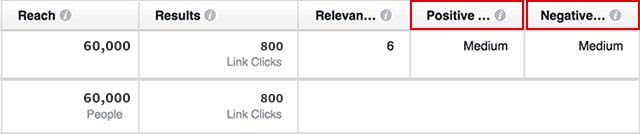
Do you have any idea what is the relevance score? No? Thought so. Most of the businessmen tend to overlook this part, and then they have to bear the consequences. Facebook provides you with a relevance score ranging from 1 to 10. It tells you how interesting or engaging your ads are to your audience.

Your audience can give positive feedback such as it is liking, commenting, and sharing your ad, or it can be the other way around where your audience is reporting it as a scam or hiding it away from the newsfeed. All of this contributes to the overall relevance score of your ad. If you get a high score, it means your ads are performing well, and you will also be paying less.

If you want to see your score, go to the ads manager and click on your campaign. From there on, you will need to edit several columns, and then your relevance score will be visible to you along with the positive or negative feedback as low, medium, or high.

How can you solve this issue?

Do you have a low relevance score? Don’t worry. I’ve brought four ways through which you can increase your relevance score. Proceed below to know all about them.

Split test your images

When it comes to images, you may be targeting only your younger audience, but what about your older one? You may use bright-colored, contrasting, and different fonts to portray your message. This can be really difficult for your older audience to read. Therefore, try to portray what you’re actually offering to your audience. e.g., by showing a picture of your product (free download, etc.).

Refine your targeting

If you’re giving ads about home insurance, then surely your target audience won’t come between the ranges of 18-24. Therefore, you need to refine your targeting by checking out the behaviors and demographics of your target audience. You can look them up in audience insights of Facebook.

Refresh your creativity

If you see one thing over and over again, will you get bored? Yes! And so does your audience. Therefore, you need to keep being creative when it comes to Facebook ads. You can do this by analyzing the performance of your previously existed ads and then change the graphics or other related things to keep your audience engaged in your ads.

Make your ads interesting

Your audience is sick of seeing that plain old photo. Thousands of ads are currently operable on Facebook, so what makes your ad stand out? Start using different images, videos, fonts, graphics, etc. Think about your product and figure out what makes it unique and how your audience can benefit from it.

Are your Facebook ads not delivering the way you want them to?
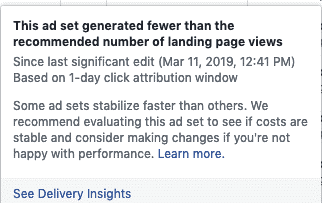
To get more info, utilize the delivery insights of Facebook

We’ve covered the top reasons why are your Facebook ads not delivering, but there is another tool that can help you to identify problems with your campaign, and that is known as delivery insights.

However, if you want to utilize this feature, your ad set must be running successfully for five continuous days, and it must have 500+ impressions.

Once you achieve this number, you will see delivery insights hovering over your ad sets.

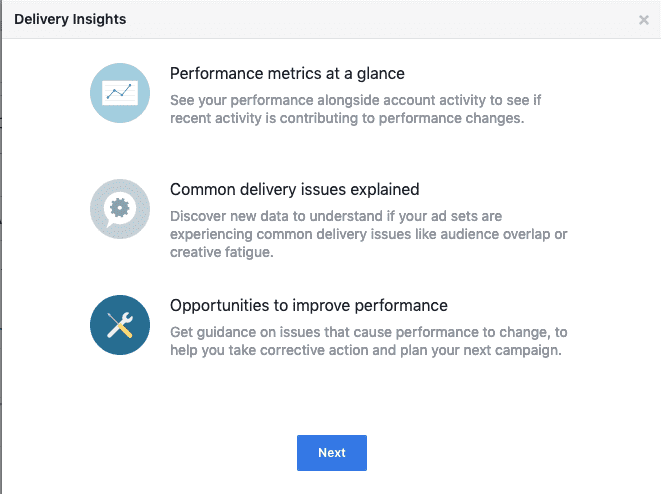
If you click on this link, you will navigate yourself to a couple of popups that will explain the uses of delivery insights, such as:

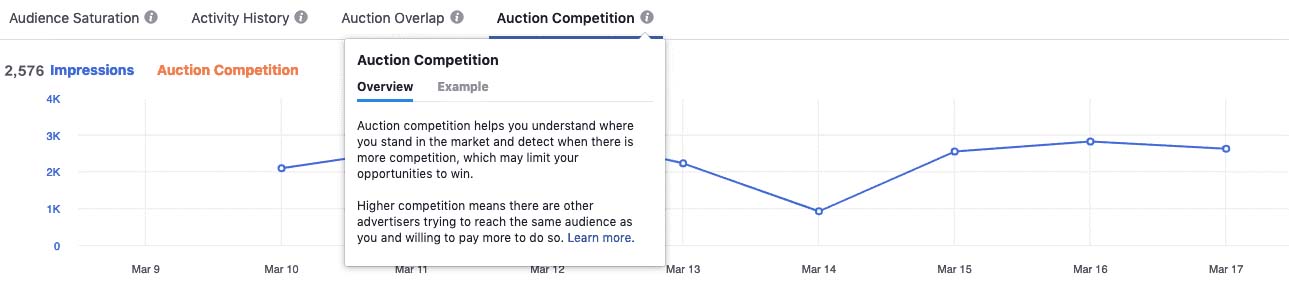
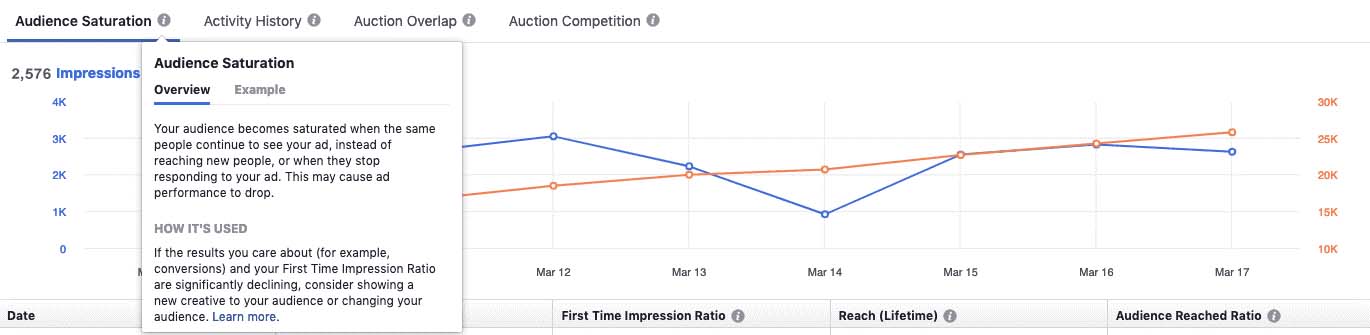
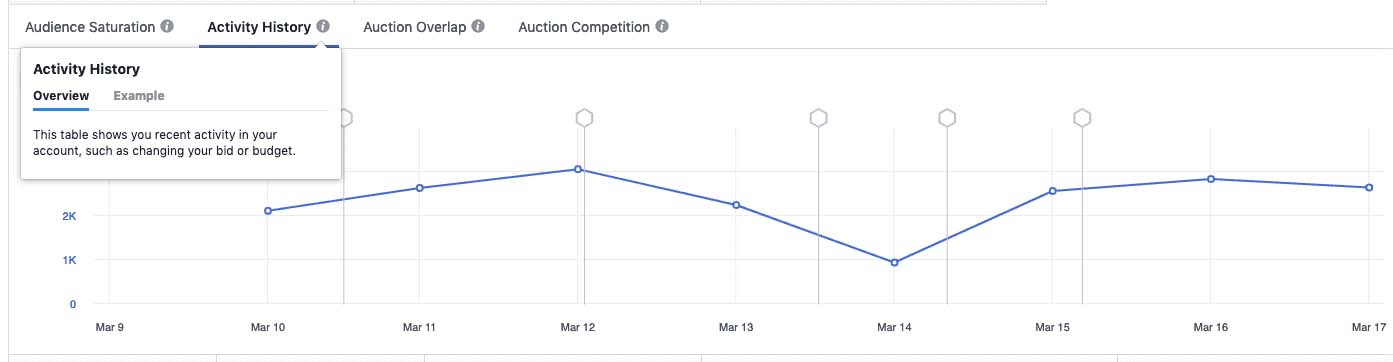
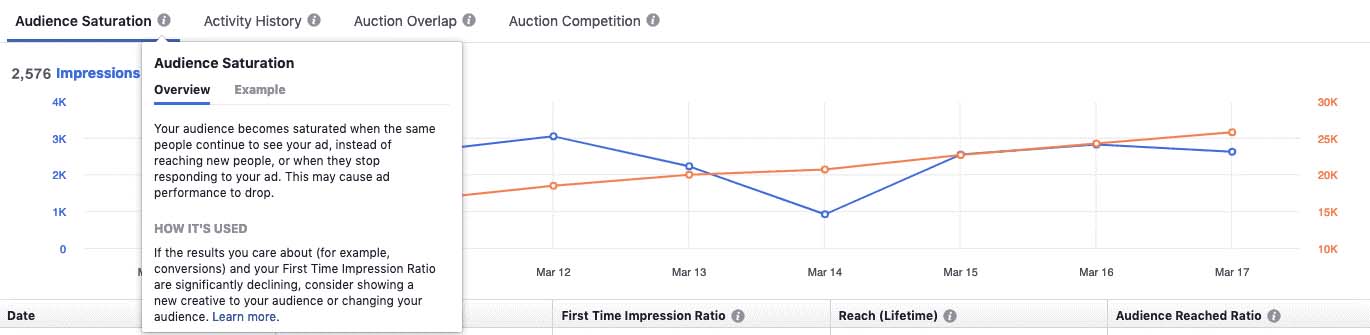
After this, you will land on a page that will make you review several things. It will start by reviewing your spending, impressions, and conversion event. You can divide these figures into four views, namely:

  1. Auction competition.
  2. Activity history
  3. Audience saturation
  4. Auction overlap

Auction competition

This view will help you to get an idea of how competitive your ad set or campaign is in the market. If it’s performing well, you can increase your bid to win the digital auction.

Audience saturation

Audience saturation will allow you to analyze the time and date when your audience stops responding to your ad or it fails to reach a newer audience.

Activity history

Do you want to get a full view of your ad set after you’ve made a specific change to it? Do you want to see how it affected your campaign? This is the perfect view to help you do that.

Auction overlap

As already mentioned, overlapping audiences can reduce your campaign delivery. You can use this view to analyze the effects of this overlapping over time.

Now, it’s all up to you!

You may think that Facebook is a malevolent beast, ready to pounce on you with a set of unwritten rules and unguided hitches. But if you know and understand all the basics, it can benefit you like no other.

Understanding the basics means that you must know all the reasons why are your Facebook ads not delivering and what you can do to solve these issues.

You don’t have to stress it out if you can’t solve every single error you face, but with the information you’ve gathered today, you will definitely be able to save yourself from banging your head against the wall.

A detailed technical SEO guide to improve website ranking and engagement

An Introduction to Accessibility and SEO

Have you ever wondered how SEO and accessibility work together? In this article, I’m going to take you on an SEO and accessibility journey to let you comprehend how both of them go hand-in-hand. Not only this but I will also unleash some of the most common myths that you may have encountered in regards to making your website accessible and search engine optimized. In the end, I will discuss the impacts of work on your website. Without further ado, let’s get straight into it.

The relationship between SEO and accessibility

Whenever you start up a new website, the first thing you need to do is make sure is that your website content appears in the search engines. Now, when I talk about search engines, I’m not just talking about meeting the needs of the searchers or the code. It contains a lot more than that. Now, what can we do to make our content appear on the search engines?

When I talk about myself, I think about the three main tags of the content which are – H1, paragraph, and title tag.

At every step of the way, I make sure that I understand what I’m doing, creating, or designing but most of all, I make sure that whatever I’m creating is fully understood by our friend, the bots. These bots are capable of reproducing my content once they fully consume or digest it.

Optimize for people, not just bots

Bots are important to reproduce your content but have you noticed that there is a much bigger audience out there? That bigger audience is your users, the ones who will read your content. What if bots understand your content, but your users don’t? That is why you need to produce such content that is understood by both the bots and the users. Once they get to know and understand your content, they will be engaged with it, which then leads to their engagement with your business. This is how you acquire a much more inclusive approach because now you’re not just thinking about your search engines but also the user engagement with your content and business.

Imagine a scenario where all of the spotlights are on a single person. You can see that person far up and clear, but can you see the rest of the cast members? They’re still there but enveloped by darkness. This is what happens when you just focus on the bots and neglect your users. I want you to take all those spotlights and place them on each of the crew members. This means that I want each of your users to get engaged with your content and get consumed by each. I want each one of your crew members to shine just like that one person is shining. So, whenever you’re thinking about launching a new product and make it SEO, you keep both the bots and your users in your mind.

How do people interact with your content?

Before you upload your content on your website, you need to ask yourself a question, will my content engage or compel my users? If the answer comes out negative, you need to work on some issues. Don’t worry, I can help you with this. No matter which type of content you’re working on, whether it is print material or marketing material, you just need to answer these questions.

Can my users easily comprehend my content, or it’s just all the other content present on the internet? Is it perceivable? Can my users utilize this content in any way? Is it functional? Can it be easily understood by my users, or they’ll need some sort of professional degree to understand it? Is my content strong? Does it exist in multiple formats, sizes, fonts, etc., so anyone who reads my content can easily understand it? Now, I’m going to answer these questions in one line, that is:

Your content should be perceivable, operable, easily understandable, and heavily robust

These four things form up the prime principles of web accessibility. Web Consortium has given me these guidelines, and you can also use them whenever you want to build something new and innovative. You can also use these guidelines when you want to modernize any old content.

To understand this concept, let’s say that you run a restaurant or a magazine company, but neither the menu nor the magazine is available in both print as well as digital form. Now, in this situation, what if someone needs a screen reader to understand what your content is saying? What if someone needs braille in order to fully comprehend the context? Such people will certainly be left out in the dark in situations like these.

If I don’t understand what your menu is saying, how can I order from your restaurant? That is why you need to make sure that whatever content you come up with must be apprehensible, operable, easily understandable, and heavily robust.

This is just one form of disability. Now I’m going to discuss some other kinds of disabilities.

Types of disability

What’s the first thing that comes into your mind when you hear the word “disability”? Do you imagine an old man needing a cane to walk? Do you imagine your friend getting panic attacks over a math test? These are just two kinds of disabilities. It can be a body structure or shape disability that makes you walk with a cane or learning or cognitive disabilities that makes your friend anxious. But what about other kinds of disabilities?

These other disabilities include:

  • Blindness
  • Color-blindness
  • Deaf-blindness
  • Low vision

Are you perfectly aware of all the colors red, yellow, green, and blue? Well, some of your users won’t; because of their color-blindness. To make the content accessible for these people, you need to add a transcript below the video along with closed captioning to make it easy for the users to understand.

The list doesn’t just stop here, but we also have:

  • Cognitive
  • Anxiety
  • Mood
  • Auditory
  • Seizure and more

Apart from the mentioned ones, there are a large number of disabilities that are out of our perceiving range. You may not have any idea of what’s going on in your user’s life. Therefore, it is best to lessen up their difficulties, not add to them, and you can do this by making your content easily perceivable and understandable.

Is it relating your SEO world so far? You can see for yourself that there are numerous similarities between your SEO and web accessibility work. With that being said, I will now move onto discussing some major legends and myths of SEO work.

Myths and legends

1. It has a small impact

The number one myth of accessibility is that only a small group of people is impacted by it. Whenever we post our content, we keep in mind the non-disabled people showing up on our page. But we forget the fact that out of every five individuals in the United States of America, one individual deals with a certain kind of disability, and that’s a lot.

This number totals up to 60 million people. Now, you know how big a problem this can be? It’s not just one individual; it’s about 60 million people! I make your content SEO by writing a title tag and a compelling meta-description that engages my users. I will create such content that is not only accessible to bots but also to my users. I’m going to work on my email campaign and come up with such a title that will make my users compelled to open it up. Plus, I’ll add a pay-per-click option for my users. So, I think, whoever said that it has a small impact, didn’t actually analyze everything. SEO and accessibility go a long way together, and they can have a deep impact on a lot of people.

2. It’s a temporary problem

The second myth is that it is considered to be only a temporary problem. In terms of accessibility, it is so much more than just being a temporary problem. Take the example of the menu and the playbill. Whenever I go to that restaurant, I’m always going to have a problem understanding the menu, and then a point will come when I’ll stop going to that restaurant just because I don’t understand what they are saying. Therefore, if you want to keep your users intact, you need to make the accessibility work going and keep evolving.

In the world of SEO, everything keeps on changing. User behavior keeps on changing. Search algorithms keep on modifying. Therefore, in order to keep your business intact, you need to keep your SEO at the top. Of course, we don’t want our business to fail, now do we?

3. Worry about it at the end

Most of us have the habit of keeping some things to do at the end. This can be a very dangerous thing, my friend. I’ve also seen some people do the same thing with SEO and accessibility work as well.

If you have a website, you should do an audit in the initial phases of its working. After auditing, you’ll have a clear idea of what needs to get fixed, and you can remodel it accordingly. This approach is always easier and much faster as compared to remodeling it after some time. In the case of SEO, you need to create content that is highly effective and draws users towards your website. You need to look deeper into your SEO work to understand where you did wrong or what other things you may add to give the people exactly what they’ve been looking for. All of this must be done in the initial phases of the accessibility work.

Most of the time, you will feel like your content isn’t drawing enough users towards your website. This is because your work isn’t for a customer; it’s for the bots. At this point, it may get too late.

4. It costs too much

The fourth most common myth that most of you must be familiar with is that this work can cost you a lot of money. But do you know what can actually cost you thousands of bucks? Lawsuits, my friend. If you don’t pay due attention to your accessibility and SEO work, you can find yourself amidst a lot of accessibility lawsuits and SEO penalties that can shrink your bank balance a lot faster than any other thing.

I suggest you sit back and critically advise a strategy that will include everything that your users and the search engines need. Once you figure this out, you can save yourself from a lot of penalties and lawsuits.

5. It’s distracting

The last most common myth is that this work can be distracting. When it comes to accessibility, we will implement a lot of things that may not be available for the average user to utilize. These things will only be available for those people who are dealing with any kind of disability. However, you should come up with such content that both of your users, the average one and the disabled one, can use.

This SEO and accessibility work isn’t distracting, but do you know what is? Unnecessary keywords stuffing, numerous links on a page that don’t even belong there, and unethical SEO. All of these things contribute to a bad user experience.

So, what can we conclude from all of this? SEO and accessibility are similar in a lot of ways. It can have a large and deep impact on the users if you do it in the right way. You need to work on it constantly from the beginning because it’s not a short-term problem; it goes a long way. It won’t make a dent in your pocket if you do it correctly the first time. However, it can cost you a lot of money if you do it wrong the first time and then work on it to make it right. Good work will never go unnoticed because it is compelling, honest, and exactly what your users need.

The impact of accessibility work

Now, I’m going to talk about the impact of accessibility together with the SEO work, which is done by using some of the practices of accessibility.

1. Makes the impossible, possible!

The most significant impact of this work is that all the content will be available for disabled people. In other words, disabled people will be given priority. In this way, accessibility work makes something impossible, completely possible.

2. It helps businesses

The second major impact of this work is that it helps your business. The SEO and accessibility work will help in perceiving your audience better. People are going to be bewildered once they see how accessible your website is. They will go like, “This company’s website is so wonderful. They made it accessible for everyone out there.” This is how people are going to have a good user experience on your website.

When you start working on captioning, transcripts, and text alternatives, you’ll see a considerable change in user engagement. Plus, as time passes, this will become a part of your routine, and whenever you renew your website, you’ll make sure to modernize your captioning and transcripts. This will make your website quite durable.

In addition to all of this, your accessibility work will remain safe from major algorithm hits and other related changes. I know that once you get the hang of it, you’ll love doing this. It’s not only going to help you in acquiring a bigger audience, but it will also help in making your SEO better. You will take the spotlight from your bots and shed it on everyone present on stage, i.e., your users and business. An increase in the number of users can significantly increase the number of bucks you make, and this is what we all want, right?

Ah, lawsuits! We will never forget that. Good accessibility can save you from a lot of lawsuits because you won’t upset anyone. People complain when you offend them by having a lack of accessibility. But if you provide them with the best accessibility, there won’t be anything to complain about, which means your business will run smoothly, and your users will remain happy.

3. It helps family and friends

Another most significant impact of accessibility work is that it helps family and friends. Before it gets confusing, let me explain it to you. When your accessibility work is great, your content or marketing material will be easily comprehended by all people. Now, some of these people may be the family or friends of disabled people. Such marketing material will be accessible to all people, including the disabled ones. They will be able to understand your content and feel a lot more independent. This independence will take some burden off of their family and friends.

It will also allow you to get to know your users better and have a much better experience. If your website is accessible to a large number of people, you will see that there will be a lot of diversity. With this approach, you will interact with many people with different perspectives, which will enable you to have a more intimate and richer experience.

Now, you know how both SEO and accessibility are similar to one another. It also helps shift our mindset to a bigger cause, i.e., to make everything accessible not just for bots but also for the users. In addition to this, it makes us question a lot of other things as well, such as how will it appear on Google? How can other search engines find you? All of this can have a much bigger impact on the people than you can imagine.

SEO and Accessibility: Content

We learned about the similarity between SEO and accessibility. Now, I’m going to discuss how you can make your content accessible to both parties, bots, and your users.

It all starts with accessibility

To make your content search engine optimized, you need to have some fundamental elements that can help your content in terms of ranking on the results of search engines. I will then use some things that will make my content a lot more competitive as compared to other results. But no matter how many things you add or elements you use, the first thing you need to make sure that your content is accessible to everyone out there including the search engines, bots, and most importantly, your users. Let me explain it to you by this example.

Making assumptions about your audience

For instance, I run a restaurant and I’ve pasted the menu on the window of the shop. It may seem much easier because now, people don’t have to unlock their phones and search my menu. They can easily read it while passing by. If they like it, they will come into my restaurant and eat what they like. If they don’t, they’ll just walk by.

Now, looking at the bad sides of this approach is that I’ve assumed a few things about my customers. I’ve assumed that all my customers are of average height and they will have no problem in reading the menu. I’ve also assumed that all of the customers are blessed with a great vision and all of them will clearly see what’s written on my menu even on rainy days. I’ve also assumed that all of my customers will instantly know what I’m talking about and they don’t need pictures for that.

I’ve also assumed that they are familiar with whatever cuisine I’m making and they understand all the culinary terms. But did you notice one thing in all of these assumptions? All of them are exclusive. We need to be much more inclusive than exclusive if we want our users to engage more with our business. Now, for instance, I get a customer who doesn’t have the average height, what do I do? If your customer is not of average height, it can be extremely difficult for him/her to reach your menu.

Not just height, what if your customer is blind? What if your customer has a low vision? Will you ask yourself, what if this menu comes in braille format? What if it is digitally available to all my customers? What if I add more engaging pictures? What if I use a different language to make people understand all the culinary terms? I should be able to answer all of these questions if I want to successfully run my business. It is very important to have a “what if” session with yourself because if you don’t, you may lose a lot of customers. In this way, you will be able to provide your services to a more diversified group of people.

Now, let’s bring some mathematics into it. For instance, I get 1000 customers every month. As already mentioned, every one out of 5 people is dealing with some kind of disability. For 1000 customers, 200 will be disabled and I’m kind of excluding these 200 people by not giving them the information they need.

Now, for every meal, I charge $15 and 200 multiplied by $15 makes a total of $3000 and I’m just wasting these $3000 by not giving my users what they need. That is why you need to give all your users equitable access to your services. If you don’t give this access, you’re not only losing some users but you’re also losing a lot of money which can affect your business tremendously. This bit is for people who are running a small business but what about other businesses? What if you want to sell your product? What if you want people to sign up for your services?
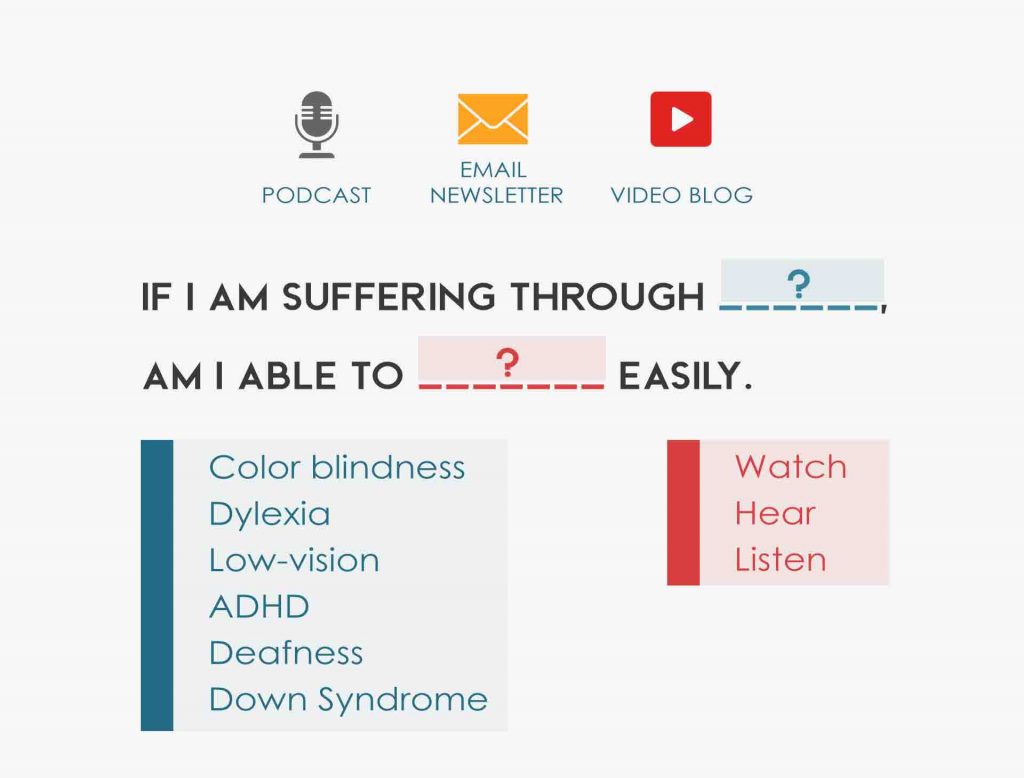
The same rules apply to all the other businesses as well. All you have to do is change your mindset. For example, if you run a newsletter, a blog, a podcast, or an entire website, you need to add this one question, “If I’m suffering through ________? Am I able to_______?” The first blank can be filled by naming all kinds of disabilities such as color-blindness, deaf-blindness, Down syndrome, dyslexia, or other cognitive disabilities. Then you will move on to filling the next blank which can go like, am I able to understand this podcast clearly? Am I able to buy this product? Am I able to enjoy what I’m watching? If the answer is negative, you’ll need to fix some issues.

Web Content Accessibility Guidelines (WCAG)
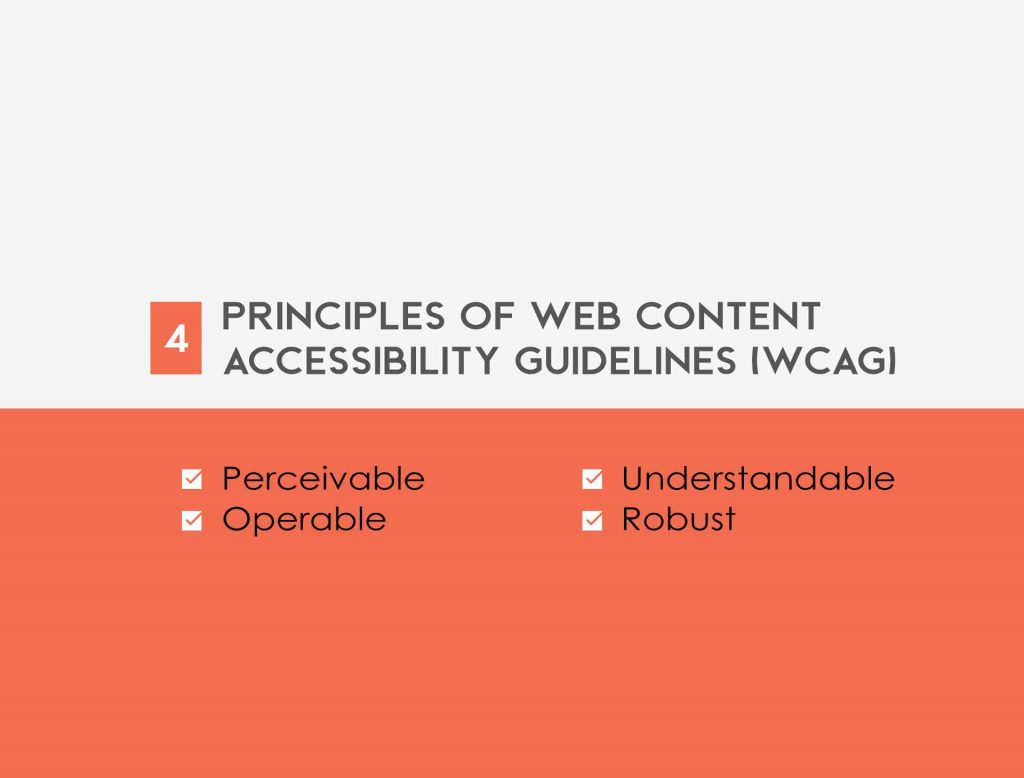
Now, how can you make your content accessible to everyone by following the web content accessibility guidelines? I’ve already mentioned these guidelines above but let’s now explore some more.

Once you make your content accessible to all of your users including the disabled ones, it will be available to the search engines of the disabled people as well. As you already know, there are four major principles of web content accessibility guidelines. Let me name them as pour which means that the content should be perceivable, operable, understandable, and robust. If you follow these guidelines, you’ll see a considerable change in the number of your users. A positive change, might I add. Because now, you will exclude a lesser number of people from understanding your content.

Perceivable

Nobody wants to look at a text that’s just sitting there and doesn’t convey any kind of message. We tend to make our text compelling by adding images, videos, and other media elements that can help us get more customers. But in this way, we’re eliminating those people who have diversified disabilities. Therefore, you need to use some kinds of text alternatives and video transcripts to make your diversified audience perceive what you are trying to communicate.

For instance, in the case of videos, you can add an interpreter known as American sign language. So, if anyone has a hearing problem, he/she can make use of this interpreter and understand your content. You will become much more inclusive and your users will know how much you care about them.

Operable

Think of yourself as a user. You go to a page or a website and you see things like “learn more” or “click here”. You have to be honest while answering this question, do you find this appealing or operable? Your search engines want to know where you’re heading and your users too. But these things like “learn more” or “click here” don’t sound very compelling. They’re not descriptive or operable enough to draw your users towards your website or a podcast.

Understandable

This can be the simplest yet the hardest guideline to follow. All you have to do is to make your content easily understandable for all of your users. But making your content understandable can be a difficult thing sometimes because you have to make your content enjoyable and compelling to read. Are you describing your content in a language that is understood by all of your customers? We’ve seen a lot of people who start using the language of SEO. This language can create a lot of problems with your customers because they simply won’t understand what you’re trying to say.

Take some time and try to break this SEO language down to make it more comprehendible for your users. Once you make your content easily understandable, you will be able to form a larger audience for your business. Don’t make content that will require a Ph.D. to understand.

Robust

Last but not least, you need to make your content robust. You need to ask yourself, can people easily access my website from their mobile phones? You need to make sure that whatever you produce must be in accordance with the latest technologies, such as assistive technologies.

You just need to remind yourself of this one word, ‘pour,’ and you will be good to go. Your users must perceive your content. It must be highly operable and functional. It must be easily understood by a diversified range of people, and it must always remain accessible to all the people.

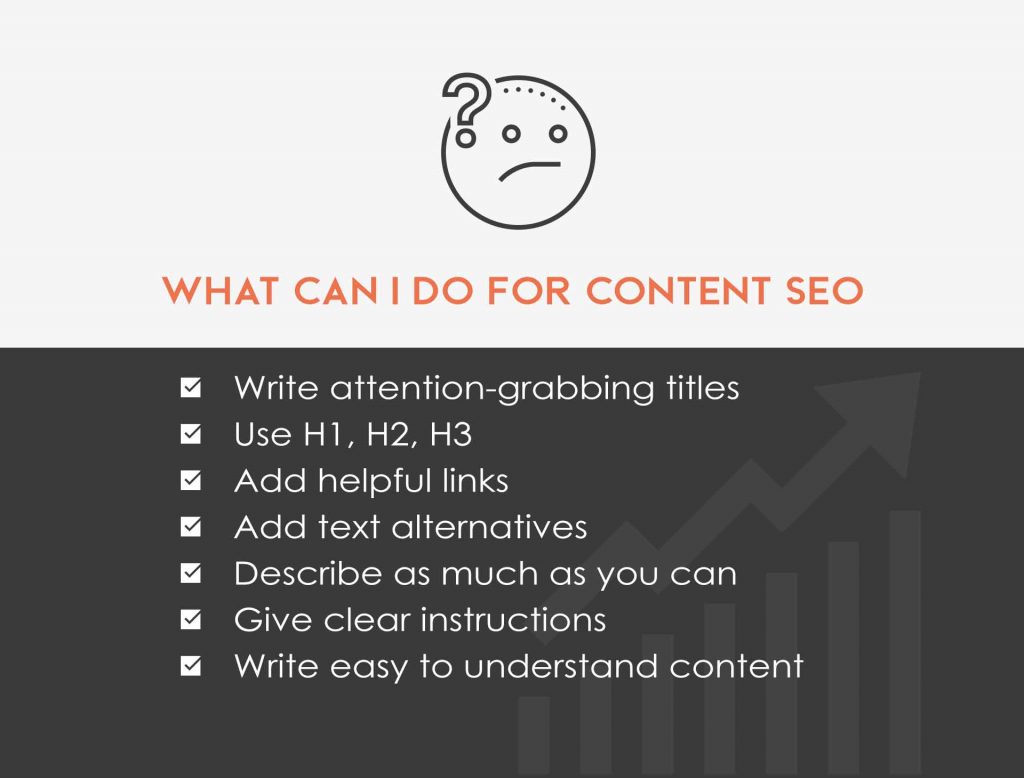
What can you do for content SEO?
Now, I’m going to move onto the details of content SEO and what approaches you can take for content SEO.

1. You need to write attention-grabbing titles for your website pages

Attractive titles will not only attract more search engines but also more users.

2. There are more headings present than just H1

Thus, you need to effectively use each of those headings. Headings play a major role in giving your content a certain format. You may have a habit of using H1 only but try to use the rest of the headings (H2, H3, and H4) as well. These headings will make your content bolder and/or larger. For instance, if I’m using assistive technology or if I simply want to understand a relationship between two things on your content, these headings will help me to understand that.

3. Links are for both the parties, SEO as well as users

Whenever I go to a certain website and see the links, I always wonder that those links are for the users or just for the search engines. If you have links on your website and they’re just for the latter, there are some instant changes that you need to make. You need to make a link that can resolve problems for your customers as well. After that, you need to put this link in the same position so that it helps SEO along with your users.

4. Don’t forget to add a text alternative

It is inevitable that whatever you create, you will add some media to make it engaging. But you need to add text alternatives, captions, and an ASL interpreter to help your disabled users understand your content.

5. Describe as much as you can.

When you add descriptions into your content, the search engines pick up those additional synonyms and talking points that can boost your website. Plus, if you add a detailed description, you’re honest, ethical, and trying to connect with your users. Your users will understand this, and they’ll love it.

6. You should be clear when you’re giving instructions.

So, if your customers need to convert your content into something else, they can easily do that.

7. Write easily understandable content that you can read as well.

Now, you know how you can optimize your content for your users and the search engines. Once you’ve finished up your content, you need to close your eyes and think about how people will perceive your content? Will it be enough to engage a larger audience and keep them engaged? Can my users understand it fully? Is it seamless? You need to help your search engines and your users. Will your content be able to do that?
If you want perfect content, you must follow the web accessibility guidelines mentioned above. I’ve covered everything related to the similarity between SEO and accessibility along with the content SEO. Now, I’m going to delve into technical SEO and explain how you can use SEO strategies to make your content apprehensible, operable, easily understandable, and robust.

SEO and Accessibility: Technical SEO

SEO strategies can be used in several ways, but if they are utilized in the right way, they can make you achieve what you want, i.e., to make your users and search engines understand your content.

Now, how do these strategies do that? Proceed below to know this.

Technical SEO and accessibility

I’ve explained the strategies of content SEO, and now, I’m going to dive into explaining the technical SEO.

Perceivable

We already know that the first web accessibility guideline is making your content perceivable. As a technical SEO, the most concerning aspect is to make your content perceivable. Both the search engines and your users must clearly perceive your content. Now, how can you do that? Whenever I go through an SEO audit, I’ve seen a lot of cases where the header tag and image are merged into one another. In such cases, the search engines may not be able to see it, or they can find it, but your users won’t be able to. These are just basic perceptions, and if you want your users and search engines to perceive your content, you need to start with these base-level perceptions. So, what can you do to make everything better at the base level?

1. Styles

The style of your text plays a very important role in making your content perceivable. What kind of text do you need on your website? Is it active or native? Can someone copy-paste it or not? Is it reachable or unreachable? Is the heading baked or merged into the image, or is it visible to all the assistive technologies? Is your text contrast compatible with the background contrast? Are your layout elements clear? If you find anything, I repeat anything, on your website that isn’t clearly mentioned, you need to go back to that drawing board and make the necessary changes.

2. Rich media

No doubt, your pages remain incomplete without any kind of image, video, text, or any other rich media. I’ve covered the style of the text, and now, I’m going to tell you how you can use your rich media to make your content accessible. Whenever you post an image, provide a text alternative with it as well. In this way, you’re providing your customer with additional descriptions that can help him/her to understand your content if that customer is dealing with any visual disability.

Coming to naming your images, you need to come up with a catchy name instead of a “DSC1345.JPEG”. This will help your search engines and assistive technologies in perceiving your image. Plus, if you’re working on on-page text, you need to add those images that add value to your content. These images tend to give an additional feeling to your users to help them connect better with your page. That is why it is important to add valuable images that concern your users, not just Google image search.

Let’s move onto videos now. Videos work in a kind of a different way than images because it contains moving images on the roll. Whenever I think about videos, I always wonder that how can I stop this video midway?

Playback can do wonders, my friend. If you give the option of playback to your users, it can create a wonderful video player experience for them because you’re giving them accessibility to do whatever they want.

Just like you provide text alternatives for images, you need to provide such text alternatives for videos as well. But you need to make sure that all your text alternatives must synchronize with time, so it keeps making sense.

Then comes the part of making everything distinguishable. For instance, if you add a video or audio, make sure that there is a significant difference between the foreground and the background. If the quality is muddy and the visuals are baked into one another, you will need to add a little bit crisp so that it doesn’t strain your user’s eyes and ears.

I won’t forget the audio, fellas. Your audio needs text transcripts. In this way, if I’m unable to listen to that audio, I will be able to understand what it contains or conveys through these text transcripts.

So, images, videos, and audio. These are the most basic things that a website contains, and whenever you’re reviewing any code, you need to be aware of what’s going on with three of them or more, depending upon how many media you have on your website.

If you don’t add any of these things to your images, videos, and audios, then what would visibly and auditory disabled do? For such diversified people, you add these text alternatives and transcripts to make your content perceivable.

3. Page structure

The third and fourth points of how your users can perceive your content consists of the structure of the page and semantic HTML. Both of these points can be considered a part of the understandable guideline of web accessibility as compared to the perceiving one. In my point of view, it is a little bit of both. Imagine a page contains numerous H1s. Your search engine goes like, “Oh. This page contains a lot of H1s; what is it about exactly?” So, if you want to make your content perceivable, you need to format it in such a way that it is easily understandable by the search engines.

4. Semantic HTML

I’ve seen a lot of people that tend to stuff up their HTML with a lot of elements that don’t really belong there. Other than these elements, I’ve also seen a lot of spans and DIVs accumulated in the HTML. To make your HTML easily understandable and perceivable, you need to find some appropriate ways to mark it. You need to properly mention what those tags mean and what they enclose. Does it contain tables? Does it contain forms? If you properly mark it, you will allow your assistive technology and search engines to fully understand what you’re trying to convey. The search engines will perceive all the information and put it into your page without stuffing them all together. This can also provide your users with a much better user experience.

Operable

We’re done with perceiving and understanding your content. Now, we will work on the operating part of it. So ask yourself, is your content operable?

1. HTML sitemaps

Do you know what plays the most important part in making your website functional? It’s the HTML sitemaps. But many people put breadcrumbs and HTML sitemap on your website’s page. Now, this can be a setback for you. Both the HTML sitemap and breadcrumbs are important if you want your users to discover your website. The assistive technology also takes help from both of these for better navigation.

The HTML sitemap helps to form a clarified website. It gives a specific order to the number of pages present on your website. No matter which technology you’re using, an HTML sitemap will make everything accessible.

2. Breadcrumbs

Then comes the breadcrumbs that help to analyze whatever you’re offering to your users. Let me clear it with this example. If you offer certain products and your users want to search for a single product. These breadcrumbs will allow the user to search that product on your e-commerce website without having to go back all the way to the main menu.

Thus, both the HTML sitemaps and breadcrumbs come in handy to provide a great user experience, especially for those users who are using assistive technology or a simple motherboard.

3. Develop keyboard-first

It may seem unnecessary for a lot of people. But, trust me, it brings a lot of benefits. It is a non-SEO thing, but it will help draw more customers towards your website, and that is, forming a keyboard first. Many of your customers don’t have the proper hardware, or they may be having some movement disability due to which they can’t use the mouse properly. So, this keyboard will give them a chance to explore your website and engage with your business.

Understandable

1. Language

One word, understandable. All of your customers inevitably belong to different continents, countries, and states. All these countries and states have different languages through which they communicate with one another. This is where HTML jumps in and provides you with a wide range of languages in both the national and international context. Every person will be able to read and understand your content.

2. Navigational layout

A confusing layout or navigation of a website can create a lot of problems. You may have heard the terms interstitials and navigational layout. If you have, then you know how everything can fall apart if they don’t do their jobs properly. For navigation and layout, they must be properly streamlined so that when your user comes to buy or engage with your website, he/she can easily do so. This is because, if they are properly streamlined, all your users will be able to convert it to anything that is more understandable for them. Streamlining navigation and layout means that you don’t unnecessarily use different words at different places that may mean the same thing. It holds much more significance for the people who are using assistive technology.

3. Interstitials

Are you tired of seeing those pop-ups everywhere? So are your users! Surprisingly, Google is not very fond of them either. But for people using assistive technology, these pop-ups can feel like a trap. They will feel like they are stuck in an endless loop. You don’t want to do that to your customers, right? Therefore, you need to keep interstitials at bay or use a very keen approach whenever you use them.

Robust

As a technical SEO, how can we check our website’s robustness? How can we ensure that it will run efficiently on all the devices?

1. Validation

You can have a robust website just by using HTML. All you have to do is to make the right code for your website. If you’re working with semantic HTML, it can be much better because semantic HTML provides a certain meaning to the code. Because of this, your users can consume your content in a much better way.

2. Responsive

Is your website responsive on all the devices such as a tablet, mobile phone, or desktop? If you haven’t checked it, then I suggest you do it now. Because it must be a responsive website, no matter which device your potential customer is using, however, the size of the images may appear different on different devices.

3. Interactive

Make your website as interactive as it can be. Does it allow the users to zoom in on a product? Does it allow the users to change the colors? This is important because some of your customers may have a visual disability or color-blindness. If you take care of these things, you will certainly acquire a bigger audience for yourself and your business. Once you get these three things right, a massive weight will be lifted off of your shoulders. Because now, you have built the framework, and all your users have an access to it.

The system administrator needs to ensure that all Leads coming from the website are assigned a website lead queue, that all Leads for a recent trade show are assigned to Matt Wilson and all other leads are assigned to Phil Smith. The system administrator will

Below is the answer and explanation for the question in the Salesforce Exams.

The system administrator needs to ensure that all Leads coming from the website are assigned a website lead queue, that all Leads for a recent trade show are assigned to Matt Wilson and all other leads are assigned to Phil Smith. The system administrator will

  • Create 3 assignment rules
  • Create 1 assignment rule with multiple criteria entries ✅
  • Create an assignment rule and 2 workflow rules
  • Use workflow rules to accomplish this

Correct Answers

Create 1 assignment rule with multiple criteria entries ✅

The above question is related to the Salesforce Exams. You can find all the updated questions and answers related to the Salesforce Admin Practice Exam on the “Salesforce Exams” page. If you find the update in questions or answers, do comment on this page to let us know. I will update the answers as soon as possible.

To learn about Salesforce Exams: Salesforce Exams.

Assignment rules allow Leads and Cases to be automatically assigned to users and queues based on criteria defined by the system administrator.

Below is the answer and explanation for the question in the Salesforce Exams.

Assignment rules allow Leads and Cases to be automatically assigned to users and queues based on criteria defined by the system administrator.

  • True
  • False ✅

Correct Answers

False ✅

Explanation

Assignment rules are a powerful feature within Salesforce to assist your team’s automation of its lead generation and customer support processes. Assignment rules in Salesforce are used to define to whom your leads and cases (customer questions, issues or feedback) are assigned based on any one of a number of specified criteria you determine.
A lead or case assignment rule often consists of multiple rule entries to specify exactly how leads and cases are assigned throughout your go-to-market teams. For example, related to customer service inquiries, a standard case assignment rule might have multiple entries – cases with “Type equals Gold” are assigned to the Gold Level service queue, cases with “Type equals Silver” are assigned to the Silver Level service” queue, and so on.

The above question is related to the Salesforce Exams. You can find all the updated questions and answers related to the Salesforce Admin Practice Exam on the “Salesforce Exams” page. If you find the update in questions or answers, do comment on this page to let us know. I will update the answers as soon as possible.

To learn about Salesforce Exams: Salesforce Exams.

Queues can be made up of the following

Below is the answer and explanation for the question in the Salesforce Exams.

Queues can be made up of the following

  • Users ✅
  • Public Groups ✅
  • Roles ✅
  • Profiles
  • External Chatter Users

Correct Answers

Users ✅
Public Groups ✅
Roles ✅

The above question is related to the Salesforce Exams. You can find all the updated questions and answers related to the Salesforce Admin Practice Exam on the “Salesforce Exams” page. If you find the update in questions or answers, do comment on this page to let us know. I will update the answers as soon as possible.

To learn about Salesforce Exams: Salesforce Exams.