Along with New Year’s wishes, this time we are here with a useful article for your reading and help.
Firstly, being an SEO expert, I will help you know all about the 23 tricks for doing profitable SEO in 2022. This encompasses a list of what should be on top of your mind while doing SEO of your website and what you should be looking out for. A useful listing of references also comes with this article to offer you a hand!
Best wishes to all Krcmic.com followers. This is Michal, and I am happy for all of you to be here so that we can talk at large about the special 23 SEO tricks. With a new year, Google comes with a new set of updates, and that requires new tips and tricks. By implementing these 23 tips, your site will hopefully start getting good numbers of organic reach.
The list has been specially made after evaluating different strategies in 2022. Even I will be making use of them in my own SEO collection.
Well, everyone knows Google continually updates its SEO algorithm. Reports are that it will bring about a whopping 500 modifications in this year alone!
SEO is all about adding a bunch of optimizations to your material so that it is seen among the top search results. As hundreds of features need your attention here, you might miss out on some of them. However, that one mistake can also doom your content and demote it to the last pages of the search engine.
On the other hand, if you pay close attention to Google’s updated features, you can get maximized traffic, an increased level of conversions, and more lead generation. And who would not desire increased sales, traffic, and conversions? The last few years have seen a remarkable change in how SEO ranking works (read more about it in our guide about keyword research). The methods that were practical a few years ago might not provide as good results now. So, we contacted a bunch of experts to get some practical SEO advice from them. We tried to dig out the best SEO practices so that you don’t have to.
2022 will be a year with SEO strategies that are practical as well as result-oriented. Partly owing to how the pandemic has changed the online world, most strategies will be geared towards building an enhanced user experience. As these strategies come from different professionals, you will see how each has added its unique approach to give you maximum results.
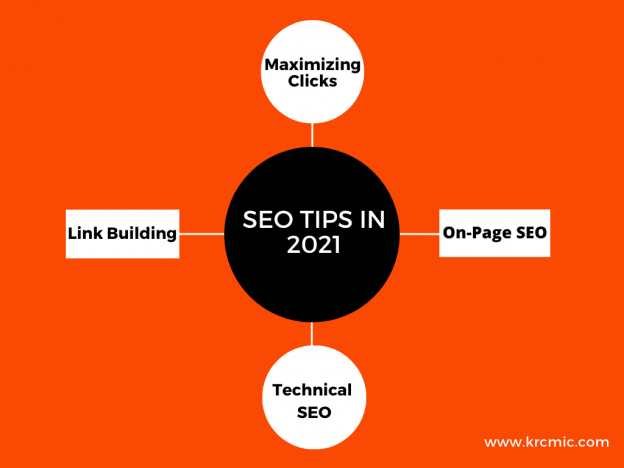
These 23 tips can be classified together into four groups:
- Maximizing Clicks
- Technical SEO
- Content/On-page SEO Tricks
- Link Creation
We’ll quickly go through them in a matter of about 10-13 minutes. However, a comprehensive list will be attached below for your further assistance. OK, let’s begin!
Maximizing clicks
Clicks should be the first thing to start when talking about SEO, especially when one gets an increasing number of clicks from Google without practically ranking higher. If your existing rankings provide you more traffic, you don’t need to aim for a higher ranking in order to get better traffic. Let’s dive into some particular techniques that you can use to obtain increased clicks while staying at the current level of ranking.
1. Favicon Optimization
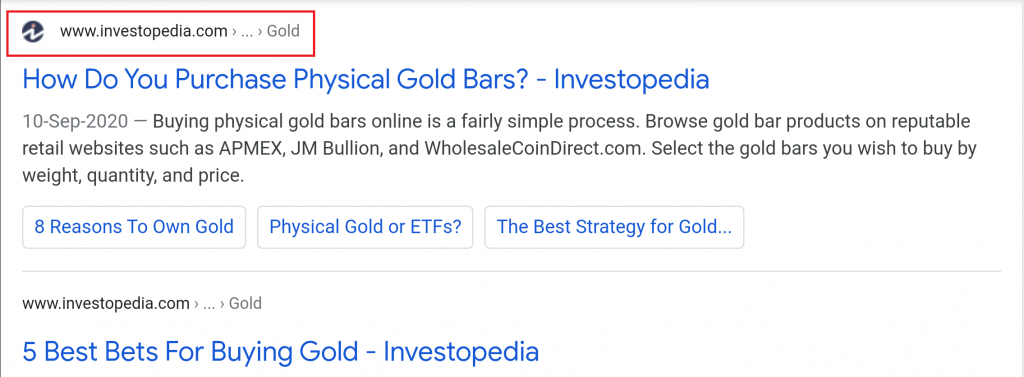
Favicon optimization is essential, and so we deal with it first. It is curious why not many people took benefit of this factor in the previous year. Among mobile search results, favicons are shown by Google. They can positively impact your click-through scale provided they are in high contrast. However, the differences made by Favicons might be slight, but still, it does makes a difference, and that’s important.
Aaron Wall, from SEO Book, has also written an in-depth article on Favicon SEO, which further clarifies why it is so important.
2. Breadcrumb Optimization
Apart from making the most of optimization through Favicons, it is also important not to forget breadcrumb optimization. Breadcrumbs are shown in desktop and mobile version results on Google. Breadcrumbs can be full of keywords, hence maximizing the click-through rate of your website. There are a bunch of places where Google obtains its breadcrumbs; for instance, it can get them from your URL, your webpage breadcrumb, as well as your schema markup.
Always check that Google displays the exact breadcrumbs which you want them to display by using the same keywords that you choose. Utilizing schema markup is the best way you can ensure that. In most cases, it would match with your URL design. Therefore, do an exceptional Breadcrumb Optimization Check.
3. Meta descriptions
Meta-descriptions should be optimized as well. This seems basic because it is. However, a new study has revealed that meta-descriptions are not utilized by many websites, going as high as 30%. However, according to another study, Google fills up the meta-description in 70% of the instances since the keywords the searcher is looking for are not added in it. This makes the earlier 30% figure understandable.
Keep in mind that a well-designed meta-description can attract more customers, and make them click on your website. This means one has to use descriptions by using relevant keywords. This ensures that when Google will use your meta-description, it is promoting those clicks, and as advertising copy for your website.
The perfect length for meta-description is somewhere around 50-160 characters.
Now you might wonder, why is it 50-160 characters?
The answer lies in the fact that if meta-descriptions’ length exceeds 160+ characters, then Google will automatically make it between 50-160 characters. Therefore, to avoid cutting-off of important elements from the meta-description later on, be careful from the start. So, include only the above-mentioned characters.
Well, remember, that ideal length varies depending on the situation; therefore, your primary priority should be to keep providing quality content and value to your visitors.
4. Add Numbers in Titles
Titles are not to be forgotten when doing SEO. A new study by Search Pilot has revealed how including a title combined with a date has a substantial impact on attracting organic traffic and maximizing traffic for companies. You can see the results below.
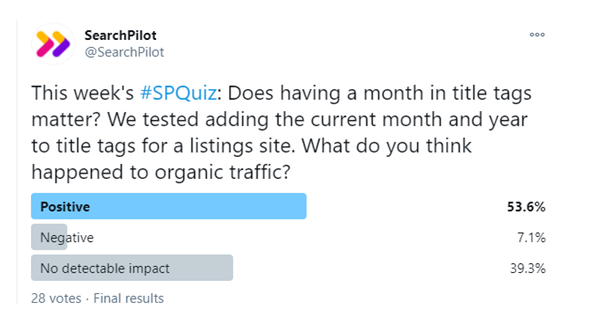
Speaking from personal experience, numbers are usually on top of my concern list when testing in title tags. And I’ve consistently secured good results from it. Particularly, mentioning dates carries the day.
As a rule of thumb, don’t overdo them, as that looks like spam. Include them only if they are making sense there and avoid them if they look superficial. However, generally, numbers are a definite way to maximize your click-through value to any particular search.
5. <Title> boilerplate
This trick involves including a boilerplate audit for your title tag. Let me explain what a boilerplate is.
Any text that a user can reuse in a new context and applications with slight modifications only. As per Google, a boilerplate is a content that creates a section of the page layout on your website, for example, a navigational tool or tagline.
For instance, here at Krcmic.com, we place “Krcmic” as our brand name at the end of each title tag. Earlier, we were using a different phrase at that place. However, experiments showed us that we could obtain higher rankings and increased clicks when we didn’t use it. The key takeaway here is that your title must be catchy and should carry value. Experimenting with a boilerplate is a great way to improve the whole process. After that, you can decide whether you want to keep or discard it to enhance your rankings. So, perform experiments and decide for yourself!

6. Frequently Asked Questions and How-to Schema
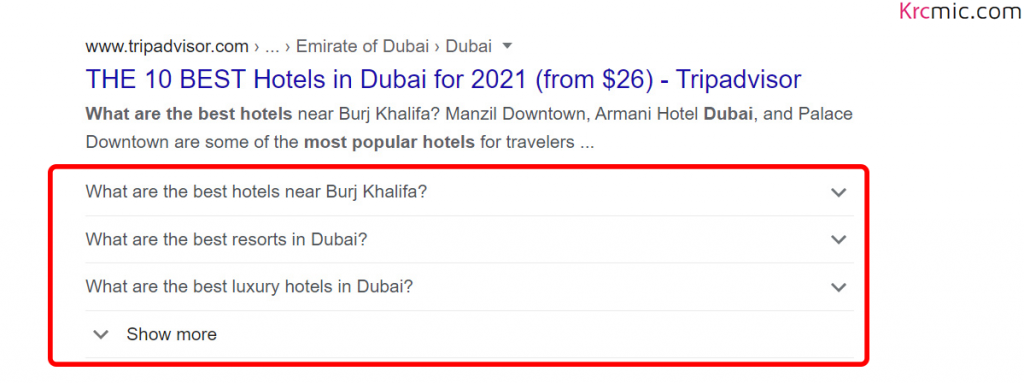
This is our method number 16; call it tip or trick: using FAQs and how-to schema. Including them in search results was a great favor Google did all of us. A bulk of SERP real estate is obtained through FAQ schema, and it is not written in a way that you would always be successful in it, but when you do, you can see a significant uplift in how people are clicking on your result. So what are you waiting for? Roll them out today!
Another thing that needs to be mentioned here is that it’s not mandatory for everyone. Only make sure that you have those FAQs at your site. However, when used appropriately, it is the only way that can maximize your clicks while your actual Google ranking remains the same.
Technical SEO
So next come a bunch of technical SEO tricks. It shouldn’t take long.
7. Invest in Core Web Vitals
2022 should be your year of investing in Core Web Vitals. Core Web Vitals include a few page experience signals that Google intends to surface during 2022. This has the potential to be a valuable factor affecting ranking. Here we are referring to cumulative shift layout. Typically, it involves site speed and giving a brilliant experience on the page. Some of these factors may seem too technical, and to sort out this issue, Google has introduced many tools, for instance, Lighthouse.
If you are engaged in WordPress, there is a trick that you need to know. Our recommendation is to use Cloudflare, especially their APO for WordPress. It can greatly assist in mobilizing your WordPress site and help you score more effectively with Core Web Vitals. It’s not expensive as well, and implementation is simple. Speeding up your WordPress site seems like a piece of cake with it!
Here are the views of a few SEO pros regarding Core Vitals in 2022:
Areej AbuAli, SEO Manager, Zoopla:
“Websites and businesses need to prioritize for them to ensure they don’t fall behind their competitors,” Abu Ali opined. “Make the most out of insights provided via tools such as Lighthouse and Crux API. Everything from page speed, mobile-friendliness, rendering, image optimization, and security protocols need to be optimized for.”
Rachel Costello, Technical SEO Consultant, Builtvisible, believes that testing the experience a page gives a user is crucial and considering whether the page is accessed quickly and understandable to a common web searcher.
This means you have to step into the shoes of the visitor while optimizing and emphasizing more on:
- The way pages seamlessly and quickly loading.
- Response time of the page in relation to visitors’ interaction with it.
- Is the website easily navigable on cell phones?
- How safe and secure the connection of a site is when visitors are browsing through it.
“Incorporating page experience into your SEO workflow will not only help to future-proof your website’s performance and rankings ahead of the upcoming algorithm update, but it can also help to improve UX and conversions now,” -Costello Said.
Jess Peck, Senior Analytics Consultant, CVS:
“Measure, test, and use machine learning to look at your content – this will give you a huge leg up. Google’s focus on Core Web Vitals shows that they’re starting to measure how annoying sites can be, so give your users a pleasant experience, and Google will do the same for you.”
8. Sitemaps should not cross the limit of 10,000
You will often come across this question in quizzes about SEO asking how many URLs are available per sitemap. Although 50,000 URLs are allowed per sitemap, you don’t need to utilize all of them. You can do perfectly fine with just 10,000. And this is the core of our tip number 18.
Evidence suggests that employing smaller sitemaps and compressing them into a set range of URL schema can enhance their crawlability. Think of it as if Google may give priority to some of them across a few sectors. Support is also given to it by data. Google Search Console is sure to provide you with better data in some aspects. Here, what’s indexed and what’s not can be seen visibly.
9. Control Dynamic sitemaps in your favor
Take advantage of those dynamic sitemaps. SEO Pro, Oliver Mason, narrates how a dynamic sitemap is one that alters depending on what you desire Google to crawl (reference for this can be obtained at the bottom). Therefore, if you keep a big set of URLs that you wish Google to crawl, place the ones you prioritize in their own unique sitemap.
Probably you’d want to set the limit at a thousand URLs. Eliminate them and place them in highly prioritized URLs that you intend Google to explore so that Google crawls and discovers those. Smallness and tightness should be the rubric for the sitemap. It is important to let Google know that you are prioritizing those and it will do the same.
Content/On-Page SEO
This portion includes some tips about content and on-page SEO.
10. Give a fresh look to your “Almost” First Page Posts
SEO Expert Andy Crestodina recommends that you need to look for the posts that rank higher on search engine and rewrite them. These posts are just a few clicks away from you. Go to Google Analytics and Click on Acquisition » Search Console » Queries and set up the filter for displaying the phrases in which your average keyword rank is higher than 10.
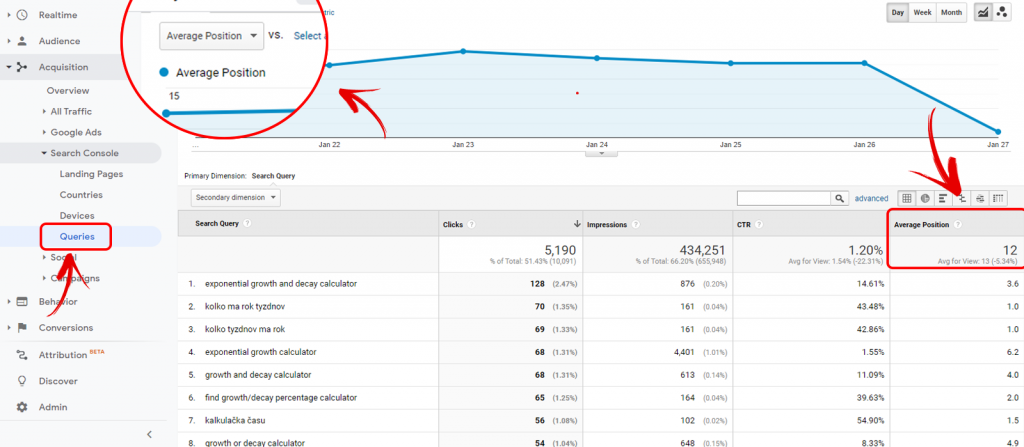
Next, give these transcribes a fresh look. Whip them up by including details, pictures, responses, instances, quotes from contributors, and other things that might make it better.
If you are a quality geek, most probably, you’d include the length and keyword usage naturally. Let it be a page you like so much that you’d make a poster out of it and paste it on your wall.
We are giving you a list of 3 techniques on how you can make it more powerful.
- Every ranking for this page must be checked. This will ensure that you don’t hurt relevance for another attractive sentence.
- While rewriting, give special consideration to the connected sub-topics visible on the search result page in the “people also ask” section as well as in the “related searches” placed at the page’s bottom.
- Pursue this activity as a continuous and consistent content marketing audit.
11. Relaunch Your High-Quality Content
OK, so this is our trick number 2. We cannot overemphasize the importance of relaunch your high-quality content. Content doesn’t stay new after passing few years. To resolve this, we relaunch it. For instance, you upload some content, and it gets attention. Then after a while, in the internet’s fast-paced world, people even forget it exists. Therefore, you need to be constantly in touch with your previously-published material. See how you can improve and update it while keeping the same URL. Whopping 500%-1000% uplift in traffic can be observed just by relaunching some of your previous content. What can be better than this to do in 2022?
12. Increase Internal Links
Many top SEO companies seek two easy things when trying to boost rankings for customers, which includes:
- Title tags and meta-descriptions.
- Increasing internal linking.
Well, there are many ways to achieve this, and chances are you haven’t explored many of them. By doing the necessary research, you can increase your website traffic and conversions.
13. Update and Overhaul Old Content by Adding New Links
Now this one is generally ignored by people. They don’t usually give much attention to updating their previously published material by adding new links. Every time you upload a new piece of writing/blog post, ensure that you update your old content by adding the more recent content’s links into it.
What you can do here is that take a look at high-ranking keywords that you are aiming for. After that, go to Google Search Console or other monitoring tools, for instance, Keyword Explorer. Do this to check your other pages’ rankings for those keywords and then add links to the fresh content leading to those pages. It will gradually help to bring down your website’s bounce rates. In this way, you can update your previous content with new material and links and increasing relevance. This needs to be done every time you publish new material. Easy, right?
14. Eliminate Links that are Not Needed
This is a type of PageRank sculpting. PageRank sculpting doesn’t have a good reputation in SEO circles, but it still performs well to a certain degree. It is not no-follow link page sculpting. Instead, it is the elimination of unnecessary links. Are you sure a link to your team page is needed on your website’s every page? Are you sure each page of your website must have a link to your contact information? Your answers could be either ‘yes’ or ‘no’ to such questions. However, if unnecessary links are removed, one may pass more link equity through the important links, and such links will be the primary signals for Google ranking.
15. Mobile Link Parity Audit
A mobile link parity audit needs to be done. You might be wondering about its details. Well, mobile link parity audit means that your mobile website’s linkages are identical to the ones on your computer. Why do we emphasize it so much? The reason is that the previous few years have seen Google shift to prioritizing the mobile versions. Therefore, the version on your mobile is the actual version of your site.
Unfortunately, what happens with people is that they create a site keeping in view the desktop versions and then customize it for cellphones and end up at losing links. They eliminate footer links, header navigation, and many other things. As revealed by a new study, there are 61 links on an average desktop page, while the number for mobile pages is 54. It means that many links are missing on mobile pages compared to the desktop ones, which means a lot of link equity is missed out.
It is important to conduct a study according to your website. Ensure mobile link parity between your mobile and desktop so that you don’t miss out on anything crucial!
16. Long-Form Content Should Not Be Ignored
Long-form content is a worthwhile platform to invest in. We are not suggesting that ranking essentially depends on content length because that would be wrong. A good ranking can be obtained by using short-form content as well. However, when both forms are compared over a long-term basis, data reveals that long-form content certainly ranks better and receives more shares.
Google search results also rank it higher. Now, this is not an argument against the short-form content, I repeat. We absolutely adore it. However, if you want to make the most bang (SEO ranking potential) out of your buck, then creating long-form content should be on top of your list!
17. More Headers Leads to High Ranking
As we mentioned in the previous point, long-form content should be preferred. However, in order to make it interesting and readable, ensure adding headers, i.e., H2 and H3 headings.
These header tags should be rich in keywords, and content should be intelligently spread across them. The reason for this is that a study by A.J. Ghergich has shown that adding more header tags can lead to your page ranking for more featured snippets. It might seem a bit off, but sites having 12 to 13 headers generally ranks higher for the most featured snippets than any others.
Therefore, ensure you are dividing your content with proper headers. Adding a little background context won’t hurt anyone. It does wonder for the ranking factor of your site or page.
18. Take Advantage of Topic Clusters
This point entails being diverse in your approach. Launching a single piece of material on one topic just isn’t enough; you should try to look at the topic from multiple perspectives and then link those pieces together. This should be done cautiously and intelligently. If done so, it can significantly increase your website’s engagement because visitors generally engage more with similar articles.
Adding proper links with the context shouldn’t be a big deal. In the reference below, I’ve included a remarkable study that shows how this strategy was used to obtain excellent outcomes. So do consider this factor if you intend to become an SEO pro in 2022!
19. Content Should Be Brought Out of Tabs
Lastly, content should not be hidden in tabs. Studies have shown that if the content is in accordions and drop-down menus, it is harder to see. Therefore, people face trouble looking at all of the content at once. If the content is easily visible, i.e., if it is kept in the main body, the page ranks better.
I am not suggesting here that Google doesn’t count content hidden in tabs. The problem doesn’t arise at Google’s end. However, visitors usually connect more with the content when it’s outside the tabs. Content outside the tabs gives a good signal and certainly helps pages rank better.
20. Links Creation
No one seems fond of link creating tips and tricks in 2022. The reason for this is that link creation is difficult. Nobody likes doing it. However, some professionals love doing it because they are so good at it. I wish I were one of those people, which I am not. However, I can still humbly claim that I can build quite excellent links.
21. Passive link acquisition
So my first method of creating links is through passive link acquisition. This signifies forming content that passively obtains links as visitors explore it in the SERPs. This skips the ‘reaching out to people’ part. What it signifies is that when visitors, journalists, bloggers, searchers find it, they wish to link to it. This can be done by forming the kind of content that bloggers, journalists, and web developers seek. Usually, such content includes guides, definitions, explanations, and DIYs. Such type of content attracts a lot of links as visitors find it. An efficient and effective way to obtain links overtime is undoubtedly passive link building, and there is no doubt about that.
22. Page-Level Link Intersect
You generally outreach to the webpages that will most likely link to you. You might be thinking that one of your top SEO tricks for creating links is looking for sites that would link with your competitors rather than you. I would like to make it a bit more specific by suggesting that you should look for pages that link with two of my competitors—at a minimum—but not with me. They are most likely a resource page because they link with a multitude of competitors but not to me, and they can more likely link with me if I reach out to them.
23. Manage to Be the Last Click
Here is the last tip of this blog. At first sight, “Be the last click” might seem a bit vague to you, but let me clarify it.
By being the ‘last click’, I mean you should be the ultimate source of satisfaction for searchers. As soon as you obtain the initial click, you’d aim for that first click that visitors open; however, you would wish to be the last click as well. This involves satisfying visitors in a way that they find the content in your site for which they were really looking for and do not have to look elsewhere. One can translate it simply as ‘user satisfaction.’ This is the first signal of ranking on top of search engines and it involves providing visitors what they are really looking for, and you’ll get tons of traffic on your site.
Conclusion
With this, I end this list of 23 SEO tips. These should be the guiding light for your SEO journey in 2022. I have tried my best to make it enjoyable and useful for you. I hope I succeeded, and I now request you to share this blog and also drop down your own tips in the comments section below.