Author Archives: krcmic.com

How to make a downward arrow symbol on keyboard- Alt+25

what does a downward arrow symbol mean? ⬇

The image of an arrow pointing downwards is the emoji for disapproval or the southern direction. This emoji can mean that something has gone wrong or it can emphasize disapproval or dislike towards something or someone. Downward arrow symbol/emoji can be used to express  “This really sucks!” or “Let’s head south!”.

how to make down arrow on keyboard (Windows & Mac)

This is a very thorough guide with several methods you can use to insert downward arrow symbol on the keyboard anywhere on your PC keyboard, like in Microsoft Word/Excel/PowerPoint or somewhere in your browser like Google Docs.

Whether you are using a Windows or Mac keyboard, you’ll learn all the easy methods on how to make a down arrow on keyboard by using alt code and different shortcut methods.

Without wasting much time, let’s get to work.

Quick Guide on how to make down arrow on keyboard (↓)

To type the down arrow symbol anywhere on your PC or laptop keyboard (like in Microsoft Word or Excel), simply press down the Alt key and type 25 using the numeric keypad on the right side of your keyboard.

For Mac users, to get the downward arrow symbol, first press Control + Command + Spacebar to bring up the character viewer. Using the search bar near the top of the character Viewer, search for ‘arrows’ and double click on the down arrow sign to insert it into your work.

The table below contains everything you need to know to be able to type this symbol on both Windows and Mac.

Name of Symbol Downward Arrow symbol/emoji
Symbol Text
Symbol Alt Code 25
Shortcut for Windows Alt + 25

Whether you are using Mac or Windows, the above information is enough for you to get the downward arrow symbol into your Word/Excel document.

However, if you are not satisfied with this quick help, keep reading below as I will explain in detail how to make down arrow on keyboard of your Mac or Windows PC.

You may already know, there are several dual-purpose keys on the keyboard for both Mac and Windows . That is to say that there are symbols readily available as second keys on the keyboard. Just by pressing two or more keys simultaneously, you can easily insert such symbols into your document. For example, pressing shift + 1 keys give you the exclamation (!) mark.

However, other symbols aren’t printed on the keyboard as second keys. This makes it difficult to type. One of these symbols is the downward arrow symbol/emoji text( ).

Typing becomes very difficult for you if you need to add some of these emojis regularly into your document. But it doesn’t have to be difficult. Especially now that you are reading this step-by-step guide.

how to make down arrow on keyboard (Word/Excel)

In this section, I’ll show you all the easy ways to type downward symbol/emoji () anywhere on your Windows or Mac (such as Word or Excel, or PowerPoint). I’ll explain several methods you can use to get a downward arrow symbol/emoji and any other symbol.

Without any further delay, below are the methods explained in detail on how to make down arrow on keyboard.

Method #1: Typing Downward arrow symbol

Using Shortcuts (For Windows)

The downward arrow symbol shortcut is Alt+25. Windows has several shortcuts, some of them work only in Microsoft Word. However, there’s a Windows shortcut for the downward arrow symbol that works across all applications. It is the alt code shortcut which is Alt+25 (will be discussed in the next section).

The next section explains more about the Alt Code shortcut for the downward arrow symbol.

Method #2: Typing Downward arrow symbol

Downward Arrow Symbol Alt Code for Windows

The downward arrow symbol (↓) alt Code is 25. Every symbol in Word has a unique code that you can use to insert the symbol into your document. This code is well known as “Alt code”.

Below are the steps to type downward arrow symbol on your keyboard (using the Alt code provided above:

  • Press the num lock key to enable the numeric keypad. Use Fn key + NumLk keys to turn on Num Lock on laptops without the numeric keypad.
  • Press and hold the Alt key and type 25 using the numeric keypad.
  • After typing the Alt code (i.e. 25), release the [Alt] key you pressed down.

As soon as you release the alt Key, the downward arrow symbol () will appear in your document.

Method #3: Typing Downward arrow symbol

Make down Arrow Symbol/emoji on Mac

Using the character viewer on Mac, below are the steps to make a downward arrow symbol on Mac keyboard

  • Click to place the insertion pointer where you want to add the symbol.
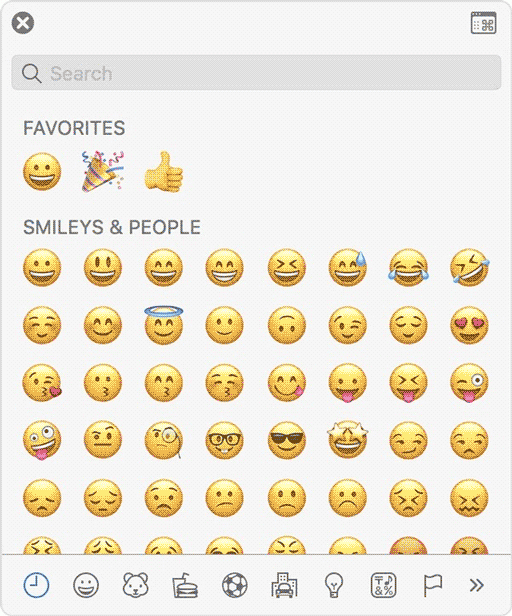
  • Press Control Command Spacebar on your keyboard. This brings up the character viewer, which looks like the picture below:
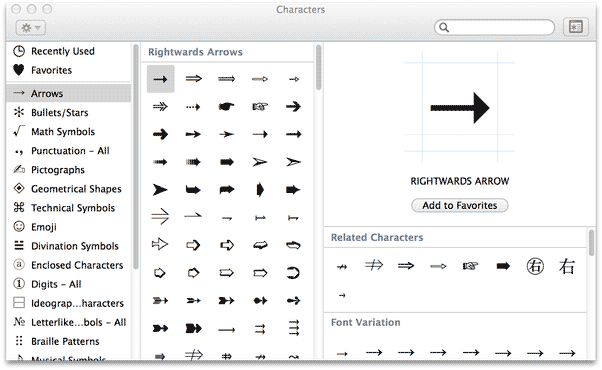
  • Using the search bar at the top of the character Viewer, search for “arrows”. Alternatively, click on the expand icon in the top right corner that looks like the image below:

  • Once you’ll click on this icon, the expanded view of the character viewer will appear.

  • Now you can see “arrows” in the left-hand menu, just under the “emoji” group. Browse through these arrows and double-click on the downward arrow symbol or any other arrow you wish to insert.

This is how you make a downward arrow symbol on keyboard.

Method #3: Typing Downward arrow symbol

This approach isn’t as straightforward as the shortcut methods. But it’s fairly simple. And once you get the symbol into your document, you can always copy and paste it again as and when you need to add it to your document.

This method works on both Windows and Mac.

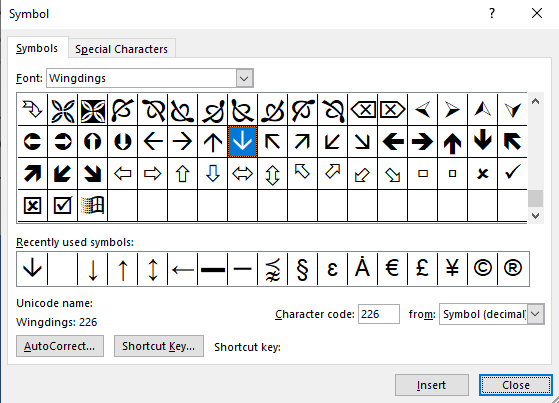
Below are the steps to insert the downward arrow symbol in Word using the insert symbol dialog.

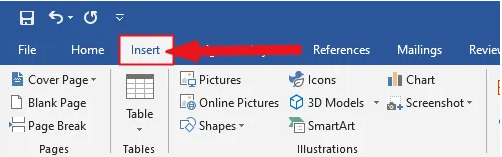
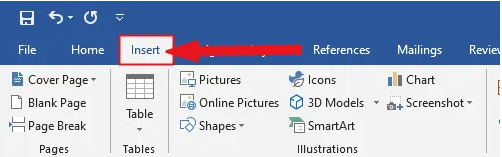
  • Go to the Insert tab.

Insert tab in Word

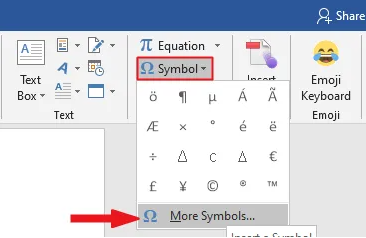
  • On the insert tab, click the symbol button and choose more symbols.

These few clicks will bring up the symbol dialog box.

  • Under the symbols tab, in the font drop-down list, type and select wingdings. This should filter out all the windings symbol texts including the downward arrow symbol.
  • Select the symbol, and then click on the Insert button.

  • Alternatively, double-clicking on the downward arrow symbol will also insert the symbol into your document.
  • Click the close button.

This is how you may insert a down arrow symbol text in Word using the insert symbol dialog.

Method #4: Typing Downward arrow symbol

Copy and paste the downward arrow symbol text

You can simply copy the downward arrow symbol text given below and paste it into your document.

Copy and paste is my favorite method for inserting symbols, which I can’t easily type. With this method, all you need to do is google the symbol you need to type, then copy it from one of the search results provided. Once you get the emoji into your document, you can always recopy and paste it as and when the need arises.

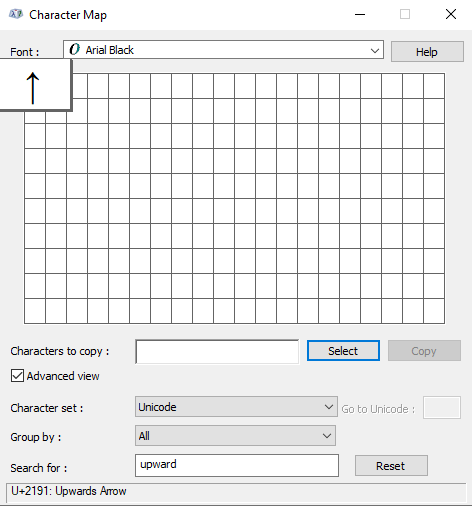
There is another way to copy this and any other symbol on Windows. It involved using the Windows character map.

Obey the steps below to copy and paste any symbol using the character map.

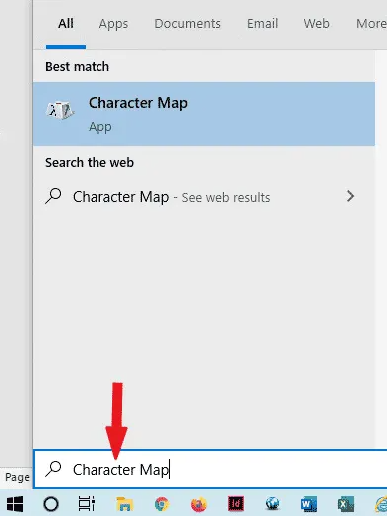
  • Search for the character map app by clicking on the start button.
  • The character map app will show up in the search results. Click on it to launch.

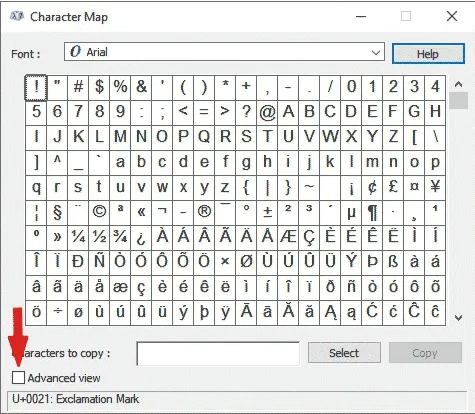
  • After the character map window opens up, click to check the advance view checkbox to expand the window for more advanced options.
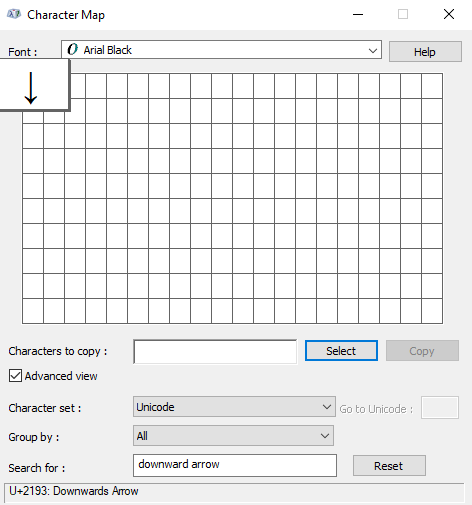
  • On the advanced View section, type arrow or downward arrow in the search box.
  • The symbol you searched for (i.e. the downward arrow) will now appear on the character map. Double click on it to select it. You’ll see that the symbol appears in the characters to copy text box. This allows you to select and copy several symbols at the same time.

  • After selecting the symbol, you wish to copy, click on the copy button.
  • Switch over to wherever you need the symbol, whether in MS Word, Excel, or PowerPoint, and press Ctrl + V to paste.

This is how you may copy and paste the downward arrow symbol using the character map on Windows.

Method #5: Word’s AutoCorrect for the ↓ Arrow Symbol Text

You can also type the Down Arrow Symbol text using the AutoCorrect feature in Word.

It is a feature in MS Word designed for correcting spelling mistakes like thsi to this.

Using this AutoCorrect Feature, you can assign a shortcode to the downward arrow symbol (such as DWNARR).

This way, whenever you type the text DWNARR, Word will think that you actually wanted to type  and will convert it into the downward arrow symbol for you automatically.

HOW TO ADD downward arrow symbol IN HTML?

To add the downward arrow symbol in HTML, you can use an HTML entity, an HTML code (decimal), and a Hex code. Use the shortcode section to copy the various shortcodes for the black right-pointing pointer. Here is the example:

<span>&#8595;</span>

HOW TO ADD downward arrow symbol IN CSS?

To add the downward arrow symbol in CSS, you can use a CSS entity or CSS shortcode. Use the shortcode section to copy the CSS entity code for the downward arrow symbol/emoji.

Here is the example:

span {
  content: "\2193";
}

Conclusion

Given above is a detailed explanation of how to make down arrow on keyboard. As you can see, there are various ways you may insert or type the downward arrow symbol text in Word/Excel with or without using the keyboard.

My favorite method is using the copy and paste method followed by the downward arrow symbol shortcut in Word for both Windows and Mac. The alt code method also comes simple.

For any comments or questions regarding this downward arrow symbol guide, please let me know in the comments section below.

World Leprosy Day

World Leprosy Day – January 30, 2022

Leprosy is caused by mycobacterium leprae, commonly known as Hansen’s disease, which is a chronic infectious disease. The condition mainly affects the skin, peripheral nerves, upper respiratory mucosal surfaces, and eyes.

Leprosy is thought to have been eradicated, but still, many people are diagnosed every year with leprosy.

To raise awareness for leprosy, world leprosy day is commemorated every year on the final Sunday in January.

This date was chosen by Raoul Follereau, a French humanitarian, as a tribute to Mahatma Gandhi’s life, who worked extensively with leprosy patients and died at the end of January in 1948.

World leprosy day is dedicated to raising awareness about a disease that many people assume is no longer present. Today, the sickness and the people who have suffered through the disease have been forgotten.

About 600 additional people are diagnosed with leprosy and begin their treatment every day. In 2014, 213 899 people were diagnosed with leprosy with millions more likely to go undetected.

When is Leprosy Day 2022?

The date for world leprosy day in 2022 is Sunday, January 30.

What is Leprosy?

Leprosy is a contagious disease that causes severe disfiguring skin sores and nerve damage in the arms, legs, and other body parts. Leprosy has existed from the beginning of time. In every part of the world and every country, people have been affected.

However, sometimes known as Hanson’s sickness, leprosy is not particularly contagious. You can only get it if you come close and repeatedly contact with a leprosy-infected person’s nose and mouth droplets. Leprosy is more common in children than in adults.

According to the World Health Organization (WHO), over 208,000 people worldwide are infected with leprosy, most of whom live in Africa and Asia. About 100 people in the United States are diagnosed with leprosy, predominantly in South California, Hawaii, and other US territories.

Leprosy Symptoms

Leprosy primarily affects your skin and peripheral nerves outside of your brain and spinal cord. Your eyes and the delicate tissue lining the inside of your nose may be impacted as well.

Leprosy is distinguished by disfiguring skin lesions, lumps, or bumps that last for weeks or months. The skin lesions are pale in color.

Damage to the nerves can result in:

  • Feeling lost in the arms and legs
  • Weakness in the muscles

After coming into touch with the bacteria that causes leprosy, symptoms usually occur after 3 to 5 years. Some people do not show signs until they are 20 years old. The incubation period is between the contact with germs and the onset of symptoms. The long incubation period of leprosy makes it difficult for doctors to pinpoint when and where a patient became infected.

The Theme for World Leprosy Day 2022

“United for Dignity” is the theme for World leprosy day 2022. The campaign celebrates people who have lived with leprosy by sharing their inspiring tales and pushing for mental health and the right to live a dignified life free of disease-related stigma.

The following are the essential messages:

  • We can raise voices and honor people experiences who have had leprosy.
  • People with leprosy encounter mental health issues due to stigma, discrimination, and isolation, and we must join hands to eliminate discrimination.
  • Leprosy patients have the right to a decent existence devoid of disease-related stigma and discrimination.

This day emphasizes the need to diagnose leprosy early, stopping associated deformities and disabilities caused by it and preventing the disease’s spread through negative leprosy-related attitudes and feelings.

There are also significant impediments to leprosy patients receiving the dignity and human rights they are entitled to.

There must be the elimination of discrimination against people affected by leprosy. Special attention should be paid to women and children affected by leprosy and have been victims of stereotypes, physical and verbal abuse, delays in diagnosis, and proper treatment and care.

Where is Leprosy Most Common?

Leprosy is most common in the tropics and subtropics, where it’s warm and humid. Over 200,000 new cases of leprosy were reported worldwide in 2017. The global prevalence is around 5.5 million with India, Indonesia, Myanmar, Brazil, and Nigeria accounting for 80 percent of cases.

In New Zealand, there were 38 instances documented between 2004 and 2013, with most cases originating in the Western Pacific or Southeast Asia, with the bulk of patients coming from Samoa. Every year in Australia, a small number of new topics afflict the indigenous population and migrants from endemic areas.

Armadillos are a significant cause of infection in Brazil and the United States’ southern states. M. leprae infection is widespread in people who hunt, kill, process, or eat armadillo meat.

Leprosy Prevention

The most effective strategy to avoid M. leprae infection is to prevent contact with droplets from untreated M. leprae patients’ nasal and other secretions. Patients treated with the appropriate antibiotics do not spread the sickness to others.

According to researchers, people living with untreated leprosy patients are eight times more likely to contract the disease because family members are near infectious droplets. Although leprosy is not passed down the generations, recent research suggests that vulnerability to the illness may have a genetic foundation.

Leprosy Treatment

Your treatment options are determined by the type of leprosy you have. Antibiotics are used to treat the infection. Doctors frequently recommend long-term treatment, ranging from 6 months to a year.

If you have severe leprosy, you may need to take antibiotics for a more extended time. Antibiotics are unable to repair the nerve damage caused by leprosy. MDT (Multi-drug therapy) is a typical leprosy treatment that includes antibiotics.

Anti-inflammatory medicines may also treat nerve discomfort and injury caused by leprosy. Steroids, such as prednisone, may be involved.

Leprosy is not preventable with a commercially available vaccination. However, there have been reports that administering the BCG vaccine alone or its combination with heat-killed M. leprae organisms and other preparations may benefit infection clearance and minimize treatment time.

Why is Leprosy Day Important?

Awareness

World leprosy day is observed to raise awareness of a disease that many people believe no longer exists. Every year, 200,000 people are diagnosed with leprosy, and millions more suffer from the devastating effects of delayed leprosy treatment.

World leprosy day is a chance to honor individuals who have been touched by the disease and to promote awareness of the disease’s signs and symptoms.

To Eliminate Stigma

Although discriminatory legislation against people with Hansen’s disease and their families no longer exists in America, stigmatization and discrimination exist in both high and low burden countries.

Discrimination by health professionals, educators, and the justice system has been reported in these countries. On world leprosy day, we urge governments to combat stigma, leprosy-related discrimination and enact policies that promote, protect, and respect the human rights of people suffering from leprosy and their families.

To Advocate Leprosy Patient

On the last Sunday of January, the international community advocates for the rights of those who have had Hansen’s disease. They join hands to battle the medical and social consequences of this tropical disease that is often overlooked.

To Tribute Mahatma Gandhi

World leprosy day is observed annually on January 30 in India, even though it is celebrated worldwide on the last  Sunday of January’s first month. The day is commemorated as an homage to Mahatma Gandhi. Mahatma Gandhi worked tirelessly to help leprosy patients find remission from their illness during his lifetime.

Leprosy is Curable

Educate people about Hansen’s disease and know that leprosy is a treatable condition. Multi-drug therapy (MDT), a combination of antibiotics, can treat leprosy. This treatment is provided free of charge all over the world. Leprosy can have significant consequences if it is not treated.

Facts About Leprosy

Oldest Disease

Leprosy is one of world’s oldest diseases, dating back at least 4,000 years. On the other hand, WHO believes that we can be the generation that ultimately ends leprosy transmission – the goal is zero transmission by 2035.

It Still Exists!

Leprosy is still a thing! Around 200,000 individuals are diagnosed with leprosy every year, and millions more suffer from leprosy-related disabilities, primarily in Asia, Africa, and South America.

It is Curable

Leprosy can be cured with a combination of drugs (MDT). If left untreated, it can cause lasting damage to the skin, nerves, limbs, and eyes.

Frequently Asked Questions (FAQs)

Why Do We Celebrate Leprosy Day?

In 1953, French humanitarian Raoul Follereau chose to coincide leprosy day with the 30th anniversary of Mahatma Gandhi’s death on January 30, 1948.

World leprosy day is dedicated to raising awareness about a disease that many people assume is no longer present. Today, not only the sickness but also the people who have suffered through it have been forgotten.

When Did Leprosy Day Begin?

Raoul Follereau, a French philanthropist, put the foundation of leprosy day in 1954 on the last week of January.

What is the Theme of Leprosy Day 2022?

“United for Dignity” is the theme of World leprosy day 2022. We want everyone to know that people living with leprosy have the right to a dignified life free of stigma and discrimination. We will pay tribute to persons who have lived with leprosy by sharing their inspiring stories and campaigning for the mental health of people living with leprosy and other neglected tropical diseases.

What Is Leprosy Sunday?

Leprosy Sunday is the last Sunday of January every year on which leprosy day is celebrated to raise awareness against leprosy.

When is Leprosy Day Celebrated in India?

Every year on January 30, Mahatma Gandhiji’s martyrdom day, India commemorates leprosy day, as Gandhiji was firmly committed to the cause of leprosy. Since 2017, Sparsh Leprosy Awareness Campaigns (SLAC) have been held to honor world leprosy day to eradicate stigma and discrimination against leprosy patients.

Is Leprosy an Infectious Disease (accessible to contract)? 

Hansen’s illness (leprosy) is a complex disease to contract. 95% of the adults are resistant to leprosy because their immune system can fight the bacteria which causes leprosy.

Is it Possible to Contract with Leprosy by Sitting Near Someone Who Has the Disease?

You cannot contract leprosy by casual contact with someone who has the disease, such as shaking hands, sitting next to, or chatting to them.

What is the Tradition of Commemorating World Leprosy Day?

The day is observed in both leprosy-affected and non-leprosy-affected countries. World leprosy day is celebrated by churches, NGOs, and leprosy champions in nations where leprosy is either non-existent or extremely rare, intending to raise awareness that leprosy still exists and is ruining lives.

Communities and persons afflicted by leprosy join together in places where the illness still exists to promote awareness and organize events to decrease leprosy stigma and promote awareness of the disease. Governments in several nations actively participate in activities with ministers commemorating the day.

Conclusion

Leprosy is an old disease with a long history of stigma. It is, nevertheless, a modern disease, with thousands of cases reported each year, including some in developed countries.

What appears to be a rash can turn into a dangerous bacterial infection that affects vision, and if left untreated, can lead to paralysis or the loss of feet and hands.

On world leprosy day this year, on January 30, we should unite to raise awareness for leprosy symptoms as its early diagnosis is the key to eliminating it.

We hope to raise public awareness about Hansen’s disease and reduce the social stigma associated with this perfectly curable condition on world leprosy day.

Want to read about other important days in the month of January? Then click here.
Or if you want to read about important days of other months of the year, then check out “Important Days of the Year” category.

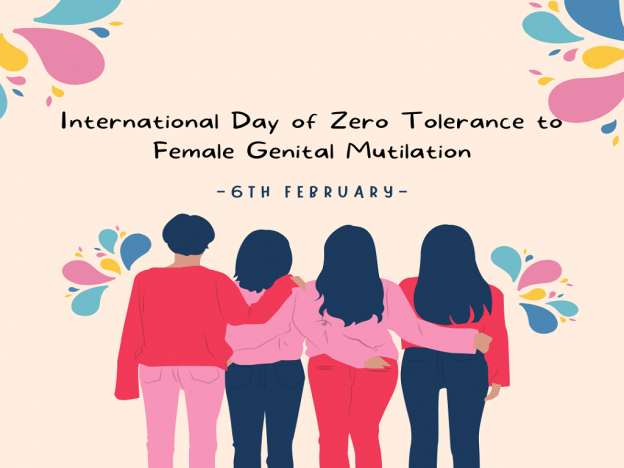
International Day of Zero Tolerance to Female Genital Mutilation

International Day of Zero Tolerance to Female Genital Mutilation — February 6, 2022

When is the International Day of Zero Tolerance to Female Genital Mutilation?

International day of zero tolerance to female genital mutilation is celebrated on February 6 to eradicate female genital mutilation.

International Day of Zero Tolerance to Female Genital Mutilation

According to the World Health Organization (WHO), 120 to 140 million women have been subjected to FGM each year, and 3 million girls are in danger. FGM refers to any non-medical process that involves the partial or complete removal of the external female genitalia or any harm to the female genital organs. This violates human rights leading to significant health problems, including deadly bleeding.

On February 6, 2003, the United Nations declared the international day of zero tolerance for female genital mutilation. In addition to the observance, the UN fights against FGM through various initiatives.

History of International Day of Zero Tolerance to Female Genital Mutilation

During a conference convened by the Inter-African Committee on traditional practices affecting the health of women and children on February 6, 2003, Nigeria’s first lady, Mrs. Stella Obasanjo, formally announced “Zero tolerance to FGM” in Africa.

On February 6, 2012, the United Nations declared the international day of zero tolerance for female genital mutilation. In addition to the observance, it fights against FGM through various initiatives.

This day has been observed all around the world since then. As we remember February 6, we should not forget the courage of individuals who first came out against it, as well as their recent hard-won victories. However, we must equally acknowledge the still-overwhelming problems and the leaders working on the front lines to effect change.

What is Female Genital Mutilation?

All treatments involving the removal of the external female genitalia or other harm to the female genital organs for non-medical reasons are classified as female genital mutilation.

FGM is most commonly performed on girls and young women under 18. FGM is not a religious practice and has no health advantages. On the contrary, the technique can create long-term bodily and psychological harm.

Types of FGM

  • Type 1 (clitoridectomy): Removal of part or all clitoris.
  • Type 2 (excision): Removal of part or all of the clitoris and the inner labia, which is the lips that surround the vagina, with or without removal of the labia majora (the more giant outer lips)
  • Type 3 (infibulation): is a seal made by cutting and repositioning the labia, narrowing the vaginal aperture.

Pricking, piercing, cutting, scraping, or burning the female genitals are other dangerous treatments. FGM is frequently carried out by traditional circumcisers or cutters who lack medical training. However, in other nations, a medical expert may do the procedure.

FGM is frequently performed using knives, scissors, scalpels, bits of glass, or razor blades, with no anesthetics or antiseptics employed.

FGM is frequently performed against a girl’s will and without her consent, and girls may be forced to undergo this procedure.

Consequences of FGM

Severe pain, bleeding, shock, difficulties in passing urine, infections, harm to surrounding genital tissue, and death are immediate results of FGM. In addition, severe bleeding, hemorrhagic shock, neurogenic shock resulting from pain and stress, and overwhelming infection and septicemia are all possible outcomes of the procedure.

Almost every woman who has had FGM suffers from pain and bleeding due to the surgery. In addition, the operation itself is traumatic because the girls are restrained.

Women who have undergone FGM suffer from a variety of long-term physical, sexual, and psychological repercussions in addition to the acute pain they experience during and after the cutting.

Persistent discomfort, chronic pelvic infections, cysts, abscesses, vaginal ulcers, excessive scar tissue formation, disease of the reproductive system, diminished sexual enjoyment, and psychological effects such as post-traumatic stress disorders are all possible outcomes for women who have undergone FGM.

Urinary and menstrual issues, infertility, and painful sexual intercourse are among potential complications of infibulations, a type of FGM. Sexual intercourse is only possible when the infibulation has been opened through surgery or penetrative sexual intercourse. As a result, during the first few weeks after sex life initiation, sexual intercourse is frequently uncomfortable, and the male partner may also feel pain and problems.

The scar tissue may rip during delivery, or the opening may need to be cut to allow the baby to emerge. Women from various ethnic cultures are frequently sewed up after childbirth to “tight” for their husbands. A woman’s genitalia is sliced and restitched repeatedly, resulting in excruciating scar tissue.

Treatment of FGM

If necessary, surgery to open up the vaginal canal can be performed. This is referred to as deinfibulation. It’s frequently called a reversal, but that’s a misnomer because the surgery doesn’t replace any lost tissue and doesn’t repair any harm. However, it can help with a variety of FGM-related issues.

Surgery may be indicated for the following reasons:

  • For FGM-affected women who are unable to have sex or have trouble urinating.
  • FGM puts pregnant women at risk of complications during labor or delivery. If at all possible, defibulation should be performed before conception.

If necessary, it can be done during pregnancy or labor, but it is best done before the last two months of pregnancy. The procedure entails an incision to open the scar tissue covering the vaginal opening.

It’s usually done in a clinic under a local anesthetic, and you won’t have to remain overnight. However, a tiny minority of women require general anesthesia or a back injection, which may necessitate a brief stay.

When and Where is FGM Performed?

The term “prevalence” refers to the percentage of women and girls who have experienced FGM at some point in their lives in a given country. Some African countries, the Middle East, Indonesia, Malaysia, and some migrants in Europe, the United States, and Australia practice FGM. It’s also found in several South Asian populations. The highest known incidence rates are found in 30 African countries, spanning Senegal in West Africa to Ethiopia on the east coast, Egypt in the north, and Tanzania in the south.

FGM is reported to be prevalent in 27 African nations, Yemen, and Iraqi Kurdistan, where 125 million women and girls have had FGM according to a 2013 UNICEF report based on surveys, In addition, other publications suggest that FGM is prevalent in countries not covered by the UNICEF report from 2013.

Jordan, Iraq, Syria, Oman, the United Arab Emirates, and Qatar are among the countries that practice it. Earlier reports suggested that FGM was common among the Negev Bedouin in Israel, but by 2009, it had nearly vanished.

Girls are sometimes sent abroad if they are in Europe for female genital mutilation (FGM), but they may be unaware that this is the reason for their journey.

Girls are more likely to be subjected to FGM over the summer vacation since they have more time to “heal” before returning to school.

If you believe you are at risk of FGM, you can download the Statement Opposing FGM and show it to your family while on vacation.

FGM-practicing communities can be found in Africa, the Middle East, and Asia. However, FGM is more likely to occur in girls born in Europe or those who live here but their families come from an FGM-practicing group.

Effect of Pandemic on FGM

The COVID-19 pandemic adds to the difficulty of putting an end to FGM. More FGM cases appear to have occurred during the COVID-19 pandemic, according to the UNFPA and UNICEF. According to the UNFPA and UNICEF rapid assessment report for Somalia, 31% of community members believe there has been an increase in female genital mutilation cases compared to the pre-COVID-19 era.

According to another survey, adolescent females are at risk since school closures have cut them from their peer social networks and mentors. FGM is a violation of women’s and girls’ human rights and their right to health, security, and bodily integrity.

Unfortunately, it looks that ending FGM by 2030 will be challenging. According to the UNFPA, an additional 2 million girls are expected to be at risk of FGM over the next decade due to COVID-19. Therefore, efforts to end FGM globally, at national and local levels should be supported.

Why is FGM Carried Out?

Female genital mutilation is a sign of profoundly established gender inequality in every community where it is practiced. FGM is frequently accepted without question by both men and women in areas where it is extensively practiced. Anyone who does not follow the standard may face censure, harassment, and ostracism. Without community support, it may be difficult for families to give up the practice. It is frequently practiced even when it is known to cause harm to females since the practice’s perceived social benefits outweigh its disadvantages. FGM is carried out for a variety of reasons, which can be divided into five categories:

  • FGM is performed for psychosexual reasons to manage women’s sexuality, which is frequently insatiable if sections of the genitalia, particularly the clitoris, are not removed. In addition, it is claimed to boost male sexual pleasure and ensure virginity before marriage and loyalty afterward.
  • FGM is viewed as part of a girl’s initiation into womanhood and as an integral element of a community’s cultural legacy for sociological and cultural reasons. In addition, FGM is sometimes perpetuated by beliefs about female genitalia (for example, that an uncut clitoris will grow to the size of a penis or that FGM will improve fertility or infant survival).
  • External female genitalia is considered unclean and unattractive in some communities and is removed to increase hygiene and aesthetic appeal.
  • Although neither Islam nor Christianity condones female genital mutilation, religious law is frequently invoked to excuse the practice.
  • FGM is a requirement for marriage in several communities. Economic necessity can be a primary driver of the procedure when women are heavily reliant on men.

Laws Against Female Genital Mutilation

24 of the 29 nations with the highest prevalence of FGM have employed a human rights-based approach to their FGM laws since 1965. The sentences might last anywhere from three months to a lifetime. Several countries also levy monetary penalties. Twelve affluent countries with large populations of FGM practitioners have also approved legislation criminalizing the practice.

FGM is prohibited in government health facilities and medical practitioners under several legislation. Some countries only prosecute FGM when it is carried out on minors, whereas others charge it in all cases. Fines may be imposed solely on practitioners or anybody aware of the situation but not report it. The crime could be as simple as cutting a female in the country or as complex as bringing her to another country to have it done.

International law protects the right to participate in cultural life and enjoy religious freedom. On the other hand, international law states that the freedom to express one’s religion or views may be subject to restrictions to protect others’ fundamental rights and freedoms. As a result, societal and cultural grounds protected under article 4 of the International Covenant on Civil and Political Rights cannot be used to justify FGM. Therefore, legislation is a crucial weapon for ending FGM.

Individuals, groups, and countries go through stages of wanting to adhere to FGM, contemplating abandoning the practice, and finally renouncing the practice entirely. The willingness to end FGM differs by country. In Somalia, for example, there is a high prevalence of FGM  (98 percent) and a solid wish to stick to the practice; in Egypt, two-thirds of women want to stick to FGM, while nearly a quarter like to abandon it; and in Nigeria, almost equal proportions (about 40%) want to adhere to and leave the practice, with 14 percent “reluctantly adhering” and 13 percent contemplating abandonment.

Tensions continue between those who want to eradicate FGM and others who wish to keep it going in these early stages of abandonment. Because FGM is firmly ingrained in African culture and is considered vital to many Africans’ identities, Westerners must approach the matter with significant care and effort to comprehend the cultural background and eradicate this practice. If FGM is to be eradicated, African communities and international aid organizations must collaborate on the ground to assess the practice’s consequences.

Why is International Day of Zero Tolerance to Female Genital Mutilation Important?

FGM awareness day is essential because it allows us to honor the girls and women who have undergone the pain of  FGM and died due to it. In many countries, female genital mutilation is considered a tradition or part of religion, so this day is essential to increase awareness that any religion does not promote FGM. Almost every religion gives women the right to protect their bodies. Yet, unfortunately, millions of girls have undergone FGM in the name of religion.

The purpose of the international day of zero tolerance of female genital mutilation is to educate girls about FGM in various ways. They should be aware of the signs that they will be a victim of FGM, and they should be informed about the helplines to contact in case they think they are in danger of FGM.

As a result, the observance of this day stimulates dialogue about the policy reforms, resources, and public education required to develop a robust community-driven program to stop FGM.

We must maintain our commitment to zero tolerance for female genital mutilation by closely monitoring the implementation of anti-female genital mutilation legislation, policies, and programs.

How to Celebrate International Day of Zero Tolerance to Female Genital Mutilation?

Survivors of female genital mutilation are encouraged to share their tales on this day by the United Nations Population Fund for Population Activities (UNFPA). Educational lectures, discussions, and displays are also held at the UN headquarters. Even though it is a sensitive subject, protecting women from this heinous behavior is critical.

Raise public awareness

Although more individuals are aware of FGM, most are unaware of cutting season and the number of girls at risk. Simply raising awareness of the problem is a vital step in ending FGM. Share information about FGM on Facebook and Twitter, and join the conversation with #EndFGM.

Join hands

Many groups practice FGM for various reasons, and the technique has been practiced for many generations. It won’t change their beliefs just by yelling that it’s wrong. If we want to end FGM, we need to reach out to residents and form partnerships.

If you reside in a region where this occurs, consider volunteering to assist. It’s important to express concerns, but the real action will have the most impact.

Speak about the dangers of FGM

FGM has long-term physical and mental implications that must be addressed so that girls and women do not have to suffer in silence any longer. Girls must be aware that they have complete control over their bodies, and no one can take that away from them.

FGM  prevention training

If you work with children or vulnerable adults, one thing you can do is enroll your school or team in FGM prevention training on FGM awareness day. This will ensure that everyone in the organization or school is aware of the situation and that children and vulnerable adults are protected from harm.

Support and fund frontline campaigners

The people defending girls and women against FGM are the unsung heroes of the struggle to abolish this practice. Frontline activists are collectively responsible for the protection and education of many people. The very least we could do is provide them with funding and support. Follow them on social media and share their work to do this.

Facts About Female Genital Mutilation

  • FGM is predominantly practiced in 30 African countries, Middle Eastern, and Asian nations. Over 200 million girls have had the operation and are still living today.
  • The treatment is most commonly used on young females between the ages of five and fifteen. The benefits of the therapy are viewed differently in different cultures. Some people believe it suppresses sexual urges, ensures virginity until marriage, and lowers the risk of extramarital affairs.
  • Africa has the four countries with the highest percentage of women and girls who have had their genital area chopped. Somalia, Guinea, Djibouti, and Sierra Leone are the countries in question.
  • The United Nations campaigns against female genital mutilation, which it considers a violation of human rights.
  • In December 2012, the United Nations passed a resolution officially prohibiting the practice of female genital mutilation (FGM).
  • Female genital mutilation was made illegal in the United States in 1996. It is also prohibited to go outside of the United States for treatment.

Frequently Asked Questions (FAQs) 

Which country has the highest rate of FGM?

Somalia has the world’s highest female genital mutilation (FGM) rate, with almost 98 percent of women undergoing the practice.

Where is FGM the most severe?

In Somalia, female genital mutilation is practically universal, and many women are subjected to infibulation, the most severe type of female genital mutilation.

FGM begins at what age?

FGM is most typically performed on young girls between the ages of five and fifteen, usually before puberty. It is against the law in many countries and constitutes child abuse. It’s excruciatingly uncomfortable and harmful to women’s and girls’ health.

How many people have survived FGM?

At least 200 million girls and women in 30 countries have been subjected to FGM.

What are the signs that a girl has been circumcised?

A girl who has had FGM may find it difficult to walk, stand, or sit and may spend more time in the restroom or toilet. In addition, after being absent from school or college, they may appear withdrawn, worried, or depressed and exhibit strange behavior.

What religions practice female genital mutilation (FGM)?

No religion supports FGM. Women and girls are respected in both Islam and Christianity. Both religions agree that God created people in the best possible shape and that the human body’s sacredness must always be protected from harm.

What impact does FGM have on gender equality?

FGM is a sign of gender inequality firmly rooted in social, political, and economic institutions as a biased harmful practice. It also depicts society’s control over girls and women and the maintenance of unfair and damaging gender norms.

Is there a link between female genital mutilation and the risk of contracting HIV?

There is a risk of HIV transmission when one tool is used to cut numerous girls, as is commonly the situation in communities where large groups of girls are cut on the same day during a sociocultural rite.

Sexual intercourse can also result in tissue laceration resulting from damage to the female sexual organs, which dramatically raises the risk of HIV infection.

What is the origin of this custom?

The practice’s origins are unknown. It existed before Islam and Christianity. Some Egyptian mummies are claimed to show signs of female genital mutilation. According to Herodotus, circumcision was practiced by the Phoenicians, Hittites, and Ethiopians in the fifth century BC.

Circumcision procedures were also practiced in Africa’s tropical zones, the Philippines, by tribes in the Upper Amazon, by women of the Arunta tribe in Australia, and by some early Romans and Arabs.

Conclusion

For the past decade, global initiatives have accelerated eliminating female genital mutilation (FGM). Maintaining these successes, however, in the face of humanitarian disasters like the coronavirus epidemic, population increase, and economic distress, is a significant challenge. If worldwide efforts are not significantly increased, the number of girls at risk of FGM in 2030 will be higher than it is now.

The elimination of female genital mutilation (FGM) requires increased and expedited investment in women and girls. The international day of zero tolerance to female genital mutilation allows us to work on a problem that has plagued us for a long time. It’s a high time to remove FGM at its source to make a world secure for women.

how to make an up arrow on keyboard – Alt + 24

Meaning of ⬆️ Up Arrow Symbol/emoji

Up Arrow symbol/emoji is the icon of the arrow, pointing up. It is often used in its direct meaning of “to rise”, “to go up”, “the upper floor”, “above”, and so on. However, not less popular is its indirect meaning of “to become better than before”, “to become more popular than before”, and all things like that.

By the way, in the case of some emoji providers, this emoji looks more like a road sign. On Snapchat, it is the official icon of the extremely popular British boy band “One Direction” — and it symbolizes the only direction the boys would go in their careers.

This is a very thorough guide with several methods you can choose from, to how to make an up arrow on the keyboard anywhere on your PC keyboard, like in Microsoft Word/Excel/PowerPoint or somewhere in your browser like Google Docs.

Whether you are using a Windows or Mac keyboard, you’ll learn all the easy methods to get this symbol including the up-arrow alt code and shortcut.

Without wasting much time, let’s get to work.

Upward arrow symbol/emoji Alt Codes, HTML Code (Copy and Paste)

Here is the list of all alt codes for the upward arrow symbol/emojis. You can copy and paste upward arrow symbol/emoji in Word, Excel, and PowerPoint or use alt codes to make various kinds of arrows. If you want to use the arrows in HTML documents use the HTML code given in the table below.

List of alt codes for arrow symbols/emojis

Symbol Description Alt Code HTML Code
Up Down Arrow 18 &#8597;
Upward Arrow 24 &#8593;
Downwards Arrow 25 &#8595;
Rightwards Arrow 26 &#8594;
Leftwards Arrow 27 &#8592;
Left Right Arrow 29 &#8596;
North West Arrow 8598 &#8598;
North East Arrow 8599 &#8599;
South East Arrow 8600 &#8600;
South West Arrow 8601 &#8601;
Leftwards Wave Arrow 8604 &#8604;
Rightwards Wave Arrow 8605 &#8605;
Leftwards Arrow with Tail 8610 &#8610;
Rightwards Arrow with Tail 8611 &#8611;
Leftwards Arrow from Bar 8612 &#8612;
Upward Arrow from Bar 8613 &#8613;
Rightwards Arrow from Bar 8614 &#8614;
Downwards Arrow from Bar 8615 &#8615;
Upward Arrow with Tip Leftwards 8624 &#8624;
Upward Arrow with Tip Rightwards 8625 &#8625;
Downwards Arrow with Tip Leftwards 8626 &#8626;
Downwards Arrow with Tip Rightwards 8627 &#8627;
Symbol Description Alt Code HTML Code
Rightwards Arrow with Corner Downwards 8628 &#8628;
Downwards Arrow with Corner Leftwards 8629 &#8629;
Anticlockwise Top Semicircle Arrow 8630 &#8630;
Clockwise Top Semicircle Arrow 8631 &#8631;
Anticlockwise Open Circle Arrow 8634 &#8634;
Clockwise Open Circle Arrow 8635 &#8635;
Rightwards Arrow Over Leftwards Arrow 8644 &#8644;
Upward Arrow Leftwards of Downwards Arrow 8645 &#8645;
Leftwards Arrow Over Rightwards Arrow 8646 &#8646;
Leftwards Paired Arrows 8647 &#8647;
Upward Paired Arrows 8648 &#8648;
Rightwards Paired Arrows 8649 &#8649;
Downwards Paired Arrows 8650 &#8650;
Leftwards Double Arrow 8656 &#8656;
Upward Double Arrow 8657 &#8657;
Rightwards Double Arrow 8658 &#8658;
Downwards Double Arrow 8659 &#8659;
Leftwards Triple Arrow 8666 &#8666;
Rightwards Triple Arrow 8667 &#8667;
Leftwards Squiggle Arrow 8668 &#8668;
Rightwards Squiggle Arrow 8669 &#8669;


Symbol Description Alt Code HTML Code
Leftwards Dashed Arrow 8672 &#8672;
Upward Dashed Arrow 8673 &#8673;
Rightwards Dashed Arrow 8674 &#8674;
Downwards Dashed Arrow 8675 &#8675;
Leftwards Arrow to Bar 8676 &#8676;
Rightwards Arrow to Bar 8677 &#8677;
Leftwards White Arrow 8678 &#8678;
Upward White Arrow 8679 &#8679;
Rightwards White Arrow 8680 &#8680;
Downwards White Arrow 8681 &#8681;
Downwards Arrow Leftwards of Upward Arrow 8693 &#8693;
Three Rightwards Arrows 8694 &#8694;
Leftwards Open-Headed Arrow 8701 &#8701;
Rightwards Open-Headed Arrow 8702 &#8702;
Left Right Open-Headed Arrow 8703 &#8703;
Heavy Wide-Headed Rightwards Arrow 10132 &#10132;
Heavy South East Arrow 10136 &#10136;
Heavy Rightwards Arrow 10137 &#10137;
Heavy North East Arrow 10138 &#10138;
Drafting Point Rightwards Arrow 10139 &#10139;
Symbol Description Alt Code HTML Code
Heavy Round-Tipped Rightwards Arrow 10140 &#10140;
Triangle-Headed Rightwards Arrow 10141 &#10141;
Heavy Triangle-Headed Rightwards Arrow 10142 &#10142;
Dashed Triangle-Headed Rightwards Arrow 10143 &#10143;
Heavy Dashed Triangle-Headed Rightwards Arrow 10144 &#10144;
Black Rightwards Arrow 10145 &#10145
Three-D Top-Lighted Rightwards Arrowhead 10146 &#10146;
Three-D Bottom-Lighted Rightwards Arrowhead 10147 &#10147;
Black Rightwards Arrowhead 10148 &#10148;
Heavy Black Curved Downwards and Rightwards Arrow 10149 &#10149;
Heavy Black Curved Upward and Rightwards Arrow 10150 &#10150;
Squat Black Rightwards Arrow 10151 &#10151;
Heavy Concave-Pointed Black Rightwards Arrow 10152 &#10152;
White-Feathered Rightwards Arrow 10163 &#10163;
Heavy Black-Feathered Rightwards Arrow 10168 &#10168;
Teardrop-Barbed Rightwards Arrow 10170 &#10170;
Wedge-Tailed Rightwards Arrow 10172 &#10172;
Heavy Wedge-Tailed Rightwards Arrow 10173 &#10173;
Long Leftwards Arrow 1024 9 &#1024 9;
Long Rightwards Arrow 10230 &#10230;

Quick Guide on how to make an up arrow on keyboard (↑)

For Mac users, to get the up-arrow symbol, first press Control + Command + Spacebar to bring up the character viewer. Using the search bar near the top of the character viewer, search for ‘arrows’ and double click on the upper arrow symbol to insert it into your document.

The table below contains everything you need to know to be able to type this symbol on both Windows and Mac.

Name of Symbol Upward Arrow
Symbol Text
Symbol Alt Code 24
Shortcut for Windows Alt + 24

how to make an up arrow on keyboard IN WORD or EXCEL

Microsoft Office provides several methods for inserting or typing upward arrow symbols/emojis that do not have dedicated keys on the keyboard.

In this section, I will teach you different methods you can use to type or insert the upward arrow symbol/emoji on your PC, like in MS Office (i.e., Word, Excel, or PowerPoint) for both Mac and Windows users.

Without any further delay, let’s get started.

USING THE UPWARD ARROW SYMBOL/EMOJI ALT CODE (FOR WINDOWS)

The upward arrow symbol/emoji alt code is 24. Even though the upward arrow symbol/emoji does not have a dedicated key on the keyboard, you can still type it on the keyboard with the Alt code method. To do this, press and hold the Alt key whilst pressing the upward arrow symbol/emoji Alt code (24) using the numeric keypad.

Your keyboard must have a numeric keypad as this method works on Windows only.

Below is a break-down of the steps you can take to type the upward arrow symbol/emoji on your Windows PC:

  • Place your insertion pointer where you need the upward arrow symbol/emoji.
  • Press and hold one of the Alt keys on your keyboard.
  • Whilst holding on to the Alt key, press the upward arrow symbol/emoji’s alt code (24). You must use the numeric keypad to type the alt code. If you are using a laptop without a numeric keypad, this method may not work for you. On some laptops, there’s a hidden numeric keypad which you can enable by pressing Fn+NmLk on the keyboard.
  • Release the Alt key after typing the upward arrow symbol/emoji Alt code to insert the symbol into your document.

This is how you can type upward arrow symbol/emoji on a Windows keyboard using the Alt code method.

Typing Upward arrow symbol/emoji on Mac

Using the character viewer on Mac, below are the steps to insert this upward/up arrow symbol on Mac:

  • Click to place the insertion pointer where you want to add the symbol.
  • Press Control Command Spacebar on your keyboard. This brings up the character viewer, which looks like the picture below:

  • Using the search bar at the top of the Character Viewer, search for “arrows”. Alternatively, click on the expand icon in the top right corner.
  • After you click on this icon, the character viewer will be open.
  • You should now see “Arrows” in the left-hand menu, just below the “Emoji” section. Browse through these arrows and double-click on the up/upward arrow symbol to insert.

This is how you may easily insert the up/upward arrow symbol on Mac.

Copy and Paste Up/upward Arrow symbol/emoji text

Another easy way to get the upward arrow symbol/emoji on any PC is to use copy-paste method.

All you have to do is to copy the symbol from somewhere like a web page, or the character map for windows users, and head over to where you need the symbol (say in Excel or Word), then hit Ctrl+V to paste.

Below is the symbol for you to copy and paste into your Word document. Just select it and press Ctrl + C to copy, switch over to Microsoft Word, place your insertion pointer at the desired location, and press Ctrl + V to paste.

For Windows users, follow the given instructions to copy and paste the upward arrow symbol/emoji using the character map dialog box.

  • Click on the start button and search for the character map. The character map app will appear in the search results, click to open.

  • The character map dialog will appear. Click to check the advanced view check-box to expand the dialog box for more advanced options.

  • On the advanced view, type the upward arrow symbol/emoji in the search box.
  • You should now see the upward arrow symbol/emoji on the character map dialog. If you can’t see it, then you should look through the library of symbols to spot it. When found, double-click it to select.
  • After you select the upward arrow symbol/emoji, it should appear in the “character to copy” field. Now, click on the copy button to copy the symbol.

  • Switch to your Microsoft Word or Excel document, place the insertion pointer at the desired location, and press Ctrl+V to paste.

This is how you may use the character map dialog to copy and paste the upward arrow symbol on Windows PC.

These are the simple steps you may use to insert the upward arrow symbol/emoji in Word.

TYPING UPWARD ARROW SYMBOL/EMOJI USING INSERT SYMBOL DIALOG BOX (WORD, EXCEL, POWERPOINT)

The insert symbol dialog box is a library of symbols from where you can insert any symbol into your Word document with just a couple of mouse clicks.

Follow the steps given below to insert the upward arrow symbol/emoji in Word using the insert symbol dialog box.

  • Open your Word document.
  • Click to place the insertion pointer where you wish to insert the symbol.
  • Go to the Insert tab.

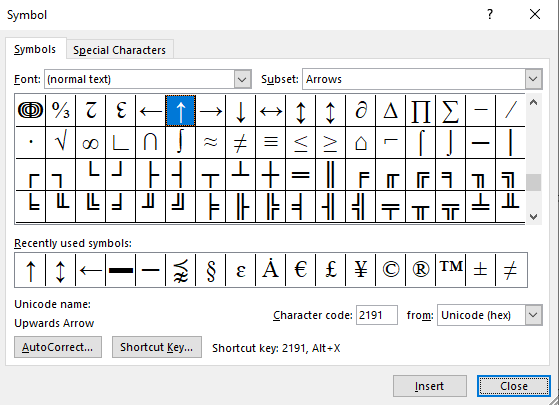
  • In the symbol category, click on the symbol drop-down and select the more symbols button.

  • The symbol dialog box will appear.
  • Click on the insert button. Alternatively, double-click on the upward arrow symbol/emoji to insert it into your Word document.

  • Close the dialog.

The upward arrow symbol/emoji will then be inserted exactly where you placed the insertion pointer.

Conclusion:

As you can see, these are the various ways you can make up arrow symbol on keyboard or insert the upward/upper arrow symbol in Word/Excel with or without using the keyboard.

My favorite method is using the copy and paste method followed by the upper/upward arrow symbol shortcut in Word for Windows. The Alt Code method also comes simple.

For any comments or questions about this upper arrow symbol guide, please let me know in the comments section below.

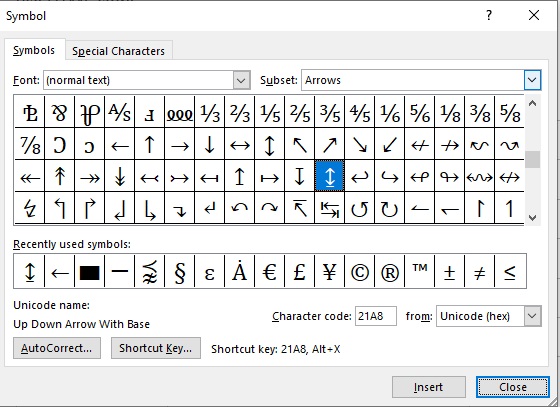
How to write/type up down arrow with base symbol/emoji on keyboard- Alt + 23

Quick guide to up down arrow with base symbol (↨)

For Windows users, simply press down the Alt key and type 23 (i.e., up down arrow with base symbol/emoji alt code) using the numeric keypad, then let go of the Alt key. These keyboard shortcuts work everywhere including MS Word, Excel, and PowerPoint.

The table below contains all the shortcuts you need to type the Up down arrow with base symbol/emoji on the keyboard.

Symbol Name Up down arrow with base symbol/emoji
Symbol

Alt Code 23
Shortcut for Windows Alt + 23

The above quick guide provides some useful shortcuts and alt code on how to type the up down arrow with base symbol/emoji on Windows. However, below are some other methods you can also use to insert up down arrow with base symbols in Word or Excel documents.

List of alt codes for arrows symbol

Symbol Description Alt Code Shortcut
Leftwards arrow 27 Alt + 27
Rightwards arrow 26 Alt + 26
left-right arrow 29 Alt + 29
Upwards arrow 24 Alt + 24
Downwards arrow 25 Alt + 25
Up down arrow 23 Alt + 23

HOW TO ADD up down arrow with base IN HTML and CSS?

To add the up-down arrow with a base in HTML, you can use an HTML entity, an HTML code (decimal), and a CSS code. Use the shortcode section to copy the various shortcodes for the black rectangle. Here is the example:

HTML Code Example

<span>&#8616;</span> 

CSS Code Example

 
span { content: "\21A8"; 
}

HOW TO TYPE UP DOWN ARROW WITH BASE SYMBOL/EMOJI IN WORD/EXCEL

Microsoft Office provides several methods for inserting or typing up down arrow with base symbol/emoji that do not have dedicated keys on the keyboard.

In this section, I will teach you different methods you can use to type or insert the up down arrow with base symbol/emoji on your PC, like in MS Office (i.e., Word, Excel, or PowerPoint).

Without any further delay, let’s get started.

USING THE UP-DOWN ARROW WITH BASE SYMBOL/EMOJI ALT CODE (FOR WINDOWS)

The up down arrow with base symbol/emoji alt code is 23. Even though the Up down arrow with base symbol/emoji does not have a dedicated key on the keyboard, you can still type it on the keyboard with the Alt code method. To do this, press and hold the Alt key whilst pressing the up down arrow with base symbol Alt code (23) using the numeric keypad.

Your keyboard must have a numeric keypad as this method works on Windows only.

Below is a break-down of the steps you can take to type the up down arrow with base symbol/emoji on your Windows PC:

  • Place your insertion pointer where you need the up down arrow with base symbol.
  • Press and hold one of the Alt keys on your keyboard.
  • Whilst holding on to the Alt key, press the up down arrow with base symbol’s alt code (23). You must use the numeric keypad to type the alt code. If you are using a laptop without a numeric keypad, this method may not work for you. On some laptops, there’s a hidden numeric keypad which you can enable by pressing Fn+NmLk on the keyboard.
  • Release the Alt key after typing the Up down arrow with base symbol/emoji Alt code to insert the symbol into your document.

This is how you can type up down arrow with base symbol in Word using the Alt code method.

USING THE UP-DOWN ARROW WITH BASE SYMBOL/EMOJI SHORTCUT (WINDOWS AND LINUX)

For Windows users, use the alt code method by pressing down the [Alt] key whilst typing the Up down arrow with base symbol/emoji alt code which is 23. You must use the numeric keypad to type the alt code. Also, ensure that your num lock key is turned on.

Below is a breakdown of the Up down arrow with base symbol/emoji shortcut for Windows:

  • Place the insertion pointer at the desired location.
  • Press and hold down the Alt key.
  • While pressing down the Alt key, type 23 using the numeric keypad to insert the symbol.

TYPING UP DOWN ARROW WITH BASE SYMBOL/EMOJI USING INSERT SYMBOL DIALOG BOX (WORD, EXCEL, POWERPOINT)

The insert symbol dialog box is a library of symbols from where you can insert any symbol into your Word document with just a couple of mouse clicks.

Follow the steps given below to insert the up down arrow with base symbol/emoji in Word using the insert symbol dialog box.

  • Open your Word document.
  • Click to place the insertion pointer where you wish to insert the symbol.
  • Go to the Insert tab.

  • In the symbol’s category, click on the symbol drop-down and select the more symbols button.

  • The symbol dialog box will appear.
  • Click on the insert button. Alternatively, double-click on the Up down arrow with base symbol to insert it into your Word document.

  • Close the dialog.

The up down arrow with base symbol will then be inserted exactly where you placed the insertion pointer.

COPY AND PASTE UP DOWN ARROW WITH BASE SYMBOL/EMOJI (FOR WINDOWS)

Another easy way to get the up down arrow with base symbol/emoji on any PC is to use copy-paste method.

All you have to do is to copy the symbol from somewhere like a web page, or the character map for windows users, and head over to where you need the symbol (say in Excel or Word), then hit Ctrl + V to paste.

Below is the symbol for you to copy and paste into your Word document. Just select it and press Ctrl + C to copy, switch over to Microsoft Word, place your insertion pointer at the desired location, and press Ctrl + V to paste.

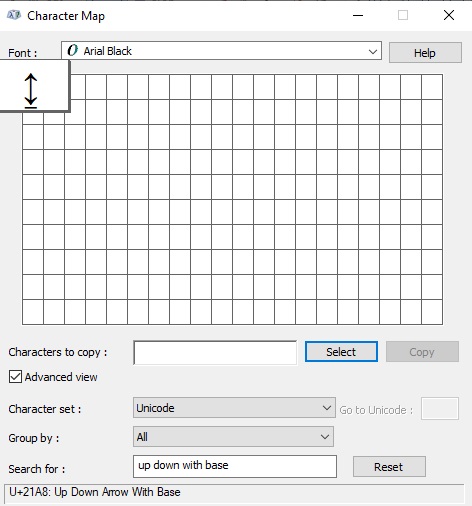
For Windows users, follow the given instructions to copy and paste the up down arrow with base symbol/emoji using the character map dialog box.

  • Click on the start button and search for the character map. The character map app will appear in the search results, click to open.

  • The character map dialog will appear. Click to check the advanced view check-box to expand the dialog box for more advanced options.

  • On the advanced view, type up down arrow with base symbol in the search box.
  • You should now see the Up down arrow with base symbol/emoji on the character map dialog. If you can’t see it, then you should look through the library of symbols to spot it. When found, double-click it to select.

  • After you select the up down arrow with base symbol, it should appear in the “character to copy” field. Now, click on the copy button to copy the symbol.
  • Switch to your Microsoft Word or Excel document, place the insertion pointer at the desired location, and press Ctrl + V to paste.

This is how you may use the character map dialog to copy and paste any symbol on Windows PC.

These are the simple steps you may use to insert the up down arrow with base symbol/emoji in Word.

CONCLUSION

There are many different methods you can use to type the up down arrow with base symbol/emoji in Microsoft Word.

Thank you very much for reading this blog. If you have any questions regarding up down arrow with base symbol, please drop them in the comments.

How to type/write black rectangle symbol/emoji on keyboard- Alt + 22

Black Rectangle Symbol

A black symbol rectangle is a four-sided shape, and all the angles are right angles. If you want to figure out if a shape is a rectangle, you have two tests. Is it four-sided? And, are all the angles 90 degrees? If both answers are yes, then you’re looking at a rectangle.

Rectangles have a few special features. First, the opposite sides are parallel. Second, the opposite sides are equal in length. In the rectangle shape, if we know the side, AB is parallel to side CD, and BC is parallel to AD. Also, if we know AB is six, then so is CD. If BC is four, then so is AD.

Rectangle Symbol/emoji Alt Codes, HTML Code (Copy and Paste)

Here is the list of all alt codes for rectangle symbols. You can copy and paste black rectangle symbol/emoji in Word, Excel, and PowerPoint or use alt codes to make various kinds of rectangle. If you want to use the rectangle in HTML documents use HTML code.

List of alt codes for Rectangle Symbols

Symbol Description Alt Code HTML Code
X in A Rectangle Box 8999 &#8999;
Black Rectangle 9644 &#9644;
White Rectangle 9645 &#9645;
Black Vertical Rectangle 9646 &#9646;
White Vertical Rectangle 9647 &#9647;

How to add Black Rectangle in HTML?

To add the ▬ black rectangle in HTML, you can use an HTML entity, an HTML code (decimal), and a HEX code. Use the shortcode section to copy the various shortcodes for the black rectangle. Here is the example:

HTML Code Example

<span>&#9644;</span>

HEX Code Example

 
<span>&#x25ac;</span>

How To Add Black Rectangle In CSS?

To display the black rectangle symbol from CSS, you can use a CSS shortcode or CSS entity. Use the shortcode section to copy the CSS entity code for the Black Rectangle. You can only add content :before or :after an element: Here is the example:

// CSS entity code example
.addSymbol:after {
content: ' \25ac';
}

// The HTML
<div class="addSymbol">Black Rectangle</div>

QUICK GUIDE to BLACK RECTANGLE SYMBOL ( )

To type the black rectangle symbol/emoji on Linux, press the Strg + ⇧ + U + 25AC shortcut on your keyboard. For Windows users, simply press down the Alt key and type 9644 (i.e., rectangle symbol/emoji alt code) using the numeric keypad, then let go of the Alt key. These keyboard shortcuts work everywhere including MS Word, Excel, and PowerPoint, on both Windows and Linux. The table below contains all the shortcuts you need to type the black rectangle symbol/emoji on the keyboard.

Symbol Name black rectangle symbol/emoji
Symbol

Alt Code 9644 OR 22
Shortcut for Windows Alt+9644 OR Alt+22
Shortcut for Linux Strg + + U + 25AC

The above quick guide provides some useful shortcuts and alt code on how to type the black rectangle symbol/emoji on both Windows and Linux. However, below are some other methods you can also use to insert black rectangle symbols in Word or Excel documents.

HOW TO TYPE BLACK RECTANGLE SYMBOL/EMOJI IN WORD/EXCEL

Microsoft Office provides several methods for inserting or typing black rectangle symbol/emoji that do not have dedicated keys on the keyboard. In this section, I will teach you different methods you can use to type or insert the black rectangle symbol/emoji on your PC, like in MS Office (i.e., Word, Excel, or PowerPoint) for both Linux and Windows users. Without any further delay, let’s get started.

USING THE BLACK RECTANGLE SYMBOL/EMOJI ALT CODE (FOR WINDOWS)

The black rectangle symbol/emoji alt code is 22. Even though the black rectangle symbol/emoji does not have a dedicated key on the keyboard, you can still type it on the keyboard with the Alt code method. To do this, press and hold the Alt key whilst pressing the black rectangle symbol Alt code (22) using the numeric keypad. Your keyboard must have a numeric keypad as this method works on Windows only. Below is a break-down of the steps you can take to type the black rectangle symbol/emoji on your Windows PC:

  • Place your insertion pointer where you need the black rectangle symbol.
  • Press and hold one of the Alt keys on your keyboard.
  • Whilst holding on to the Alt key, press the black rectangle symbol’s alt code (22). You must use the numeric keypad to type the alt code. If you are using a laptop without a numeric keypad, this method may not work for you. On some laptops, there’s a hidden numeric keypad which you can enable by pressing Fn+NmLk on the keyboard.
  • Release the Alt key after typing the black rectangle symbol/emoji Alt code to insert the symbol into your document.

This is how you can type black rectangle symbol in Word using the Alt code method.

USING THE BLACK RECTANGLE SYMBOL/EMOJI SHORTCUT (WINDOWS AND LINUX)

For Linux users, the keyboard shortcut for the black rectangle symbol/emoji is Strg + ⇧ + U + 25AC. For Windows users, use the alt code method by pressing down the [Alt] key whilst typing the black rectangle symbol/emoji alt code which is 22. You must use the numeric keypad to type the alt code. Also, ensure that your num lock key is turned on.

Below is a breakdown of the black rectangle symbol/emoji shortcut for Windows:

  • Place the insertion pointer at the desired location.
  • Press and hold down the Alt key
  • While pressing down the Alt key, type 22 using the numeric keypad to insert the symbol.

Below is a breakdown of the black rectangle symbol/emoji shortcut for Linux:

  • First of all, place the insertion pointer where you need to type the black rectangle symbol.
  • Now, press Strg + + U + 25AC simultaneously on your keyboard to insert the symbol.

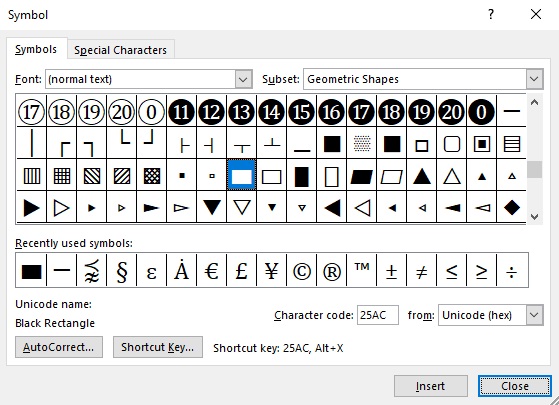
TYPING BLACK RECTANGLE SYMBOL/EMOJI USING INSERT SYMBOL DIALOG BOX (WORD, EXCEL, POWERPOINT)

The insert symbol dialog box is a library of symbols from where you can insert any symbol into your Word document with just a couple of mouse clicks. Follow the steps given below to insert the black rectangle symbol/emoji in Word using the insert symbol dialog box.

  • Open your Word document.
  • Click to place the insertion pointer where you wish to insert the symbol.
  • Go to the Insert tab.

Insert tab in Word

  • In the symbol’s category, click on the symbol drop-down and select the more symbols button.

  • The symbol dialog box will appear.

  • Click on the insert button. Alternatively, double-click on the black rectangle symbol to insert it into your Word document.
  • Close the dialog.

The black rectangle symbol will then be inserted exactly where you placed the insertion pointer.

COPY AND PASTE BLACK RECTANGLE SYMBOL/EMOJI (FOR WINDOWS)

Another easy way to get the black rectangle symbol/emoji on any PC is to use copy-paste method. All you have to do is to copy the symbol from somewhere like a web page, or the character map for windows users, and head over to where you need the symbol (say in Excel or Word), then hit Ctrl+V to paste. Below is the symbol for you to copy and paste into your Word document. Just select it and press Ctrl + C to copy, switch over to Microsoft Word, place your insertion pointer at the desired location, and press Ctrl + V to paste.

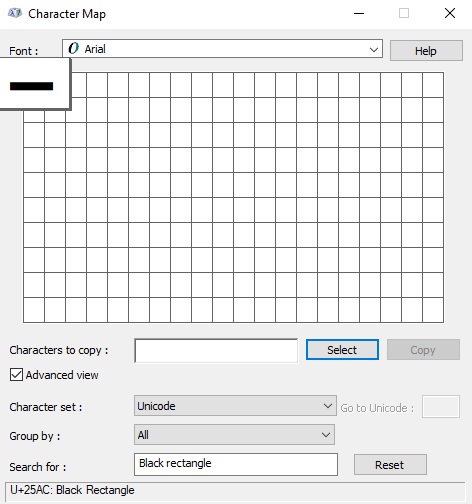
For Windows users, follow the given instructions to copy and paste the black rectangle symbol/emoji using the character map dialog box.

  • Click on the start button and search for the character map. The character map app will appear in the search results, click to open.

  • The character map dialog will appear. Click to check the advanced view check-box to expand the dialog box for more advanced options.

  • On the advanced view, type black rectangle symbol in the search box.
  • You should now see the black rectangle symbol/emoji on the character map dialog. If you can’t see it, then you should look through the library of symbols to spot it. When found, double-click it to select/
  • After you select the black rectangle symbol, it should appear in the “character to copy” field. Now, click on the copy button to copy the symbol.

  • Switch to your Microsoft Word or Excel document, place the insertion pointer at the desired location, and press Ctrl+V to paste.

This is how you may use the character map dialog to copy and paste any symbol on Windows PC. These are the simple steps you may use to insert the black rectangle symbol/emoji in Word.

CONCLUSION

There are many different methods you can use to type the black rectangle symbol/emoji in Microsoft Word. Thank you very much for reading this blog. If you have any questions regarding the black rectangle symbol, please drop them in the comments.

Copyright law day

Copyright Law Day — January 1st, 2022

Copyright law does not appear to be the most engaging topic to discuss. But it’s far more critical than some of us realize. Without it, we’d be arguing over who owns what.

All of the things we enjoy in life, from the music we listen, the books and magazines we read, everything we watch on TV, and the computer programs were created by people who worked extremely hard. It is our responsibility to give credit where it is due.

Copyright law is probably something we take for granted most of the time.

Copyright law day is an excellent time to think about what the world would be like if the law didn’t safeguard the hard work we put into making content.

Every January 1, copyright law day is observed to recognize the role of copyright law to assure the legitimate use of one’s creations and encourage people to support and uphold copyright laws.

What is Copyright?

According to Google definition, copyright is defined as,

“The unique legal right, given to a creator or an assignee to print, publish, perform, film, or record literary, artistic, or musical work, and to authorize others to do the same.

Any author needs copyright because it gives them the legal right to distribute their writings, music, and artistic work to a large audience. As a result, it makes sense to thank the law that allows us to conserve those masterpieces to enjoy their efforts!

History of Copyright Law Day

Originally, the concept of copyright only applied to books. The British Statute of Anne in 1710 was the first copyright statute ever enacted. The United States constitution guaranteed copyrights approximately 250 years ago, in 1787, to promote the progress of science and useful arts.

Even back then, the goal of copyright was to encourage the creation of new works by providing authors control over and profit from their work. Copyrights were typically regional means they did not extend beyond the borders of a particular state.

Copyright usually lasts for the creator’s life plus fifty to one hundred years after their death. Internet piracy, or the unauthorized downloading of works without paying for them, has been a popular means to avoid paying the creators of numerous works in recent years.

Because of the large number of people who engage in internet piracy around the world, this type of copyright infringement is wreaking havoc on a variety of companies. According to a Guardian piece published in early May 2014, the movie industry is currently losing roughly US $20.5 billion per year to online pirates. Illegal downloading has also had a significant impact on the software sector.

How to Celebrate Copyright Day?

The ideal way to commemorate copyright law day is to consider how you may express your gratitude to the creators of a computer program, their literature work, music, or art that you genuinely appreciate. You can simply accomplish this by firmly resolving to always pay for anything and everything they developed that you desire. This means no downloading pirated versions of anything and paying for any product, whether it’s a film, a CD, or any form of software, etc.

Show some appreciation to the creators of everything you appreciate, and encourage your friends and family to do the same! Many people may not view it this way, but copyright infringement is nothing more than robbing creative people of the compensation they deserve for their work.

Why is Copyright Day Important?

Copyright protects your work from being misused

Get national and worldwide protection for your work when you copyright it. This prevents individuals from exploiting your work for any reason without your consent anywhere around the world.

Copyright allows you to profit from your creative work

You have the right to reproduce, distribute, and exhibit your works if you have copyright. You have the option of licensing any of these rights to a publisher and profiting from them.

Copyright promotes innovation

Copyright ensures that people profit from their creative works, so creators are always motivated to create something new.

Facts About Copyright

Here are some interesting facts about copyright!

You don’t need to claim copyright or add a copyright notice to be protected

The copyright symbol is undoubtedly recognizable to you, but you don’t need it to ensure that your work is protected by copyright. You don’t even need to include a copyright notice. Your work is automatically protected as you commit it to paper! However, a copyright notice should still be incorporated so that no one can claim that they were unaware the work was protected.

Volunteers aren’t employees, yet employers hold the rights to their labour 

Your employer owns the rights to whatever you generate throughout your job. On the other hand, volunteers are not workers, which means they maintain ownership of their work, even if it is created while they are volunteering.

The copyright belongs to the person who created the work 

This one may seem self-evident, but it’s worth addressing with your students these facts:

If a buddy borrows your phone and snaps a photo, the copyright belongs to the friend, not the device owner. You may go even further with tattoos; if the tattooist designed and created the tattoo, they hold the rights to it, even if it’s on someone else body! This is because the law makes no distinction between the types of media created. You own the rights to your work regardless of whether it was made on a digital platform, paper, a laptop, or even your body.

Even though copyright infringement isn’t usually a criminal offense, it can nonetheless land you in hot water

With certain exceptions, if the violation isn’t particularly massive, copyright infringement is usually settled in civil rather than criminal prosecutions. However, just because it’s a civil matter doesn’t rule out the possibility of legal action! Civil courts have a lesser burden of proof than criminal courts.

Frequently Asked Questions (FAQs)

When is copyright law day?

Every January 1, copyright law day is observed to honor the role of copyright law to assure the legal use of one’s creations and encourage people to support and maintain copyright law.

Is copyright law federal?

In the United States, copyright law is governed by a federal act, the copyright act of 1976. The copyright act makes it illegal to copy a work of authorship without permission. Copyrights can be registered at the library of congress’s copyright office.

What happens if you break copyright?

Copyright law can be broken by using creative works such as logos, photos, images, or text without permission. All firms must know how to utilize copyrighted materials legally. You could face hefty fines and even imprisonment if you violate copyright laws, even if it’s by accident.

How does copyright protect you?

Copyright can assist you in preventing your work from being stolen. It also enables you to safely spread your work across platforms, giving your message a wider reach. To safeguard that masterpiece, you need to reach out to your audience in the safest way possible, and what better method than to have your copyright in place.

As a result, many authors are grateful for their copyright because it allows them to profit from their hard work while also ensuring the safety and reassurance of their work. Many incidents can happen to your hard work if you don’t apply copyright protection to your work.

Final Thoughts

The law is frequently taken for granted, and many individuals pay little or no attention to it. Copyright law day is observed to urge people to copyright, legalize, and license their work.

Copyright laws are appreciated by authors of all types worldwide, who are grateful that their creativity is protected. But, most importantly, it aids in the development of other authors’ creativity. There would never be anything fresh for us to enjoy if copyright existed.

With that in mind, celebrate copyright law day to appreciate copyright laws and show appreciation for the regulations that allow us to enjoy other people’s innovative ideas.

When you use Jobs Theory to develop a timeline of events, where does that timeline start?

Below is the answer and explanation for when you use Jobs theory to develop a timeline of events, where does that timeline start?

When you use Jobs theory to develop a timeline of events, where does that timeline start?

  • The first time a potential employee hears about your company.
  • The first time a potential customer realizes they have a need. ✅
  • The day your company was founded.
  • The day you were hired into your current role.

Correct answer

The first time a potential customer realizes they have a need. ✅

The above answer is related to HubSpot inbound certification. You can find all the updated questions and answers related to HubSpot inbound certification exam on the “Hubspot Inbound certification answers” page. If you find any error or update in question or answers, do comment below and let us know. We will update the answers as soon as possible.

Learn more about HubSpot inbound certification exam: https://academy.hubspot.com/courses/inbound

Which of the following is NOT a key part of a company’s culture?

Below is the answer and explanation for which of the following is not a key part of a company’s culture?

Which of the following is not a key part of a company’s culture?

  • The company’s mission.
  • The company’s values.
  • What customers say about the company. ✅
  • The way employees behave when unsupervised.

Correct answer

What customers say about the company. ✅

The above answer is related to HubSpot inbound certification. You can find all the updated questions and answers related to HubSpot inbound certification exam on the “Hubspot Inbound certification answers” page. If you find any error or update in question or answers, do comment below and let us know. We will update the answers as soon as possible.

Learn more about HubSpot inbound certification exam: https://academy.hubspot.com/courses/inbound

If a salesperson is speaking with a specific person and discovers that the person doesn’t exactly match their assigned persona, what should the salesperson do?

Below is the answer and explanation for if a salesperson is speaking with a specific person and discovers that the person doesn’t exactly match their assigned persona, what should the salesperson do?

If a salesperson is speaking with a specific person and discovers that the person doesn’t exactly match their assigned persona, what should the salesperson do?

  • Rely on the information in the persona and ignore apparent differences. Personas often contain information that people don’t know about themselves and should be trusted over anything the individual person says.
  • Focus on serving the person using the information they provide even if it doesn’t match the persona. If the same discrepancy comes up repeatedly, the persona might need to be updated. ✅
  • Send the person back to marketing. Marketing will nurture the person until they are more qualified for sales outreach and match their persona more closely.
  • Create a new persona. In order for personas to be as accurate as possible, your team may need to have almost as many personas as you have prospects, leads, and customers.

Correct answer

Focus on serving the person using the information they provide even if it doesn’t match the persona. If the same discrepancy comes up repeatedly, the persona might need to be updated. ✅

The above answer is related to HubSpot inbound certification. You can find all the updated questions and answers related to HubSpot inbound certification exam on the “Hubspot Inbound certification answers” page. If you find any error or update in question or answers, do comment below and let us know. We will update the answers as soon as possible.

Learn more about HubSpot inbound certification exam: https://academy.hubspot.com/courses/inbound